> For the complete documentation index, see [llms.txt](https://docs.uptiq.ai/llms.txt). Markdown versions of documentation pages are available by appending `.md` to page URLs; this page is available as [Markdown](https://docs.uptiq.ai/ai-workbench-qore/control-center/governance-operator.md).
# Governance Operator
The Governance Operator—ask about the account, and approve what it proposes.
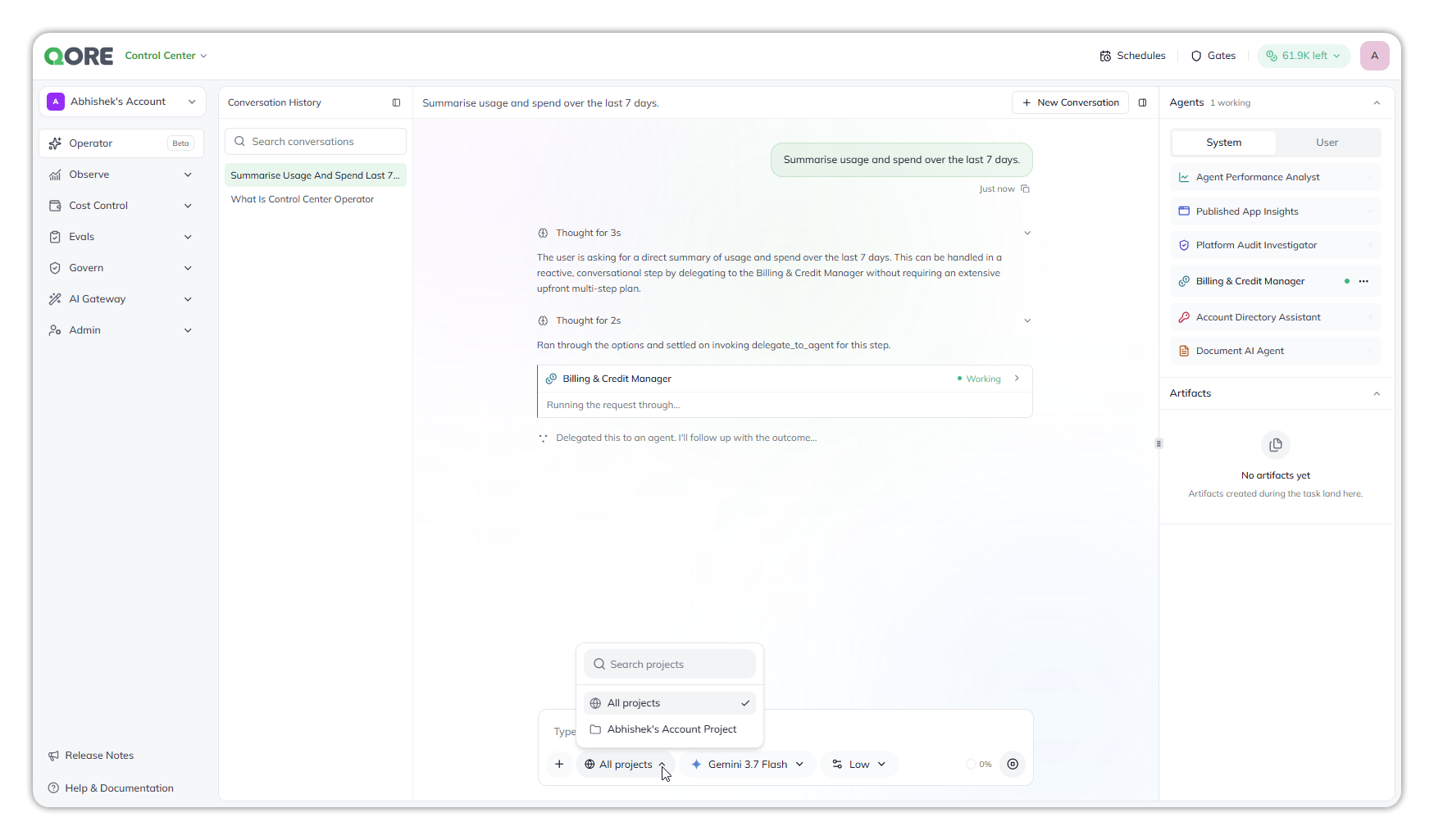
The Governance Operator is the chat surface in Control Center. Ask about platform activity, account usage, or a selected project. It coordinates the governance-review agents that hold the answer. You don't need to reconcile data across several screens.
It differs from the Console Operator in one important way: **it doesn't act on its own.** It stages each proposed change for your approval.
For general orchestration, see [Operator](/ai-workbench-qore/core-concepts/operator.md). This page covers Control Center behavior.
The Governance Operator delegating a request to one of its governance-review agents.
## At a glance
* **Where:** Control Center
* **Scope:** **Account** activity, or one selected project. It covers usage, cost, access, guardrails, and change history.
* **Acts:** never on its own. It **stages** an action and waits for you to approve it.
* **Dispatches to:** an *operating team* of governance-review agents. This is the agent team described on [Operator](/ai-workbench-qore/core-concepts/operator.md).
## What it does
**It answers cross-platform governance questions.** Ask what drove this month's cost, which agents were created recently, or which apps were published. It can also fetch the account's design systems and branding. The Operator routes each part to the relevant agent, then presents the combined result.
**It orchestrates a team.** The Operator interprets your intent, breaks the request into tasks, and assigns each task to a suitable governance-review agent. Agents report their results to the Operator, which returns one response.
**It stages, rather than acts.** It records the proposed fix. Nothing runs until you approve it.
**It can narrow to one project.** Control Center screens are account-wide. The Operator has its own project selection, so you can investigate one project without changing the wider view. See [Accounts, Projects, Spaces](/ai-workbench-qore/start-here/how-qore-is-organized.md) for account and project scope.
**It can run on a schedule, and it waits for you.** **Schedules** in the top bar runs the Governance Operator at a set time, using the governance agents you choose, such as **Agent Performance Analyst** or **Billing & Credit Manager**. When a conversation ends on a question for you, it appears on **Gates** in Control Center's top bar, separate from Console's. Both work as they do in Console; see [Schedules](/ai-workbench-qore/console/console-operator/schedules.md) and [Gates](/ai-workbench-qore/console/console-operator/gates.md).
## FAQs
Does the Governance Operator change things on its own?
No. It stages each proposed change and waits for you to approve it. Nothing runs until you do. That's the main difference from the Console Operator, which acts immediately. See [Governance Operator](#at-a-glance).
What can I ask it?
Cross-platform governance questions about usage, cost, access, guardrails, and change history, for example what drove this month's cost, which agents were created recently, or which apps were published. It can also fetch the account's design systems and branding. See [What it does](#what-it-does).
Does it cover the whole account or one project?
Either. It covers account activity, or one project you select in the Operator. Its project selection doesn't change the account-wide view of the other Control Center screens. See [What it does](#what-it-does).
Can I turn its agents on or off?
No. Its governance-review agents are always available. Its side panel lists its agents and connections, but you can't turn any of them on or off; that's a Console Operator feature. See [Notes and limitations](/ai-workbench-qore/console/console-operator/agents-and-connections.md#notes-and-limitations).
Can it run on a schedule?
Yes. **Schedules** in Control Center's top bar runs the Governance Operator at a set time, using the governance agents you choose, such as **Agent Performance Analyst**, **Billing & Credit Manager**, or **Platform Audit Investigator**. See [Schedules](/ai-workbench-qore/console/console-operator/schedules.md).
Are Control Center's Schedules and Gates separate from Console's?
Yes. Control Center's run and list only Governance Operator conversations; Console's run and list only Console Operator conversations. See [Gates](/ai-workbench-qore/console/console-operator/gates.md).
## Troubleshooting
A change it proposed hasn't happened
It stages changes rather than making them. Approve the staged change for it to run. See [What it does](#what-it-does).
A conversation stopped and is waiting
When a conversation ends on a question for you, it appears on **Gates** in Control Center's top bar. Open it and answer. See [Gates](/ai-workbench-qore/console/console-operator/gates.md).
The answer covers the wrong scope
Check the Operator's own project selection: it can cover the whole account or one selected project. See [What it does](#what-it-does).
A schedule won't save, or runs at the wrong time
**Name** and **Instructions** are required, and a name of only spaces isn't accepted. Schedule times are in UTC. See [Create a schedule](/ai-workbench-qore/console/console-operator/schedules.md#create-a-schedule).
A schedule didn't run
Check that it's **Active**, not **Paused**. If the Operator a schedule runs isn't active, the run is skipped. See [Notes and limitations](/ai-workbench-qore/console/console-operator/schedules.md#notes-and-limitations).
### Related
{% endcolumn %}
{% endcolumns %}
---
# Agent Instructions
This documentation is published with GitBook. GitBook is the documentation platform designed so that both humans and AI agents can read, navigate, and reason over technical content effectively. Learn more at gitbook.com.
## Querying This Documentation
If you need additional information that is not directly available in this page, you can query the documentation by asking a question.
Perform an HTTP GET request on the following URL with the `ask` and `goal` query parameters:
```
GET https://docs.uptiq.ai/ai-workbench-qore/control-center/governance-operator.md?ask=&goal=
```
`ask` is the immediate question: it should be specific, self-contained, and written in natural language.
`goal` is what the user is ultimately trying to achieve, the reason they need the answer. Sharing it helps GitBook give you a better, more relevant answer. A goal is most helpful when it describes the outcome the user wants rather than restating the question. For example, with `ask=how do I create an API token`, a goal like `automate deployments from our CI pipeline` lets GitBook tailor the answer to that use case.
The response will contain a direct answer to the question and relevant excerpts and sources from the documentation.
Use this mechanism when the answer is not explicitly present in the current page, you need clarification or additional context, or you want to retrieve related documentation sections.