> For the complete documentation index, see [llms.txt](https://docs.uptiq.ai/llms.txt). Markdown versions of documentation pages are available by appending `.md` to page URLs; this page is available as [Markdown](https://docs.uptiq.ai/ai-workbench-qore/control-center/govern/agent-controls.md).

# Agent Controls

Stop individual agents or all agents during an emergency.

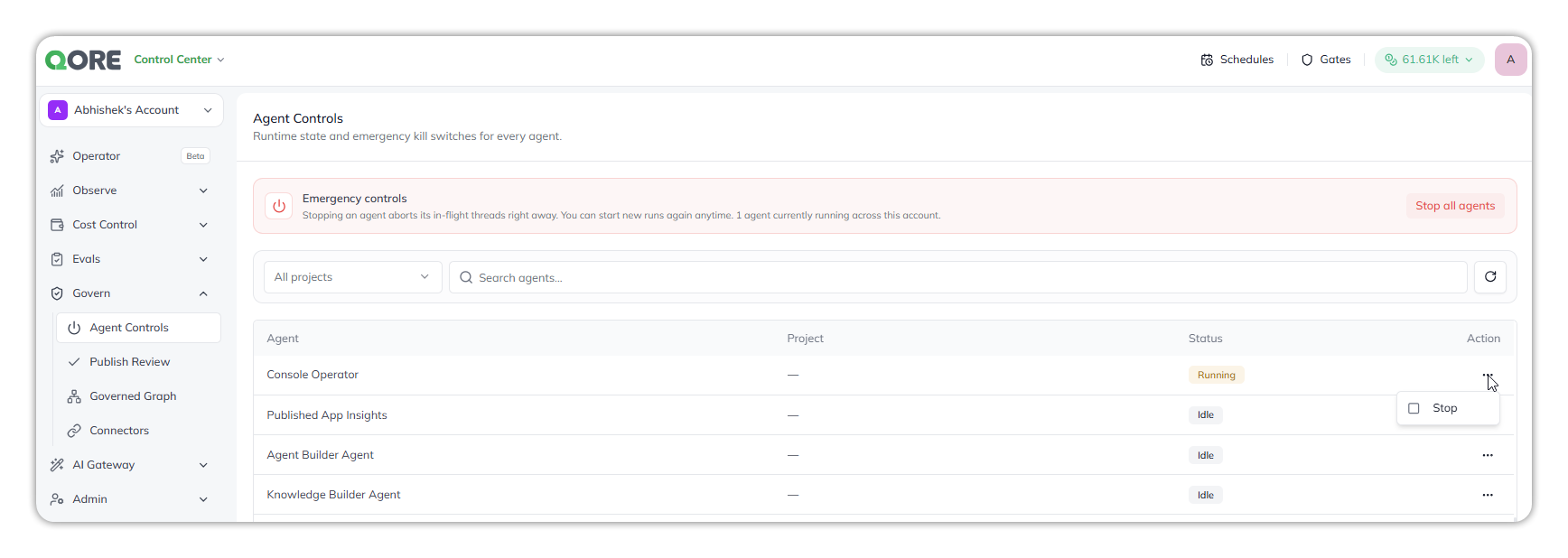
Agent Controls shows the runtime state of every agent in the account, including system agents such as the Console Operator and the builder agents. The page describes itself as *"Runtime state and emergency kill switches for every agent."* You can stop one agent or every agent.

Use it when:

* An agent behaves unexpectedly.
* A scheduled load test needs intervention.
* You must stop active work before changing configuration.

Open **Control Center → Govern → Agent Controls**.

<figure><img src="https://1326225582-files.gitbook.io/~/files/v0/b/gitbook-x-prod.appspot.com/o/spaces%2F0qmgQjJ5aArDTj2ACFHG%2Fuploads%2Fgit-blob-7e7141417b651bf5be3cd717d7e25f8513337a03%2Fagent_controls_all_projects.png?alt=media" alt="Agent Controls, with the Emergency controls banner and Stop all agents button, an All projects filter and agent search, and a list of system agents (Console Operator running; Published App Insights, Agent Builder Agent and Knowledge Builder Agent idle) with the Stop action open on Console Operator"><figcaption><p>Agent Controls, with emergency controls and per-agent runtime status.</p></figcaption></figure>

## Key terms

| Term    | Meaning                                                                                | What you can do here          | Scope         |
| ------- | -------------------------------------------------------------------------------------- | ----------------------------- | ------------- |
| Agent   | A configured AI worker with an identity, skills, knowledge, triggers, and integrations | Stop its active runs          | One agent     |
| Project | The project an agent belongs to                                                        | Filter the list by project    | One project   |
| Run     | One execution after a trigger or request                                               | Ends when complete or stopped | One execution |

Agent Controls does not build, edit, disable, delete, or deactivate agents.

## Read the list <a href="#read-the-list" id="read-the-list"></a>

The **Emergency controls** banner shows how many agents are currently running across the account. Below it, the list has one row per agent:

| Column  | What it shows                                                                   |
| ------- | ------------------------------------------------------------------------------- |
| Agent   | The agent's name.                                                               |
| Project | The agent's project. System agents show `—`.                                    |
| Status  | **Running** or **Idle**.                                                        |
| Action  | **More Actions** (`⋯`), with **Stop** and, for your own agents, **View Agent**. |

> Stopping an agent aborts its in-flight threads right away. You can start new runs again anytime. The agent runs again after its next trigger.

## Stop work safely

| Need             | Action                         | Confirmation | Result                              |
| ---------------- | ------------------------------ | ------------ | ----------------------------------- |
| Stop one agent   | Select **Stop** for that agent | None         | Interrupts that agent's active runs |
| Stop every agent | Select **Stop all agents**     | Required     | Interrupts active runs              |

The single-agent action takes effect immediately. **Stop all agents** asks you to confirm first.

{% hint style="warning" %}
Narrow the agent list with **Search agents…** before stopping work. This reduces the chance of selecting the wrong agent.
{% endhint %}

## Stop a running agent

For an agent, open **More Actions** (`⋯`) in the **Action** column. Choose **View Agent** or **Stop**. The menu is available whether the agent is **Running** or **Idle**.

**View Agent** opens the agent in a new browser tab at `/platform/agent-builder/<agentId>?…`. Configure its graph, skills, triggers, knowledge, and integrations in [Agent Builder](/ai-workbench-qore/console/agent-builder.md). Your current activity view stays open.

**Stop** interrupts the agent's active runs. Work in progress is lost. If none exist, the request has no effect. The service still sends the request and displays `Stopping the agent's executions`.

{% hint style="info" %}
`Stopping the agent's executions` can remain visible and can appear twice. It does not indicate ongoing work. The request runs once.
{% endhint %}

### Stop a system agent <a href="#stop-a-system-agent" id="stop-a-system-agent"></a>

System agents, such as the Operator and the builder agents, are listed alongside your own. On their rows:

* **Stop** is the only action. **View Agent** isn't offered.
* The **Project** column shows `—`.
* Stopping a system agent also stops every run and helper agent it started.

## Stop every agent <a href="#stop-every-agent" id="stop-every-agent"></a>

Select **Stop all agents** in the **Emergency controls** banner to interrupt active runs. The confirmation warns that the action cannot be undone. Select **Cancel** to leave work running. New runs can start immediately after stopping.

## Find agents

Use **All projects** to show every agent, or pick one project to narrow the list. Select refresh to reload the runtime state.

Use **Search agents…** to find agents by name. Matching ignores case and accepts part of a name. The filter is saved as `?search=<term>`, so you can bookmark or share it. Search covers every agent in the list, including agents beyond the default first page.

{% hint style="info" %}
Unlike Search, changing the page does **not** update the URL—page state is client-only, so a specific page cannot be bookmarked or shared. Use Search to narrow the list when you need a shareable view.
{% endhint %}

## Choose the right destination

Use these destinations for work that does not stop active runs:

| Goal                   | Destination    | Available action           | Limitation                                  |
| ---------------------- | -------------- | -------------------------- | ------------------------------------------- |
| Build or edit an agent | Agent Builder  | Change configuration       | Does not stop work automatically            |
| Stop selected agents   | Agent Controls | Stop each agent separately | Selected-agent bulk stopping is unavailable |

## Related

<table data-view="cards"><thead><tr><th>Title</th><th>Description</th><th data-card-target data-type="content-ref">Link</th></tr></thead><tbody><tr><td><strong>Governed Graph</strong></td><td>Explore how agents, apps, tools, and data connect</td><td><a href="/ai-workbench-qore/control-center/govern/governed-graph.md">Governed Graph</a></td></tr><tr><td><strong>Agent Builder</strong></td><td>Configure agents and their connected resources</td><td><a href="/ai-workbench-qore/console/agent-builder.md">Agent Builder</a></td></tr><tr><td><strong>Glossary</strong></td><td>Look up agent, project, run, and related terms</td><td><a href="/ai-workbench-qore/start-here/glossary.md">Glossary</a></td></tr></tbody></table>

***

{% columns %}
{% column width="83.33333333333334%" %}

<p align="right"><em>Maintained by</em> <mark style="color:green;">Abhishek Paul</mark><br><code>AI-assisted, human-approved</code></p>
{% endcolumn %}

{% column width="16.666666666666664%" %}

<div align="left"><img src="https://1326225582-files.gitbook.io/~/files/v0/b/gitbook-x-prod.appspot.com/o/spaces%2F0qmgQjJ5aArDTj2ACFHG%2Fuploads%2Fgit-blob-d034645b4f8f8ee661985f5306b60ded3289653c%2Fmaintainer-abhishek-paul.png?alt=media" alt="" width="60"></div>
{% endcolumn %}
{% endcolumns %}


---

# Agent Instructions
This documentation is published with GitBook. GitBook is the documentation platform designed so that both humans and AI agents can read, navigate, and reason over technical content effectively. Learn more at gitbook.com.

## Querying This Documentation
If you need additional information that is not directly available in this page, you can query the documentation by asking a question.

Perform an HTTP GET request on the following URL with the `ask` and `goal` query parameters:

```
GET https://docs.uptiq.ai/ai-workbench-qore/control-center/govern/agent-controls.md?ask=<question>&goal=<user_goal>
```

`ask` is the immediate question: it should be specific, self-contained, and written in natural language.
`goal` is what the user is ultimately trying to achieve, the reason they need the answer. Sharing it helps GitBook give you a better, more relevant answer. A goal is most helpful when it describes the outcome the user wants rather than restating the question. For example, with `ask=how do I create an API token`, a goal like `automate deployments from our CI pipeline` lets GitBook tailor the answer to that use case.

The response will contain a direct answer to the question and relevant excerpts and sources from the documentation.

Use this mechanism when the answer is not explicitly present in the current page, you need clarification or additional context, or you want to retrieve related documentation sections.
