> For the complete documentation index, see [llms.txt](https://docs.uptiq.ai/llms.txt). Markdown versions of documentation pages are available by appending `.md` to page URLs; this page is available as [Markdown](https://docs.uptiq.ai/ai-workbench-qore/control-center/govern/govern-graph.md).

# Govern Graph

Load an institution's knowledge graph from a graph package, see where every fact came from, and let agents query it.

**Govern Graph** holds one knowledge graph per institution: its products, pricing, features, channels, policies, disclosures, document requirements, rules and thresholds, and the regulatory packs behind them. Agents use the graph to answer questions from the institution's own governed facts. You load it from a **graph package**, a JSON file that lists the graph's nodes and relationships. Each fact in the graph keeps its source, owner, confidence and effective date, so you can trace where a value came from. An uploaded graph becomes **knowledge** in the account, so you attach it to agents the same way as any other knowledge.

Govern graphs are **account-scoped**: a graph you upload is created for the whole account, and every project in it can read it.

Open it in **Control Center → Govern → Govern Graph**. To load or change a graph, see [Upload and manage a govern graph](https://docs.uptiq.ai/ai-workbench-qore/control-center/govern/govern-graph/upload-and-manage-a-govern-graph.md).

{% hint style="warning" %}
**Sign-off is a preview.** The **Sign-off Queue (Preview)** tab is a preview of attestation. Attestations made there aren't saved. Every node stays **default-unconfirmed**, and agents read every node whether or not it has been signed off. See [Agent skills](#agent-skills).
{% endhint %}

## Permissions

| Action                                  | Roles                                                           |
| --------------------------------------- | --------------------------------------------------------------- |
| View govern graphs                      | Approver, Governance Manager, Auditor, Account Admin, Org Admin |
| Upload, rename and manage govern graphs | Governance Manager, Account Admin, Org Admin                    |
| Attach a govern graph to an agent       | Developer, Account Admin, Org Admin                             |

**Retry**, **Upload new version** and **Edit** need the **Ingest source & extract knowledge graph candidates** capability. See [Roles](https://docs.uptiq.ai/ai-workbench-qore/control-center/admin/roles.md) for the full capability matrix.

## Lifecycle of a govern graph <a href="#lifecycle" id="lifecycle"></a>

A govern graph moves through seven stages. The first six are available. The seventh, sign-off, is a preview.

| Stage                  | What happens                                                                                                                                                                                                                                                     |
| ---------------------- | ---------------------------------------------------------------------------------------------------------------------------------------------------------------------------------------------------------------------------------------------------------------- |
| **Upload**             | You upload a graph package, a `.json` file. The package is validated before anything is written.                                                                                                                                                                 |
| **Build**              | The platform writes the nodes, then the relationships. The row reads **Processing** with the current stage. It ends as **Completed** or **Failed**. A failed build retries on its own, then waits for you to select **Retry**.                                   |
| **Version**            | Each completed build is a numbered version of the graph. Agents read the active version. When you upload a newer package, they keep reading the current version until the new one finishes building, and then switch. A failed build changes nothing for agents. |
| **Review**             | You browse the graph on **Overview**, **Ingest & Map** and **Graph Explorer**, and trace any fact on **Provenance**.                                                                                                                                             |
| **Refine**             | You change a value with **Edit node**, upload a newer package with **Upload new version**, or go back with **Restore**. **Upload new version** and **Restore** each make a new version, and earlier versions are kept.                                           |
| **Use**                | You attach the graph to agents as knowledge. They query it with Knowledge Graph Search.                                                                                                                                                                          |
| **Sign-off (preview)** | You attest a node, and it becomes ratified. Nothing you attest in the preview is saved.                                                                                                                                                                          |

Two kinds of state apply, and they're easy to mix up.

**The graph's build state** is what you see in the list. A graph is **Processing**, **Completed** or **Failed**. In **Version history**, the version agents read carries an **Active** badge, and a version whose build failed carries a **Failed** badge.

**A node's sign-off state** is what you see on **Provenance** and the **Sign-off Queue (Preview)**. A node is unconfirmed until a person attests it. Nothing attested in the preview is saved, so every node is unconfirmed, and agents read every node.

A govern graph can't be deleted. Uploading a new version and restoring a version never remove an earlier version.

## What a graph holds <a href="#what-a-graph-holds" id="what-a-graph-holds"></a>

### Nodes <a href="#nodes" id="nodes"></a>

A **node** is a single object in the graph. Nodes fall into two groups.

**Business objects** describe what the institution offers:

| Object         | What it is                                               |
| -------------- | -------------------------------------------------------- |
| Institution    | The bank or credit union itself                          |
| Product        | An account or loan product                               |
| Feature        | A feature of a product                                   |
| Segment        | A group of customers a product is aimed at               |
| Channel        | A way customers interact, such as a branch, app or phone |
| Pricing        | A fee, rate or price                                     |
| OfferPromotion | A promotion or offer                                     |
| Customer       | A customer. Always empty                                 |
| Account        | A held account. Always empty                             |

**Governance objects** describe what the law and the institution's policies require:

| Object              | What it is                                                                                                          |
| ------------------- | ------------------------------------------------------------------------------------------------------------------- |
| RuleThreshold       | A number a law or policy fixes, such as a maximum hold period or a reporting limit                                  |
| Authority           | Who can decide or sign, such as the BSA officer or the board                                                        |
| Policy              | The institution's written position on how it meets a rule                                                           |
| Disclosure          | What the institution must tell the customer, and when                                                               |
| DocumentRequirement | What the customer must provide, such as ID                                                                          |
| Consent             | What the customer must agree to before the institution acts                                                         |
| Source              | Where a fact came from, such as a regulation, an institution document or a web page. Every other node points to one |

**Customer** and **Account** are always empty. Member data is never stored in the graph. It's resolved from your core systems when an agent needs it.

Every node carries the same properties:

| Property           | Records                                                                                                                                                                                             |
| ------------------ | --------------------------------------------------------------------------------------------------------------------------------------------------------------------------------------------------- |
| ID and version     | The node's identity and version                                                                                                                                                                     |
| Effective from     | The date the value took effect                                                                                                                                                                      |
| Source provenance  | Where the value came from: the source, its class and the pack, where one applies                                                                                                                    |
| Confidence score   | How reliable the value is. A seeded placeholder is low. A value read from a source is higher                                                                                                        |
| PII classification | Whether the value holds personal data                                                                                                                                                               |
| Owner              | The team accountable for the node                                                                                                                                                                   |
| State              | Its sign-off state. New nodes start as `default_unconfirmed`                                                                                                                                        |
| Fill               | How the value was populated. `seeded` means it came from a regulatory pack. A node read from a public source carries a source-derived value                                                         |
| Default issue flag | Marks a node that needs attention. `NEEDS_FI` means the institution must supply or confirm the value. These nodes count as open gaps on **Overview** and are listed first on the **Sign-off Queue** |

A node created from a regulatory pack is a placeholder until evidence supports it and a person signs it off. Seeded doesn't mean true.

### Unconfirmed, attested and ratified <a href="#unconfirmed-attested-and-ratified" id="unconfirmed-attested-and-ratified"></a>

A graph starts as a draft. Its nodes are built from public sources, such as the institution's website, and seeded from regulatory packs. Nobody at the institution has confirmed them. **Attestation** is the gate between that draft and the institution's own truth: until a person at the institution attests a node, it's a proposal and not a fact the institution stands behind.

Three terms describe where a node is:

| Term            | Meaning                                                                                                                                                               |
| --------------- | --------------------------------------------------------------------------------------------------------------------------------------------------------------------- |
| **Unconfirmed** | The starting state, written `default_unconfirmed`. The value was built from a public source or seeded from a pack. Every node begins here, whatever the package says. |
| **Attested**    | A person at the institution has confirmed the value. Attesting is the action you take on the **Sign-off Queue**. **Overview** counts the share of nodes attested.     |
| **Ratified**    | The state a node reaches once it's attested. A ratified node is the institution's confirmed value, with the attester and the time on its record.                      |

In short, you attest a node, and it becomes ratified. A node that was never attested stays unconfirmed.

{% hint style="info" %}
**Nothing attested in the preview is saved, so the gate isn't enforced.** Every node stays unconfirmed, and agents read every node whether or not it has been attested. Treat answers from the graph as unattested. See [Sign-off Queue (Preview)](#inside-a-graph).
{% endhint %}

### Relationships <a href="#relationships" id="relationships"></a>

A **relationship** is a typed link between two nodes. For example, a product is `GOVERNED_BY` a disclosure, or a product `INCLUDES` a feature. Relationships let you move from a product to its pricing to the rule that governs it, in the **Graph Explorer** or in an agent's query.

The relationships in a graph are the ones its package defines. Each entry in the package's `edges` list names the node it starts from in `from`, a relationship type in `rel` and the node it points to in `to`. Qore stores them as written and doesn't add relationships of its own.

A relationship is written as a pattern. `(:Product)-[:GOVERNED_BY]->(:Disclosure)` reads: a **Product** node is linked by `GOVERNED_BY` to a **Disclosure** node. A package for a credit union typically defines patterns like these:

| Relationship                                     | Meaning                                                     |
| ------------------------------------------------ | ----------------------------------------------------------- |
| `(:Institution)-[:OFFERS]->(:Product)`           | The institution offers this product.                        |
| `(:Product)-[:INCLUDES]->(:Feature)`             | The product includes this feature.                          |
| `(:Product)-[:PRICED_BY]->(:Pricing)`            | The product's rates are defined by this pricing schedule.   |
| `(:Product)-[:APPLIES_TO]->(:Segment)`           | The product is available to this member segment.            |
| `(:Product)-[:GOVERNED_BY]->(:Disclosure)`       | The product is subject to this disclosure document.         |
| `(:RuleThreshold)-[:APPLIES_TO]->(:Product)`     | This rule threshold constrains or governs this product.     |
| `(:Institution)-[:OPERATES]->(:Channel)`         | The institution operates this service channel.              |
| `(:Institution)-[:GOVERNED_BY]->(:Disclosure)`   | The institution is subject to this disclosure document.     |
| `(:RuleThreshold)-[:APPLIES_TO]->(:Institution)` | This rule threshold applies at the institution level.       |
| `(:RuleThreshold)-[:REQUIRES]->(:Product)`       | This rule threshold requires the existence of this product. |

Your own package can use other node types and relationship types. The **Graph Summary** on **About Graph** lists the ones in your graph, under **Relationships**.

A relationship is stored only when both of its ends are nodes in the package. If one end is missing, the relationship is skipped. See [Graph package](#graph-package).

### Regulatory packs <a href="#regulatory-packs" id="regulatory-packs"></a>

A **regulatory pack**, or reg pack, is a bundle of rules for one regulatory topic, such as consumer deposits or customer identification. Packs seed a graph's rules, policies and disclosures, so you start from the obligations that apply to your kind of institution instead of building them by hand.

The institution's type decides which packs apply: its charter, whether credit union, bank or thrift, the customers it serves, its product focus and its size. Every institution receives a base set of packs. Further packs are added if it lends, serves businesses, or is large.

Each pack is built in three layers:

| Layer      | Contents                                                                               |
| ---------- | -------------------------------------------------------------------------------------- |
| Citation   | The exact address of each rule in the law, with its version                            |
| Obligation | A plain-English statement of what the institution must do                              |
| Full text  | The regulation's word-for-word text, taken from the official source and never reworded |

Packs are maintained in a shared library and are the same for every institution of the same type. The institution's own documents, such as its disclosures and fee schedules, are a separate layer in the graph and are not part of a pack. The graph points to a rule's source. It doesn't store the regulation's wording.

A pack is applied when the graph package is built, and the package records which packs it used. **Overview** and **Ingest & Map** list them.

Packs are grouped into tiers by what they cover:

| Tier                    | Covers                                                                                                              |
| ----------------------- | ------------------------------------------------------------------------------------------------------------------- |
| Floor                   | Rules every institution of that type follows, such as deposit accounts, privacy, fraud, payments and communications |
| Lending                 | Consumer, mortgage, small-business and servicing rules, added when the institution lends                            |
| Commercial and treasury | Rules for business and commercial customers                                                                         |
| Prudential              | Governance, risk, capital, reporting and vendor oversight                                                           |
| Overlay                 | Additional consumer-protection rules for larger institutions                                                        |

Each pack has a short code. These are the codes you'll see most often on **Overview**:

| Code            | Pack                                                    | Regulations it covers                                      |
| --------------- | ------------------------------------------------------- | ---------------------------------------------------------- |
| DEP             | Deposit accounts and Truth in Savings                   | Reg DD, Reg E, Reg CC, Reg D                               |
| CIP-BSA         | Customer identification and BSA / anti-money-laundering | BSA/AML, CIP, OFAC, SAR/CTR reporting                      |
| PRIV-SEC        | Privacy and data security                               | Reg P for GLBA privacy, GLBA Safeguards, Red Flags         |
| FRAUD           | Fraud and identity theft                                | Red Flags, FCRA, EFT error and unauthorized transfers      |
| SERV-DEP        | Deposit servicing                                       | Reg E, Reg CC, subsequent Truth in Savings disclosures     |
| DISPUTES        | Error resolution and disputes                           | Reg E and Reg Z error resolution, FCRA disputes            |
| PAY             | Payments and funds transfer                             | Reg E, Reg CC, Reg J, ACH, Reg GG                          |
| CONS-COMPLIANCE | Consumer compliance and UDAAP                           | UDAAP, FTC Act section 5                                   |
| COMMS           | Member communications and advertising                   | Advertising rules, share-insurance signage, TCPA, CAN-SPAM |
| CARDS           | Card programs                                           | Reg Z for the CARD Act, Reg E, Reg II                      |

Other packs follow the same pattern: `LEND-` packs for lending, `BANK-` packs for banks and `THRIFT-` packs for savings associations.

## Graph list

The list shows each graph in the account.

| Column         | Shows                                                                                                   |
| -------------- | ------------------------------------------------------------------------------------------------------- |
| **Graph**      | The graph's name.                                                                                       |
| **Version**    | The newest version number. When the newest version isn't the one in use, the active version follows it. |
| **File**       | The package file.                                                                                       |
| **Created At** | When the graph was created.                                                                             |
| **Status**     | **Completed** or **Failed**.                                                                            |

The refresh button next to **Upload Govern Graph** reloads the list. Select a completed graph to open it. The `⋮` menu on a row has these actions:

| Action                 | What it does                                                                           |
| ---------------------- | -------------------------------------------------------------------------------------- |
| **View**               | Opens the uploaded package.                                                            |
| **Download**           | Downloads the package file.                                                            |
| **Retry**              | Tries a failed build again. It shows only when a retry is possible.                    |
| **Upload new version** | Uploads a new package for this graph.                                                  |
| **Version history**    | Opens the graph's versions, where you can open or restore one.                         |
| **Edit**               | Renames the graph. Renaming changes only the name, not the package, nodes or versions. |

### Builds in progress

While a graph builds, the row reads **Building the graph**. You can open a graph that hasn't finished building from this list. Its page names the current stage, such as Queued, Validating the package, Writing nodes or Writing relationships, or says the build is waiting for an automatic retry. If the build failed, the page gives the reason, the stage it failed at, the retry notice and a **Retry** button. **Retry** is hidden when the failure can't be retried. When a version becomes active, the page changes to the graph's tabs.

From the Knowledge list, an unfinished graph's page says the graph is still building. It shows no progress and no failure reason, so a failed graph can read the same way. Check the graph list instead.

### Versions

Each row in **Version history** gives:

| Item                  | Shows                                                                                                         |
| --------------------- | ------------------------------------------------------------------------------------------------------------- |
| Version number        | The version of the graph.                                                                                     |
| Package file and time | The package the version was built from, and when it was made, as a relative time.                             |
| **View graph**        | Opens that version's graph on the same tabs, so you can look at an earlier version while agents read another. |
| **Restore**           | Makes that version the one agents read.                                                                       |

The version agents read carries an **Active** badge and has no **Restore**. A version whose build failed carries a **Failed** badge and has neither button. A restore adds a new version noted `Restored file version N` and keeps the later versions, so you can restore forward again.

## Graph package <a href="#graph-package" id="graph-package"></a>

A package is one `.json` file, up to 80 MB. A file that isn't `.json` or is larger than 80 MB can't be selected. Qore reads the package as it is. This table lists what is accepted, skipped and stored.

| In the package                                                     | What happens                                                                                                                      |
| ------------------------------------------------------------------ | --------------------------------------------------------------------------------------------------------------------------------- |
| A node with no `id`                                                | The upload fails.                                                                                                                 |
| An edge whose `from` or `to` isn't a node in the package           | The edge is skipped. This includes every edge from a regulatory obligation ID, because obligations appear only as edge endpoints. |
| A field Qore ignores                                               | Not stored. `seeded_by`, which repeats the `seeds` edges, is ignored.                                                             |
| An empty value, which is `null` or an empty list                   | Not stored.                                                                                                                       |
| Field names                                                        | Stored in camelCase: `effective_from` becomes `effectiveFrom`.                                                                    |
| Relationship types                                                 | Stored in upper snake case: `governed_by` becomes `GOVERNED_BY`.                                                                  |
| Package details, such as `package`, `version`, `fi` and `coverage` | Kept as the graph's envelope and shown on **Overview**.                                                                           |

A package built with regulatory seeding can have far more edges than the graph keeps, because the `seeds` edges from obligation IDs point at nodes outside the package.

{% hint style="warning" %}
**The graph keeps where a fact was read from, but not which regulatory obligation requires it.** These are two different links:

* **Source**. Kept. Each node's source document. It's the **Source** link on the **Provenance** tab, and it opens the original page or PDF.
* **Obligation**. Not kept. The regulatory obligations that seeded the node. A package records these only as `seeds` edges and in `seeded_by`, and neither is stored.

For example, the Truth in Savings disclosure node `DISC:tis_account` keeps its **Source** link to the institution's account disclosure PDF, but loses its links to the Reg DD obligations, such as `DEP-OBL-707-01`, that require it. No screen shows the loss; only the package itself does. What survives is the envelope's summary, which holds the packs seeded and the node counts, shown on **Overview** under **Regulatory coverage**.
{% endhint %}

### Own Neo4j settings

By default, Qore builds a graph in the platform's own Neo4j graph database. In a development environment you can build it in your own Neo4j server instead. In the upload dialog, **Use your own Neo4j (Dev Only)** opens a window titled **Use your own Neo4j**, with the line `The graph is built in this Neo4j instead of the platform's.`

| Field              | Required | What to enter                                                                                                                            |
| ------------------ | -------- | ---------------------------------------------------------------------------------------------------------------------------------------- |
| **Connection URL** | Yes      | The address of your server, in the form `neo4j+s://<host name>`. Only `neo4j+s://` addresses to a publicly reachable server are allowed. |
| **Username**       | Yes      | A Neo4j user for the server.                                                                                                             |
| **Password**       | Yes      | The user's password. The eye icon at the right of the field reveals or hides what you type. The password is stored encrypted.            |
| **Database**       | No       | The database to build in. Leave it empty to use the server's default database.                                                           |

| Button              | What it does                                                                                    |
| ------------------- | ----------------------------------------------------------------------------------------------- |
| **Test connection** | Tries the connection with the details you entered, so you can catch a mistake before the build. |
| **Save**            | Keeps the details for this upload. It doesn't connect.                                          |
| **Cancel**          | Closes the window without saving.                                                               |

**Test connection** and **Save** aren't available until the required fields are filled. A graph built on your own server can't be exported or imported. In production, Qore refuses the option.

## Knowledge list

A govern graph also appears in **Knowledge** in the Console, in **MY KNOWLEDGE**, with a **Govern Graph** badge and an eye icon in place of the play icon. A graph has no **Try Knowledge** control. Its row menu has these actions:

| Action               | Behavior                                                                                                                                                |
| -------------------- | ------------------------------------------------------------------------------------------------------------------------------------------------------- |
| **Share Knowledge**  | Isn't available, because everyone in the account already has access.                                                                                    |
| **Export Knowledge** | Isn't available for a graph built on your own Neo4j server. The tooltip reads `A govern graph on your own Neo4j server cannot be exported or imported`. |
| **Delete**           | Is in the menu, but a govern graph can't be deleted.                                                                                                    |

Exporting a knowledge base that holds govern graphs is supported. Qore first checks that each graph can be exported, and refuses the export if not. The ZIP holds the knowledge package, with its govern graphs, and the document files. See [Govern graphs in My Knowledge](https://docs.uptiq.ai/ai-workbench-qore/console/knowledge.md#govern-graphs-in-my-knowledge).

## Inside a graph <a href="#inside-a-graph" id="inside-a-graph"></a>

A graph opens on six tabs: **Overview**, **About Graph**, **Ingest & Map**, **Graph Explorer**, **Provenance**, and **Sign-off Queue (Preview)**.

{% tabs %}
{% tab title="Overview" %}

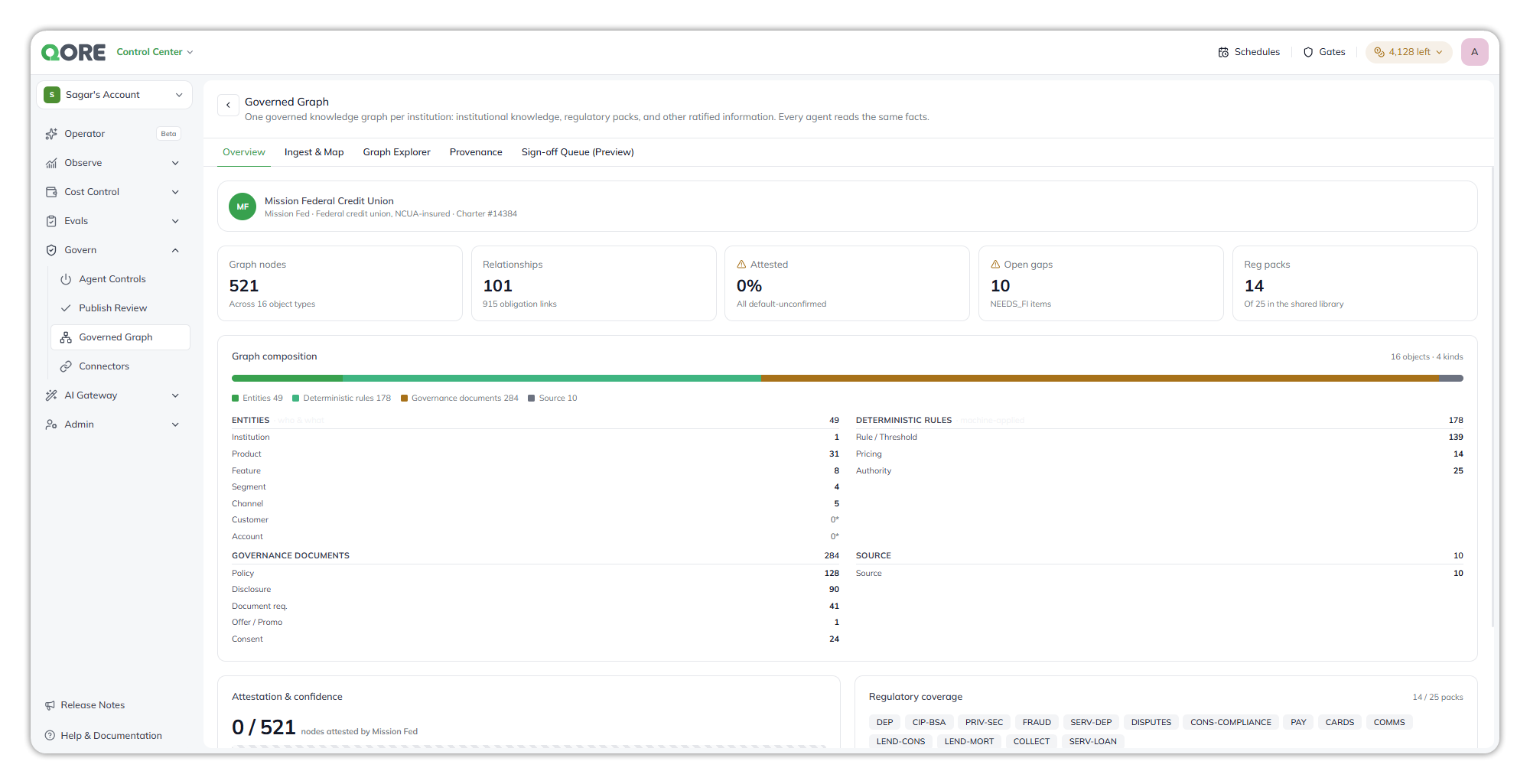
<figure><img src="https://1326225582-files.gitbook.io/~/files/v0/b/gitbook-x-prod.appspot.com/o/spaces%2F0qmgQjJ5aArDTj2ACFHG%2Fuploads%2Fgit-blob-4c5ecd1b4c4e9eee50a3333011a4533c78907b79%2Fqore_control-center_governed-graph-overview_rounded_shadow.png?alt=media" alt="The Overview tab of a govern graph, with the institution profile, counts of graph nodes, relationships, attested share, open gaps and regulatory packs, and the graph composition breakdown"><figcaption><p>Overview.</p></figcaption></figure>

* **Institution profile**. The institution's name, type and charter.
* **Headline counts**. Graph nodes, relationships, the share attested, open gaps, and the regulatory packs loaded. Open gaps are items the institution still has to supply.
* **Graph composition**. The nodes grouped into entities, deterministic rules, governance documents and sources, with a count per object type. **Customer** and **Account** are empty by design: member data is never collected into the graph; it's resolved at run time from the core systems.
* **Attestation & confidence**. How many nodes the institution has attested, and the spread of source confidence.
* **Regulatory coverage**. The [regulatory packs](#regulatory-packs) applied to the graph, each labelled with its short code. The total beside the list is the number of packs in the library for the institution's type, such as credit unions, not for every type. A note beneath the list states that the library holds further packs, loaded together with the product-line modules that need them. The card identifies which packs seeded the graph. It doesn't report whether each obligation has been met, because the graph doesn't keep the link from an obligation to the rule it seeded.
  {% endtab %}

{% tab title="About Graph" %}
**About Graph** has two tabs, **Graph Summary** and **Traversal Guidelines**. Both are written by the platform from the graph, and they are generated automatically once the graph is built. Until then, a tab reads `No graph summary yet` and `It is generated automatically once the graph is built. If it has not started, generate it now.`, with a **Generate** button. While one is running, the tab reads `Generating graph summary…` or `Generating traversal guidelines…` and `This runs in the background and takes a few minutes. You can leave this page.`

* **Graph Summary** describes what the graph holds, in sections:
  * **Purpose**. What the graph encodes and what it was built from.
  * **Questions it answers**. The questions the graph can answer, followed by what it does not cover. For example, it can note that fee amounts mentioned in disclosure notes are not ingested, or that real-time balances, transaction history and member-specific eligibility are outside the graph.
  * **Entity types**. Each node type in the package, with its count, a one-line description and the key properties worth filtering on, such as `name`, `type` and `owner`.
  * **Relationships**. Each relationship pattern in the package, such as `(:Product)-[:GOVERNED_BY]->(:Disclosure)`, with a plain-language meaning. See [Relationships](#relationships).
  * **Topics covered**. The subjects the graph covers.
* **Traversal Guidelines** are written topic by topic. Each says where to start in the graph and which relationships to follow, for example: start from a product by name, then follow what it includes or what it is priced by.

Once a guide exists, its tab has **Regenerate** and **Save** buttons. The text opens in an editor. Its toolbar has undo and redo, bold, italic, underline and strikethrough, numbered and bulleted lists, alignment, heading levels H1 to H3, and code formatting. The text is editable in place: change it and select **Save** to keep your version, or select **Regenerate** to have the platform write a new one. Each save or regeneration is stored as a new version of the guide for that graph version. A summary you have edited is not replaced when the same package is imported again. The guides are stored as text for each graph version, and agents use them when they query the graph.
{% endtab %}

{% tab title="Ingest & Map" %}

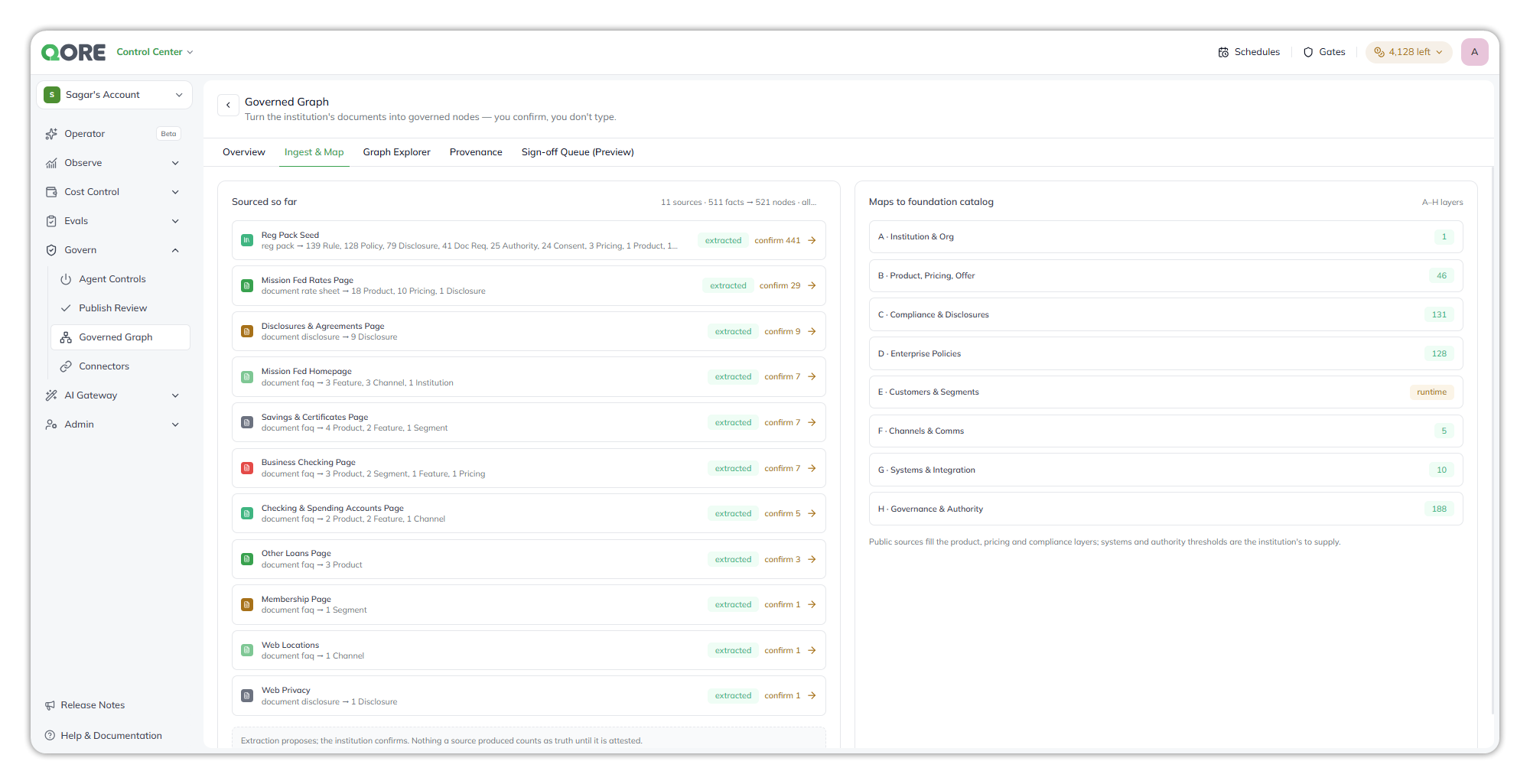
<figure><img src="https://1326225582-files.gitbook.io/~/files/v0/b/gitbook-x-prod.appspot.com/o/spaces%2F0qmgQjJ5aArDTj2ACFHG%2Fuploads%2Fgit-blob-1364c49c239852a18308176a3c4beeca5971345c%2Fqore_control-center_governed-graph-ingest-and-map_rounded_shadow.png?alt=media" alt="The Ingest and Map tab, listing each source with the node types it produced and a confirm count, beside the foundation catalog layers A to H with node counts"><figcaption><p>Ingest &#x26; Map.</p></figcaption></figure>

Ingest & Map is a read-only view of where a graph's content came from and how it fills the foundation catalog.

* **Sourced so far**. Each source, such as a regulatory pack seed or a web page, with the node types it produced and **confirm N**, the number of its nodes still waiting for confirmation. Selecting **confirm N** opens the **Sign-off Queue (Preview)**, which lists all of the graph's nodes, not only that source's.
* **Maps to foundation catalog**. How the nodes fill the catalog layers. Each row gives the number of nodes the graph holds in that layer.

The **foundation catalog** is the fixed set of layers every node is filed under:

| Layer | Name                     | Holds                                                                                       |
| ----- | ------------------------ | ------------------------------------------------------------------------------------------- |
| A     | Institution & Org        | The institution and its organisation                                                        |
| B     | Product, Pricing, Offer  | Products, rates, fees and promotions                                                        |
| C     | Compliance & Disclosures | Disclosures and regulatory references                                                       |
| D     | Enterprise Policies      | The institution's internal policies                                                         |
| E     | Customers & Segments     | Member segments. Labelled **runtime**: resolved from core systems when needed, never stored |
| F     | Channels & Comms         | Branches, ATMs, digital and contact channels                                                |
| G     | Systems & Integration    | Systems the institution runs on                                                             |
| H     | Governance & Authority   | Authority levels, thresholds and approvals                                                  |

A layer with few or no nodes marks a gap the institution still needs to fill. Public sources usually fill the product, pricing and compliance layers. Systems and authority thresholds come from the institution.

The graph is loaded from a package built outside Qore, and Qore doesn't read documents and extract facts itself. The **extracted** label on a source describes how the package was built. Nothing a source produced counts as fact until it's attested.
{% endtab %}

{% tab title="Graph Explorer" %}
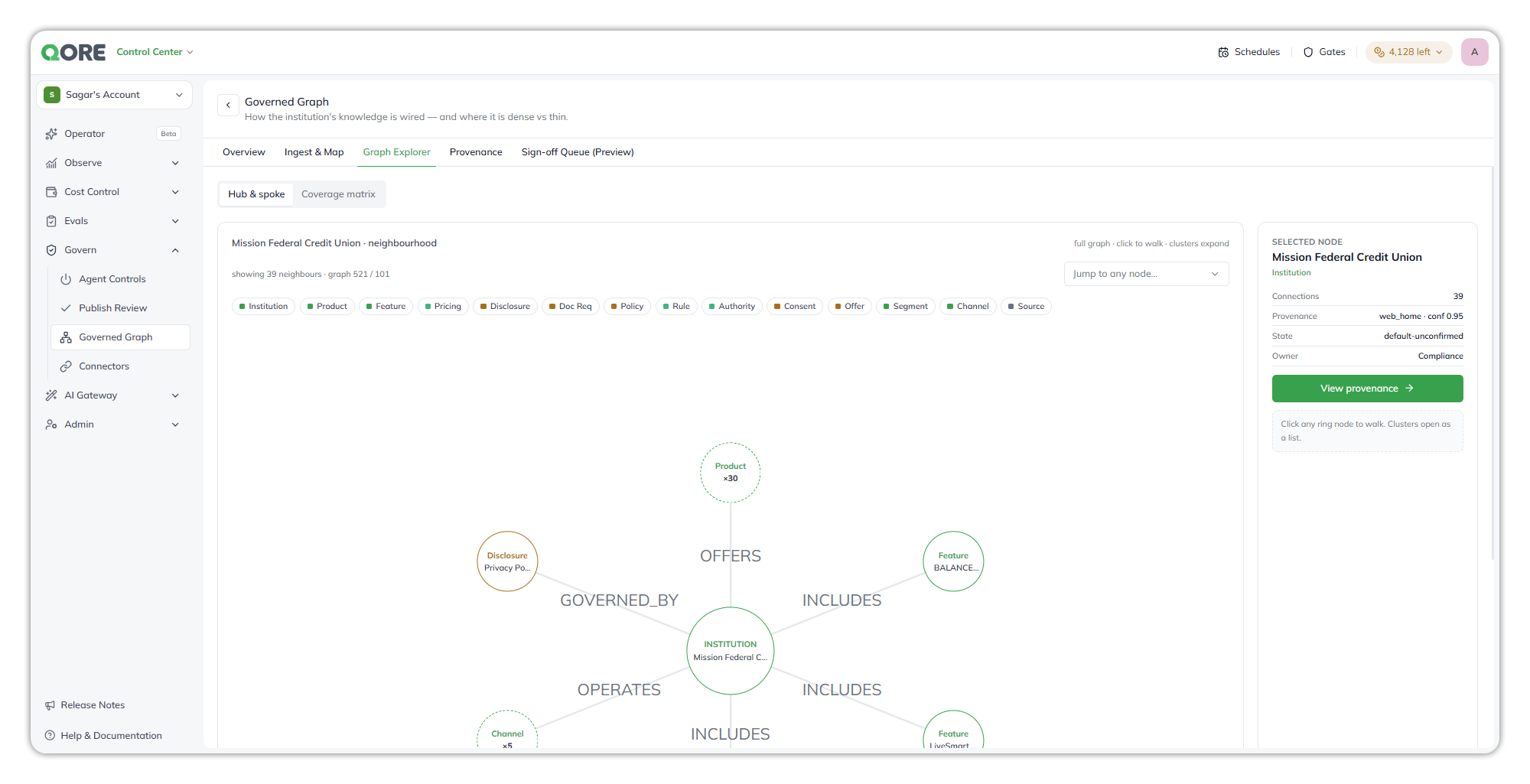
![](https://1326225582-files.gitbook.io/~/files/v0/b/gitbook-x-prod.appspot.com/o/spaces%2F0qmgQjJ5aArDTj2ACFHG%2Fuploads%2Fgit-blob-4e33d706171a4d74d98d2a953bf8e9e13536b4b4%2Fgraph-explorer.png?alt=media)

* The explorer opens with the graph's node types as bubbles, each with its count, joined by the relationships between types. Select a bubble for its actions, or double-click it to open it. The layout menu offers **All nodes**, **Group by node type**, and **Group by relationship**. **Filter by kind** narrows the kinds shown, and the buttons at the right zoom the view.
* **Search nodes** finds a node by name, with the results grouped by node type. Choose one to see it with its neighbours.
* The **selected node** panel shows the node's name, its type, and its number of relationships, with two tabs. **Properties** lists each property of the node, including its source provenance. **Relationships** lists its connections.
* **Edit node**, the pencil in the panel, changes the node's properties. See [Node editing](#node-editing).
  {% endtab %}

{% tab title="Provenance" %}

<figure><img src="https://1326225582-files.gitbook.io/~/files/v0/b/gitbook-x-prod.appspot.com/o/spaces%2F0qmgQjJ5aArDTj2ACFHG%2Fuploads%2Fgit-blob-f1c15a4c6f4838d3713c0247ab949a7d3b4c1636%2Fqore_control-center_governed-graph-provenance_rounded_shadow.png?alt=media" alt="The Provenance tab, tracing the Share Savings APY from its rate sheet source through the extracted field and the Pricing graph node to its default-unconfirmed status, above the source register"><figcaption><p>Provenance.</p></figcaption></figure>

Provenance answers one question: where did this fact come from, and where does it stand now? It has two parts, the trace for one fact and the source register for the whole graph. You can also reach it from **Lineage** on the **Sign-off Queue (Preview)**.

### The trace

The heading names the fact and gives its node ID at the right. The trace follows the fact in four steps, left to right. Select a step for an explanation.

| Step                | What it gives you                                                                                                                                                                                                |
| ------------------- | ---------------------------------------------------------------------------------------------------------------------------------------------------------------------------------------------------------------- |
| **Source**          | The source the fact was read from, with its type and the date it was read. **Source** opens the original page or document.                                                                                       |
| **Extracted field** | The value pulled from that source, and the name of the field it was stored in.                                                                                                                                   |
| **Graph node**      | The node type and version the fact was stored as, and the confidence with which it was placed.                                                                                                                   |
| **Status**          | The fact's sign-off state. A fact nobody has attested reads `Default-unconfirmed`, with the label `awaiting institution sign-off`. See [Unconfirmed, attested and ratified](#unconfirmed-attested-and-ratified). |

Four cards sit beneath the trace:

| Card                      | Meaning                                                                                 |
| ------------------------- | --------------------------------------------------------------------------------------- |
| **Owner**                 | The team accountable for the fact, such as Product.                                     |
| **Effective from**        | The date the value took effect.                                                         |
| **As-of (graph version)** | The graph version that held the fact, with its date. This is the version an agent read. |
| **PII classification**    | Whether the value holds personal data. `none` means it doesn't.                         |

Effective time is when the value took effect. As-of time is which graph version an agent read. The two are tracked as separate values, so you can always answer "which rate did the agent quote, and was it current?" A note under the cards says so.

### The source register

The **source register** covers the whole graph, not one fact. Its header gives the number of sources and the date of the last sync. Each source is a row with:

* its name and type;
* the number of nodes it produced. A source that fed no node shows a count of zero;
* its confidence;
* the date it was read, and a **Source** link to the original.

**Ingest & Map** lists the same sources from the other side, by what each one added to the foundation catalog.
{% endtab %}

{% tab title="Sign-off Queue (Preview)" %}

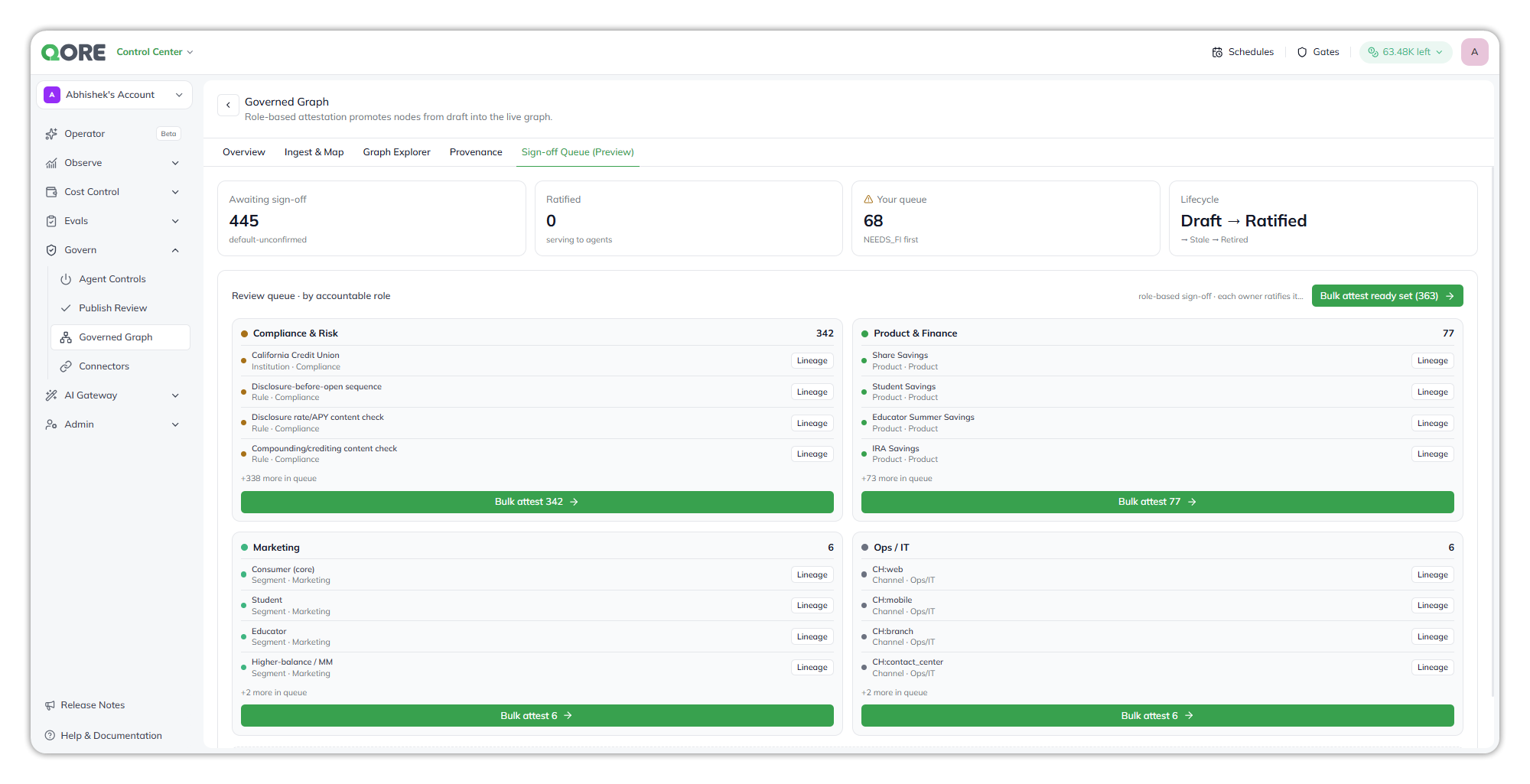
<figure><img src="https://1326225582-files.gitbook.io/~/files/v0/b/gitbook-x-prod.appspot.com/o/spaces%2F0qmgQjJ5aArDTj2ACFHG%2Fuploads%2Fgit-blob-642f95062d0a629189077069315e14ecc2a8755f%2Fqore_control-center_governed-graph-signoff_rounded_shadow.png?alt=media" alt="The Sign-off Queue preview, with counts of nodes awaiting sign-off and ratified, and review queues for Compliance and Risk, Product and Finance, Marketing, and Ops and IT, each with Bulk attest"><figcaption><p>Sign-off Queue (Preview).</p></figcaption></figure>

Sign-off is how a node moves from Draft to Ratified. The queue groups nodes by the accountable role that owns them, such as Compliance & Risk, Product & Finance, Marketing, and Ops / IT, with **Lineage** for each node and **Bulk attest** per role.

The cards at the top give the state of the graph:

| Card              | Meaning                                                                                           |
| ----------------- | ------------------------------------------------------------------------------------------------- |
| Awaiting sign-off | Nodes that are still `default-unconfirmed`                                                        |
| Ratified          | Nodes that have been ratified. It stays at zero, because nothing attested in the preview is saved |
| Your queue        | Values the institution still has to supply, shown as `NEEDS_FI`, listed first                     |
| Lifecycle         | A label naming the stages of a node's life: Draft, Ratified, Stale and Retired                    |

**Lineage** takes you to the **Provenance** tab, where the trace follows a fact from its source to its status. **Bulk attest** marks every node in a role's group at once, and **Bulk attest ready set** marks the nodes that aren't waiting on a value from the institution. When you attest, **Awaiting sign-off** falls, **Ratified** rises, and each role's group reports how many of its nodes are ratified.

{% hint style="warning" %}
This tab is a preview. **Bulk attest** updates the screen only and isn't saved: reload and every node is unconfirmed again. Agents read every node whether or not it has been attested.
{% endhint %}
{% endtab %}
{% endtabs %}

## Node editing <a href="#node-editing" id="node-editing"></a>

**Edit node** in the **Graph Explorer** panel turns every property into a field, except the ID, which can't be changed. **Name** is required. **Features** takes one item per line, and **Confidence Score** takes a number. Leaving a node with unsaved edits asks before it discards them.

The fields are the properties described under [Nodes](#nodes): **Name**, **Owner**, **PII classification**, **Fill**, **Version**, **Confidence score**, **State**, **Effective from** and **Source provenance**, which holds the source, its class and the pack. **Fill** records how the value was populated, for example `seeded` for a value taken from a regulatory pack.

| Editor behavior       | Detail                                                                                                       |
| --------------------- | ------------------------------------------------------------------------------------------------------------ |
| Values you can change | Values at any depth, including items inside a list.                                                          |
| Read-only values      | Structured values, and values the editor can't address.                                                      |
| Structure             | You can't add or remove nested objects or list items. You can only change values inside the ones that exist. |

## Agent skills <a href="#agent-skills" id="agent-skills"></a>

A graph that has finished uploading becomes **knowledge** in the account. When a govern graph is attached to an agent, the agent queries it with these skills.

| Skill                            | Behavior                                                                                                                                                                                                                                                                                                                                                                            |
| -------------------------------- | ----------------------------------------------------------------------------------------------------------------------------------------------------------------------------------------------------------------------------------------------------------------------------------------------------------------------------------------------------------------------------------- |
| **Knowledge Graph Search**       | Answers structured and relational questions, such as which documents a product requires or which policy governs a disclosure. It turns the question into a read-only graph query and returns up to 25 rows, and tells the agent when more matches exist.                                                                                                                            |
| **Knowledge Graph Cypher Query** | A pre-attached skill that isn't on by default. Turn it on in **Agent Config → Skills & Capabilities**, on the **Pre-attached Skills** tab. The agent writes a read-only Cypher query and runs it with the same safety checks as Knowledge Graph Search. The agent is told to use it only when it already has the exact query, from the user, its instructions or an earlier search. |

See [Knowledge graph skills](https://docs.uptiq.ai/ai-workbench-qore/console/agent-builder/build/skills-and-capabilities.md#knowledge-graph-skills).

The Console Operator reaches a graph through the Knowledge Builder agent it calls. The agent can list graphs and their versions, read a graph and its guides, ask it questions, retry a build, create or restore a version, edit nodes, and regenerate or edit the guides. It asks for permission before it edits nodes or restores a version.

You can't create or attach a graph by attaching the package JSON in the Agent Builder chat. Upload it in Govern Graph first.

{% hint style="warning" %}
**Agents read unconfirmed nodes.** Nothing in the graph is attested, and Knowledge Graph Search doesn't filter by sign-off state. Review what an agent quotes from the graph before you rely on it with customers.
{% endhint %}

## Messages

| Message                                                                     | Meaning                                                                                                            |
| --------------------------------------------------------------------------- | ------------------------------------------------------------------------------------------------------------------ |
| "Failed to build this graph."                                               | The build failed. The recorded reason follows.                                                                     |
| "The build failed without recording a reason."                              | The build failed and no reason was recorded.                                                                       |
| "This will be retried automatically within the next few minutes."           | Retries remain.                                                                                                    |
| "Automatic retries have been exhausted. Use Retry to try again."            | No automatic retries remain. Select **Retry**.                                                                     |
| "Version restored"                                                          | A restore finished.                                                                                                |
| "Restore version N?"                                                        | Confirms a restore. Agents start reading that version right away, nothing is rebuilt, and later versions are kept. |
| "The graph is created for the whole account, so every project can read it." | Shown in the upload dialog.                                                                                        |
| "Custom Neo4j connections are not enabled in this environment."             | Qore refuses **Use your own Neo4j (Dev Only)** in production.                                                      |
| "No graph summary yet"                                                      | The summary or guideline isn't generated yet. **Generate** starts it.                                              |
| "Generating graph summary…"                                                 | The summary is being generated in the background.                                                                  |

For package errors shown on the **Failed** badge, see [Troubleshoot govern graphs](https://docs.uptiq.ai/ai-workbench-qore/control-center/govern/govern-graph/troubleshoot-govern-graphs.md).

## What's next

<table data-view="cards"><thead><tr><th>Title</th><th>Description</th><th data-card-target data-type="content-ref">Link</th></tr></thead><tbody><tr><td><strong>Upload and manage a govern graph</strong></td><td>Upload a package, add versions, and edit nodes.</td><td><a href="https://docs.uptiq.ai/ai-workbench-qore/control-center/govern/govern-graph/upload-and-manage-a-govern-graph.md">Upload and manage a govern graph</a></td></tr><tr><td><strong>Troubleshoot govern graphs</strong></td><td>Fix failed uploads and unexpected graph content.</td><td><a href="https://docs.uptiq.ai/ai-workbench-qore/control-center/govern/govern-graph/troubleshoot-govern-graphs.md">Troubleshoot govern graphs</a></td></tr><tr><td><strong>Attaching Knowledge to an Agent</strong></td><td>Attach a govern graph to an agent as knowledge.</td><td><a href="https://docs.uptiq.ai/ai-workbench-qore/console/agent-builder/build/attaching-knowledge-to-an-agent.md">Attaching Knowledge to an Agent</a></td></tr><tr><td><strong>Govern graphs in Knowledge</strong></td><td>Where govern graphs appear in the Knowledge list.</td><td><a href="https://docs.uptiq.ai/ai-workbench-qore/console/knowledge.md">Knowledge</a></td></tr></tbody></table>


---

# Agent Instructions
This documentation is published with GitBook. GitBook is the documentation platform designed so that both humans and AI agents can read, navigate, and reason over technical content effectively. Learn more at gitbook.com.

## Querying This Documentation
If you need additional information that is not directly available in this page, you can query the documentation by asking a question.

Perform an HTTP GET request on the following URL with the `ask` and `goal` query parameters:

```
GET https://docs.uptiq.ai/ai-workbench-qore/control-center/govern/govern-graph.md?ask=<question>&goal=<user_goal>
```

`ask` is the immediate question: it should be specific, self-contained, and written in natural language.
`goal` is what the user is ultimately trying to achieve, the reason they need the answer. Sharing it helps GitBook give you a better, more relevant answer. A goal is most helpful when it describes the outcome the user wants rather than restating the question. For example, with `ask=how do I create an API token`, a goal like `automate deployments from our CI pipeline` lets GitBook tailor the answer to that use case.

The response will contain a direct answer to the question and relevant excerpts and sources from the documentation.

Use this mechanism when the answer is not explicitly present in the current page, you need clarification or additional context, or you want to retrieve related documentation sections.