> For the complete documentation index, see [llms.txt](https://docs.uptiq.ai/llms.txt). Markdown versions of documentation pages are available by appending `.md` to page URLs; this page is available as [Markdown](https://docs.uptiq.ai/ai-workbench-qore/console/knowledge.md).

# Knowledge

Build queryable knowledge from your documents, then attach it to agents and apps.

Knowledge turns source documents into queryable content for agents. Qore creates a table of contents, tags, and embeddings that agents retrieve during conversations.

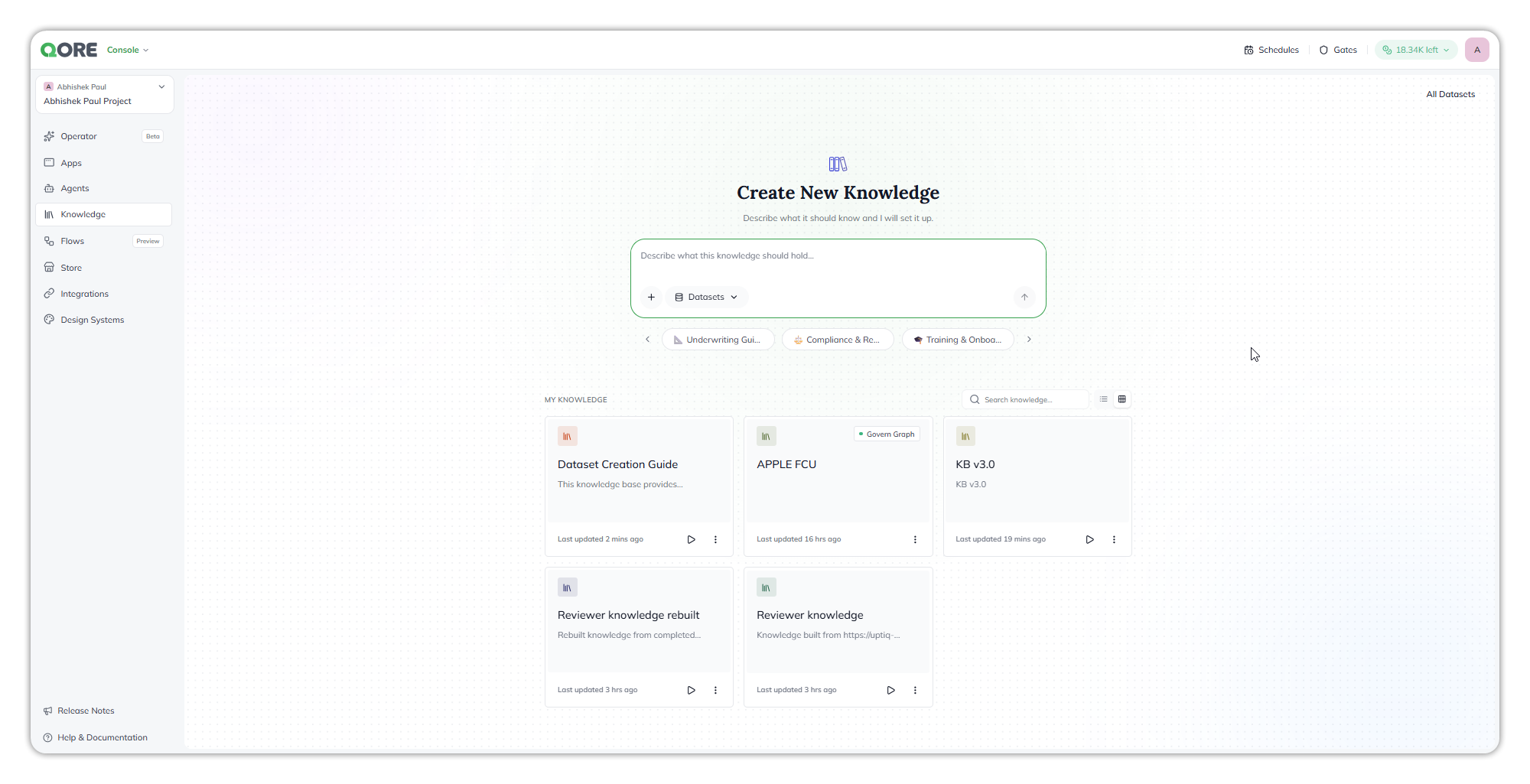
Select **Knowledge** in the Console sidebar. Create knowledge at the top of the page and manage project knowledge bases below it. Select **All Datasets** to manage source files. For every task in one place, see [Create a knowledge base](/ai-workbench-qore/task-guides/create-a-knowledge.md).

<figure><img src="https://1326225582-files.gitbook.io/~/files/v0/b/gitbook-x-prod.appspot.com/o/spaces%2F0qmgQjJ5aArDTj2ACFHG%2Fuploads%2Fgit-blob-3b39c294803ab40a8f0025e242f2c6df9170791a%2F020_knowledge_landing_cards.png?alt=media" alt="The Knowledge page: Create New Knowledge with a Describe what this knowledge should hold… prompt, a + button and a Datasets selector, three suggestion chips, and MY KNOWLEDGE below as a grid of cards, each with a name, description, Last updated time, a play button and a ⋮ menu; All Datasets sits top right"><figcaption><p>Knowledge opens on the creation prompt, with every knowledge base in the project below it.</p></figcaption></figure>

## At a glance

| Task                                   | Start with                                 | Result                                                               |
| -------------------------------------- | ------------------------------------------ | -------------------------------------------------------------------- |
| Build knowledge from a description     | The **Create New Knowledge** prompt        | A configured knowledge base                                          |
| Group source files                     | **All Datasets**                           | A named dataset that tracks ingestion                                |
| Bring changed files into the knowledge | A knowledge base → **Datasets** → **Sync** | A new knowledge version that agents answer from                      |
| Inspect what was extracted             | A knowledge base → **Content**             | The table of contents, tags, raw extraction and summary per document |
| Use what you built                     | **Try Knowledge**, or attach it            | Grounded answers, in the playground or in an agent                   |

Two concepts work together:

{% columns %}
{% column %}

#### Dataset

A named grouping of source files. It tracks ingestion but does not interpret content.

See [Datasets](/ai-workbench-qore/console/knowledge/datasets.md).
{% endcolumn %}

{% column %}

#### Knowledge base

Qore builds it from datasets or attached files. It contains a table of contents, tags, and embeddings that agents can query.
{% endcolumn %}
{% endcolumns %}

A knowledge base only changes when you **sync** it. Updating a file in a dataset does nothing to the knowledge base until that file is synced, and each file that syncs creates a new knowledge version. See [Sync & versions](/ai-workbench-qore/console/knowledge/sync-and-versions.md).

## Create knowledge

Describe what the knowledge should hold. Qore sets up the knowledge base from your description.

Ready-to-use templates provide starting descriptions for common knowledge types. Select a template, then edit its description before you send it.

Choose a source while you create the knowledge:

{% tabs %}
{% tab title="Attach files" %}
Use **+** to attach files from your computer, a cloud drive, or a website. When you give several website URLs, Qore creates a dataset for each.
{% endtab %}

{% tab title="Use datasets" %}
Use **Datasets** to select existing datasets. The selector includes **Search datasets…** and **+ Create Dataset**.
{% endtab %}
{% endtabs %}

{% hint style="info" %}
You do not have to have a dataset first. Describing the knowledge and attaching files in one step is the normal path; datasets matter when you want to reuse the same source files across several knowledge bases, or when you are crawling a website.
{% endhint %}

You can also build knowledge from the **Agent Builder** chat. The agent that builds your agent follows the same process as the Knowledge Builder: it can create a knowledge base, add the files you attach to a dataset, sync it, and attach the result to the agent you're building. See [Build knowledge from the Agent Builder chat](/ai-workbench-qore/console/agent-builder/build/attaching-knowledge-to-an-agent.md#build-knowledge-from-the-agent-builder-chat).

## Find your knowledge

**MY KNOWLEDGE** lists the project's knowledge bases. Each card shows its name, description, and last update time. Select a card to open it.

| Control               | What it does                                                                                                                                                             |
| --------------------- | ------------------------------------------------------------------------------------------------------------------------------------------------------------------------ |
| **Search knowledge…** | Filters by name and description. It does not search document contents. Query a knowledge base in [Try Knowledge](/ai-workbench-qore/console/knowledge/try-knowledge.md). |
| List and grid icons   | Switch between row and card views.                                                                                                                                       |
| **▷**                 | Opens [Try Knowledge](/ai-workbench-qore/console/knowledge/try-knowledge.md) for that knowledge base.                                                                    |
| **⋮**                 | Opens item actions, including delete.                                                                                                                                    |

{% hint style="danger" %}
**Deleting a knowledge base cannot be undone here.** It removes the generated structure — the table of contents, tags, and embeddings. The source files stay in their datasets, so you can build a new knowledge base from them, but the deleted one does not come back.
{% endhint %}

Knowledge created from a website crawl is named after its source.

**All Datasets** in the top right opens [Datasets](/ai-workbench-qore/console/knowledge/datasets.md).

{% hint style="info" %}
**Share a knowledge base.** Each knowledge base has its own URL. Anyone opening it needs access to the same project.
{% endhint %}

## Work on one knowledge base

Open a knowledge base to refine its scope, manage source files, and inspect processing.

* Select the knowledge base name to switch knowledge bases.
* Use chat to add sources or change the knowledge scope. Each reply shows its credit usage.

{% tabs %}
{% tab title="Datasets" %}
This tab lists the datasets and files that the knowledge base uses. It shows each file's version and status. Sync files, upload new versions, and resolve items needing attention here.

See [Sync & versions](/ai-workbench-qore/console/knowledge/sync-and-versions.md).
{% endtab %}

{% tab title="Content" %}
This tab lists processed documents. Select a document to review its **Content**, **Tags**, **Raw extraction**, and **Summary**.

See [Document processing](/ai-workbench-qore/console/knowledge/document-processing.md).
{% endtab %}
{% endtabs %}

* Select **vN ▾** to view each knowledge version and what created it.
* Select **+ Attach** to add files from your computer, a cloud drive, or a website. See [Add files](/ai-workbench-qore/console/knowledge/datasets.md#add-files).
* Select **▷ Try Knowledge** to query the knowledge base and inspect the chunks behind each answer. See [Try Knowledge](/ai-workbench-qore/console/knowledge/try-knowledge.md).

{% hint style="info" %}
**Detach is different from delete.** **Detach dataset** and **Detach from knowledge** remove sources from this knowledge base. The source files remain in the dataset. **Delete from dataset** removes the file from the dataset.
{% endhint %}

## When processing fails

Processing runs through ingestion, table-of-contents generation, tagging, and embeddings. Failures identify the stage that stopped.

Provider throttling commonly stops table-of-contents generation:

> **The provider rate limited the request.**\
> **Failed stage: TOC\_GENERATION**

Failed files show **Sync failed** in **Datasets** and a warning in **Content** → **Documents**. Select the file to view its error and failed stage.

Select **Retry** to process the file again. Qore also retries automatically within two hours. Retries are limited. After all retries are exhausted, **Retry** is unavailable. Correct the source file, then provide a new version. Common issues include scanned PDFs without text and password-protected files.

{% hint style="warning" %}
**Wait before retrying.** An immediate retry usually meets the same rate limit, and every attempt consumes provider quota. Repeated failures across knowledge bases usually mean a tenant-wide throttle rather than a problem with your files — check with your administrator before continuing.
{% endhint %}

A file contributes only after it shows **Synced**. To retry several failed files, select the dataset's **⋮** → **Retry failed files only**. See [Sync & versions](/ai-workbench-qore/console/knowledge/sync-and-versions.md#sync-files).

## Retired options

**Legacy Dataset** and **Legacy Knowledge** no longer appear in Knowledge. Use datasets and knowledge bases instead.

### Related

<table data-view="cards"><thead><tr><th>Title</th><th>Description</th><th data-card-target data-type="content-ref">Target</th></tr></thead><tbody><tr><td><strong>Datasets</strong></td><td>Group source files, add them from uploads, drives, or a website crawl.</td><td><a href="/ai-workbench-qore/console/knowledge/datasets.md">Datasets</a></td></tr><tr><td><strong>Sync &#x26; versions</strong></td><td>How file updates reach agents through sync and knowledge versions.</td><td><a href="/ai-workbench-qore/console/knowledge/sync-and-versions.md">Sync &amp; versions</a></td></tr><tr><td><strong>Try Knowledge</strong></td><td>Query any version and see the chunks behind each answer.</td><td><a href="/ai-workbench-qore/console/knowledge/try-knowledge.md">Try Knowledge</a></td></tr><tr><td><strong>Knowledge FAQs</strong></td><td>Short answers about knowledge bases, files, sync and versions.</td><td><a href="/ai-workbench-qore/console/knowledge/faqs.md">Knowledge: FAQs &amp; Troubleshooting</a></td></tr><tr><td><strong>Document processing</strong></td><td>The table of contents, tags, raw extraction and summary Qore produces.</td><td><a href="/ai-workbench-qore/console/knowledge/document-processing.md">Document processing</a></td></tr><tr><td><strong>Attaching Knowledge to an Agent</strong></td><td>Give an agent access to a knowledge base.</td><td><a href="/ai-workbench-qore/console/agent-builder/build/attaching-knowledge-to-an-agent.md">Attaching Knowledge to an Agent</a></td></tr><tr><td><strong>Knowledge &#x26; Context</strong></td><td>The concept behind retrieval, and when to reach for it.</td><td><a href="/ai-workbench-qore/core-concepts/knowledge-and-context.md">Knowledge &amp; Context</a></td></tr></tbody></table>

***

{% columns %}
{% column width="83.33333333333334%" %}

<p align="right"><em>Maintained by</em> <mark style="color:green;">Abhishek Paul</mark><br><code>AI-assisted, human-approved</code></p>
{% endcolumn %}

{% column width="16.666666666666664%" %}

<div align="left"><img src="https://1326225582-files.gitbook.io/~/files/v0/b/gitbook-x-prod.appspot.com/o/spaces%2F0qmgQjJ5aArDTj2ACFHG%2Fuploads%2Fgit-blob-d034645b4f8f8ee661985f5306b60ded3289653c%2Fmaintainer-abhishek-paul.png?alt=media" alt="" width="60"></div>
{% endcolumn %}
{% endcolumns %}


---

# Agent Instructions
This documentation is published with GitBook. GitBook is the documentation platform designed so that both humans and AI agents can read, navigate, and reason over technical content effectively. Learn more at gitbook.com.

## Querying This Documentation
If you need additional information that is not directly available in this page, you can query the documentation by asking a question.

Perform an HTTP GET request on the following URL with the `ask` and `goal` query parameters:

```
GET https://docs.uptiq.ai/ai-workbench-qore/console/knowledge.md?ask=<question>&goal=<user_goal>
```

`ask` is the immediate question: it should be specific, self-contained, and written in natural language.
`goal` is what the user is ultimately trying to achieve, the reason they need the answer. Sharing it helps GitBook give you a better, more relevant answer. A goal is most helpful when it describes the outcome the user wants rather than restating the question. For example, with `ask=how do I create an API token`, a goal like `automate deployments from our CI pipeline` lets GitBook tailor the answer to that use case.

The response will contain a direct answer to the question and relevant excerpts and sources from the documentation.

Use this mechanism when the answer is not explicitly present in the current page, you need clarification or additional context, or you want to retrieve related documentation sections.
