> For the complete documentation index, see [llms.txt](https://docs.uptiq.ai/llms.txt). Markdown versions of documentation pages are available by appending `.md` to page URLs; this page is available as [Markdown](https://docs.uptiq.ai/ai-workbench-qore/control-center/ai-gateway/gateway-settings.md).

# Gateway Settings

Configure model families, providers, tiers, defaults, and authentication for the account.

Gateway Settings configures model access for the account. Choose families, providers, tiers, defaults, and authentication. Review the saved configuration before making changes.

Open **Control Center** → **AI Gateway** → **Gateway Settings**. The path is `/platform/control-center/ai-gateway/gateway-settings`.

## Before you begin

{% hint style="info" %}
Changes apply to one family at a time. Save changes before selecting another family.
{% endhint %}

AI Gateway provides configured model access. Agents and API calls use the gateway rather than connecting directly to model providers.

For what these terms mean and why an application requests a tier instead of a model, read [How Model Routing Works](/ai-workbench-qore/control-center/ai-gateway/how-model-routing-works.md) first.

| Term           | Meaning                                 | Choices or examples                   | What you configure               |
| -------------- | --------------------------------------- | ------------------------------------- | -------------------------------- |
| Family         | Models from one source                  | Anthropic, Gemini, OpenAI             | Enabled state and default status |
| Provider       | Backend that supplies a family’s models | Anthropic direct, GCP Model Garden    | Authentication method            |
| Tier           | Named model selection within a family   | Economy, Smart, Premium               | Assigned model                   |
| Default family | Family used when no family is specified | One family only                       | Default family                   |
| Authentication | Provider credential ownership           | UPTIQ managed key, Bring your own key | Credential source                |

Only one family is **Default**. Setting a new default removes the previous one.

{% tabs %}
{% tab title="UPTIQ managed key" %}
The platform holds and pays for the API key. Usage counts against your credit balance.
{% endtab %}

{% tab title="Bring your own key" %}
Your organization provides its own key. The provider bills usage to that key's owner.
{% endtab %}
{% endtabs %}

## Choose the right destination

| Goal                         | Use                                                                            | Result                                     |
| ---------------------------- | ------------------------------------------------------------------------------ | ------------------------------------------ |
| Check provider availability  | [Model Catalog](/ai-workbench-qore/control-center/ai-gateway/model-catalog.md) | View `Enabled` and `Not configured` status |
| Inspect a completed request  | [Runs & Traces](/ai-workbench-qore/control-center/observe/runs-and-traces.md)  | Review its model and provider              |
| Call the gateway from code   | [Connect to AI Gateway](#connect-to-ai-gateway)                                | Create an API key and send requests        |
| Review configuration history | [Audit Trails](/ai-workbench-qore/control-center/observe/audit-trails.md)      | See recorded changes                       |
| Stop an agent                | [Agent Controls](/ai-workbench-qore/control-center/govern/agent-controls.md)   | Stop selected agents or all agents         |

## Review saved configuration

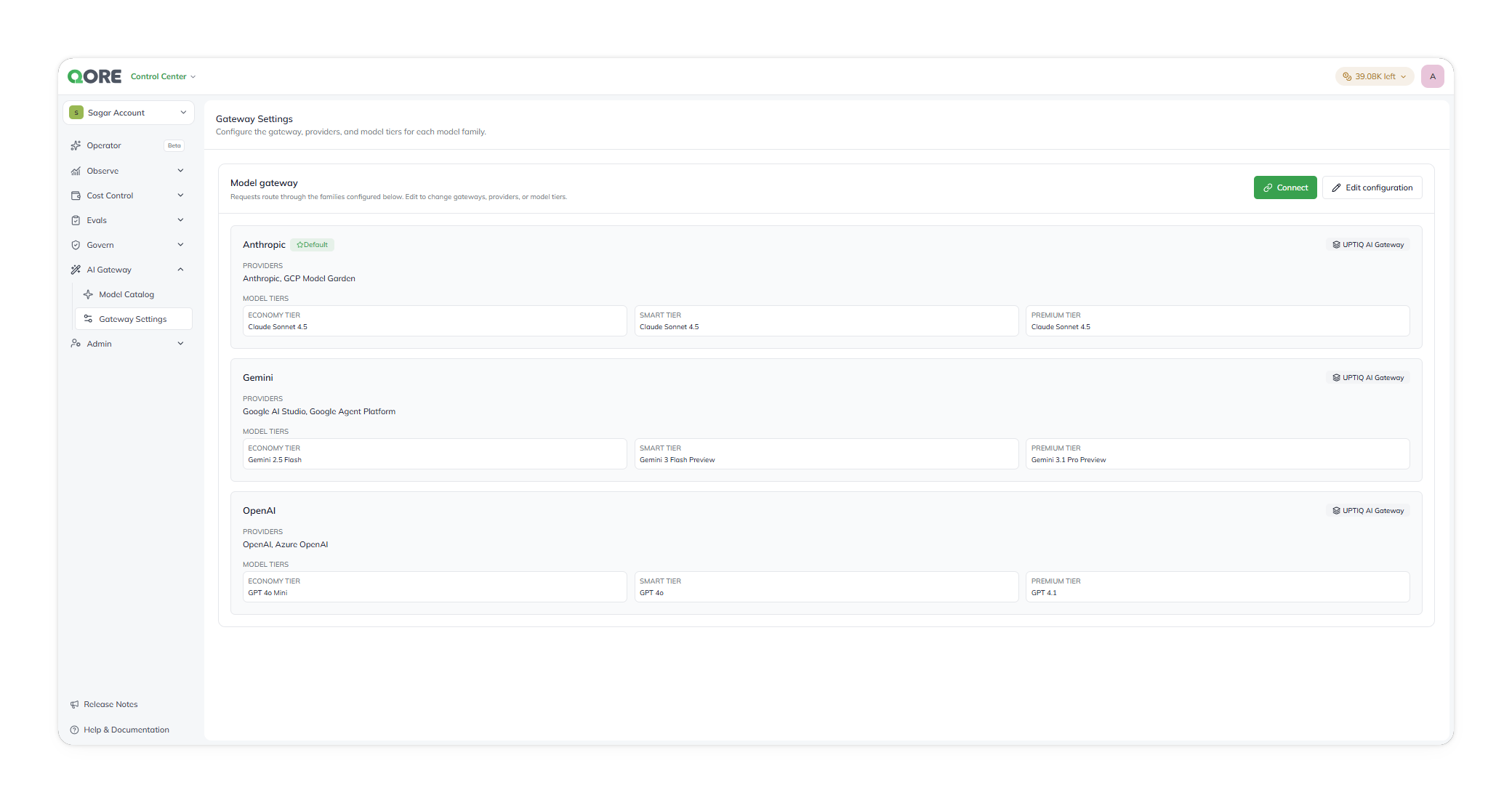
The **Model gateway** summary is read-only. Select **Edit configuration** to make changes, or **Connect** to call the gateway from your own code.

<figure><img src="https://1326225582-files.gitbook.io/~/files/v0/b/gitbook-x-prod.appspot.com/o/spaces%2F0qmgQjJ5aArDTj2ACFHG%2Fuploads%2Fgit-blob-1a81285e74b442a153bf79e4a19fac44c4c76ae9%2Fqore_control-center_control-centre-ai-gateway-gateway-settings-summary_rounded_shadow.png?alt=media" alt="The Model gateway summary, with Connect and Edit configuration buttons and a card for each family (Anthropic, Gemini, OpenAI) showing its default status, gateway, providers, and tier models"><figcaption><p>The read-only summary, one card per family.</p></figcaption></figure>

| Information | What it shows                           | Why it matters                                        |
| ----------- | --------------------------------------- | ----------------------------------------------------- |
| Family      | Family name and `Default` status        | Identifies the family used without a specified family |
| Providers   | Providers available for the family      | Shows which provider options require configuration    |
| Model tiers | Economy, Smart, and Premium assignments | Shows the selected model for each tier                |
| Gateway     | The gateway the family uses             | Shows which gateway serves the family's requests      |

## Connect to AI Gateway <a href="#connect-to-ai-gateway" id="connect-to-ai-gateway"></a>

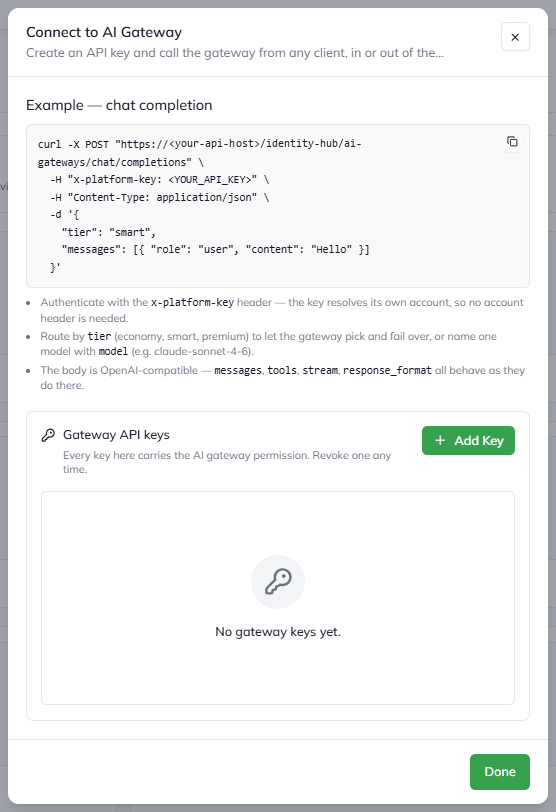
Your own applications can send model requests through the same gateway your agents use, with the same families, tiers, and failover. Select **Connect** on the summary to open **Connect to AI Gateway**.

Only **Account Admin** and **Org Admin** can create and revoke gateway API keys. See [Roles](/ai-workbench-qore/control-center/admin/roles.md).

<figure><img src="https://1326225582-files.gitbook.io/~/files/v0/b/gitbook-x-prod.appspot.com/o/spaces%2F0qmgQjJ5aArDTj2ACFHG%2Fuploads%2Fgit-blob-62f0d3de96d50c6293e36deb32ed4261811e611f%2F003_connect_to_ai_gateway.png?alt=media" alt="The Connect to AI Gateway dialog, with an example chat completion request, notes on authentication and routing, and an empty Gateway API keys list with an Add Key button"><figcaption><p>Connect to AI Gateway: an example request and your gateway API keys.</p></figcaption></figure>

{% stepper %}
{% step %}

#### Create a key

Under **Gateway API keys**, select **Add Key**. Every key in this list carries the AI gateway permission. You can revoke a key at any time.
{% endstep %}

{% step %}

#### Send a request

Copy the example from the dialog. It already contains your deployment's address. The request looks like this:

```bash
curl -X POST "https://<your-api-host>/identity-hub/ai-gateways/chat/completions" \
  -H "x-platform-key: <YOUR_API_KEY>" \
  -H "Content-Type: application/json" \
  -d '{
    "tier": "smart",
    "messages": [{ "role": "user", "content": "Hello" }]
  }'
```

{% endstep %}
{% endstepper %}

| Part of the request     | What to know                                                                                     |
| ----------------------- | ------------------------------------------------------------------------------------------------ |
| `x-platform-key` header | Authenticates the call. The key belongs to one account, so no account header is needed.          |
| `tier`                  | `economy`, `smart`, or `premium`. The gateway picks the model and fails over for you.            |
| `model`                 | Use instead of `tier` to name one model, for example `claude-sonnet-4-6`.                        |
| Body                    | OpenAI-compatible. `messages`, `tools`, `stream`, and `response_format` behave as they do there. |

{% hint style="info" %}
A `response_format` asking for JSON is a preference, not a guarantee. Validate the reply's shape yourself. See [Requests for JSON or a response schema](/ai-workbench-qore/control-center/ai-gateway/how-model-routing-works.md#requests-for-json-or-a-response-schema).
{% endhint %}

## Configuration page

Selecting **Edit configuration** opens `/gateway-settings/<uuid>` as a full-screen page.

### Enable model families

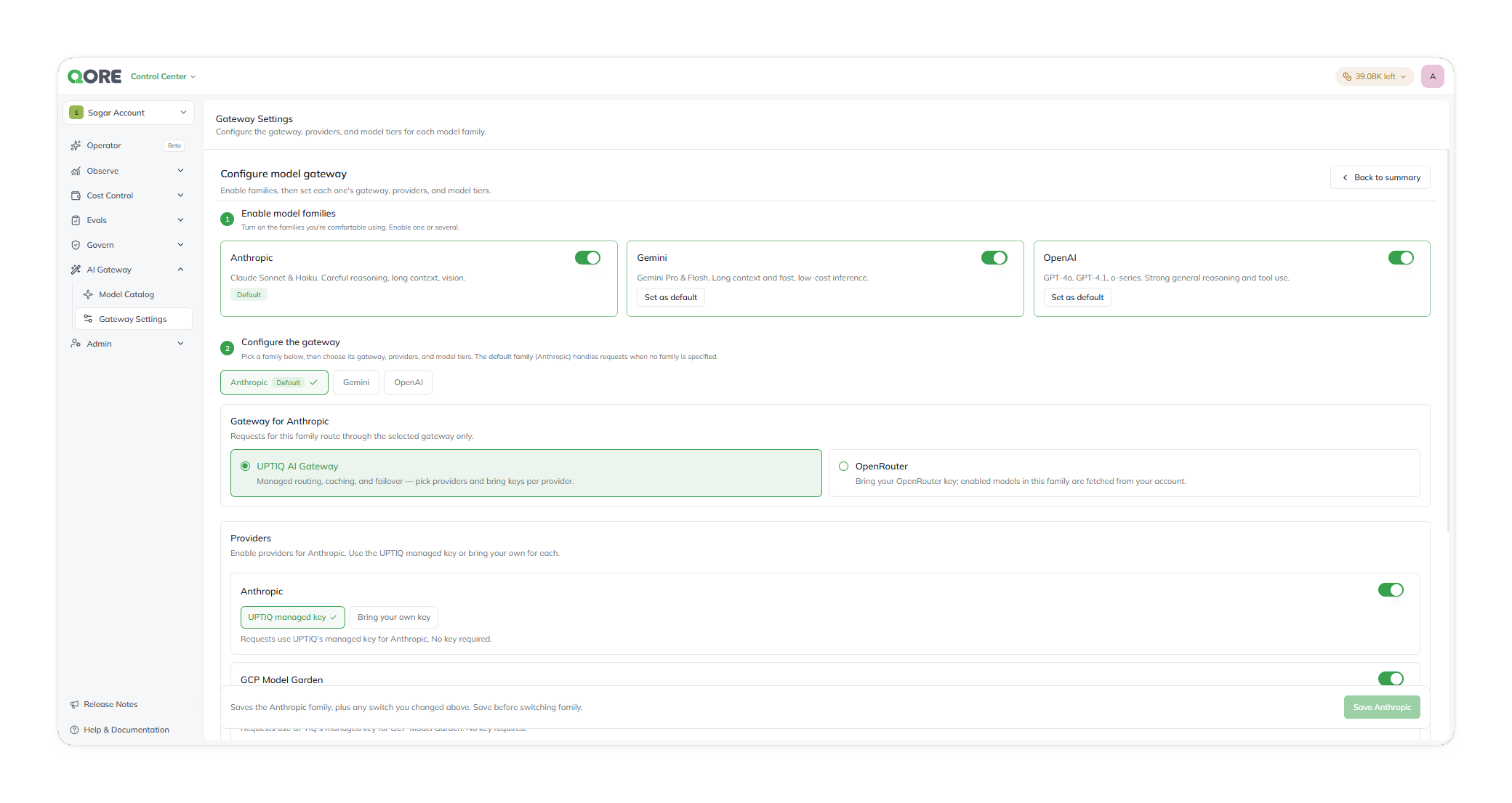
Enable or disable Anthropic, Gemini, and OpenAI for the account. Enable one family or several. Set a non-default family as the default when needed.

Changes to family availability and the default family remain pending until you save the family.

<figure><img src="https://1326225582-files.gitbook.io/~/files/v0/b/gitbook-x-prod.appspot.com/o/spaces%2F0qmgQjJ5aArDTj2ACFHG%2Fuploads%2Fgit-blob-a42a675c8038f7b2d771649a4cf741ccd99fa527%2Fqore_control-center_control-centre-ai-gateway-configure-model-gateway_rounded_shadow.png?alt=media" alt="The Configure model gateway page, with Enable model families toggles, a family selector for Anthropic, and the gateway choice for Anthropic"><figcaption><p>Enable model families, then configure the selected one.</p></figcaption></figure>

### Configure a family

Select the family to configure. **Anthropic** is selected initially.

| Configure               | Details                                                                  | Important information                                                          |
| ----------------------- | ------------------------------------------------------------------------ | ------------------------------------------------------------------------------ |
| Gateway                 | Choose **UPTIQ AI Gateway** or **OpenRouter** for the family             | Every request for the family uses the gateway you choose.                      |
| Provider authentication | Choose **UPTIQ managed key** or **Bring your own key** for each provider | Anthropic has two provider choices. The choices appear in provider-list order. |
| Tier models             | Assign a model to Economy, Smart, and Premium                            | Each tier shows its current model and available providers.                     |

For Anthropic, configure the first credential choice for Anthropic direct. Configure the second for GCP Model Garden.

#### Choose a gateway

**UPTIQ AI Gateway** is the default. It provides managed routing, retries, caching, failover, and observability across the providers you authenticate below.

**OpenRouter** is an alternative that uses your organization's own OpenRouter API key. Enter the key, then fetch the models enabled on that account.

{% hint style="warning" %}
OpenRouter selects the upstream provider itself, so you don't control which one serves a request or where it runs. Where region residency matters, use **UPTIQ AI Gateway** with your own key against your own provider tenancy.
{% endhint %}

#### Where your own keys are stored

A key you enter under **Bring your own key** is held in the deployment's cloud secret manager — GCP Secret Manager or Azure Key Vault, depending on where the platform runs.

Keys are write-only after entry. Nobody can read one back through the UI or the API. To rotate a key, enter the new one against the same provider.

#### Assign tier models

Each tier is a capability level, not a fixed model. Choose with the workload in mind:

| Tier    | Assign a model suited to                                         |
| ------- | ---------------------------------------------------------------- |
| Economy | Routing, classification, extraction, and reranking — high volume |
| Smart   | Synthesis, specialist tasks, reports, and drafts — most agents   |
| Premium | The hardest reasoning, where quality outweighs latency and cost  |

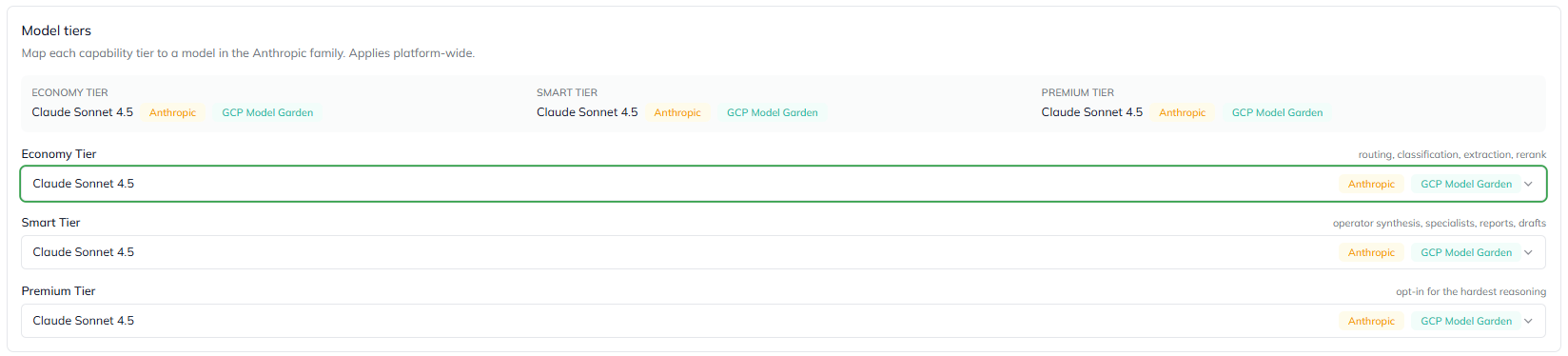
Each tier's model list shows the providers that can serve each model. A model with more than one provider can route through any of them.

<figure><img src="https://1326225582-files.gitbook.io/~/files/v0/b/gitbook-x-prod.appspot.com/o/spaces%2F0qmgQjJ5aArDTj2ACFHG%2Fuploads%2Fgit-blob-797bd88a73cf9e2da5159880b4b96ca1812947d9%2F004_model_tiers.png?alt=media" alt="The Model tiers section for Anthropic, mapping Economy, Smart, and Premium to Claude Sonnet 4.5, each with Anthropic and GCP Model Garden provider chips"><figcaption><p>Model tiers, with the providers that can serve each model.</p></figcaption></figure>

Usage against a **UPTIQ managed key** draws on your credit balance. Check what each tier costs you in [Credit Usage](/ai-workbench-qore/control-center/cost-control/credit-usage.md).

All three Anthropic tiers currently use *Claude Sonnet 4.5*. The product doesn't warn when tiers use the same model. Choose distinct models when you need different cost or capability levels.

### Save changes

Select **Save** to apply pending changes for the current family.

{% hint style="warning" %}
Save applies to one family. Changing families before saving discards pending availability, default, authentication, and tier changes. Gateway Settings has no **Save all** option.
{% endhint %}

## Google and Gemini refer to the same family

The [Model Catalog](/ai-workbench-qore/control-center/ai-gateway/model-catalog.md) labels the same family **Google**. The underlying family is the same.

## Examples

### Enable a new family

Add Gemini models to an account that currently uses Anthropic only.

{% stepper %}
{% step %}

#### Start configuration

From the summary, select **Edit configuration**.
{% endstep %}

{% step %}

#### Enable Gemini

Set Gemini as available for the account.
{% endstep %}

{% step %}

#### Configure Gemini

Select **Gemini**. Choose **UPTIQ managed key** or **Bring your own key** for Google AI Studio and Google Agent Platform. For your own key, provide the key. Assign a model to Economy, Smart, and Premium.
{% endstep %}

{% step %}

#### Save Gemini

Select **Save Gemini**. Don't change families first. Unsaved changes are discarded.
{% endstep %}

{% step %}

#### Verify

Select **Back to summary**. Confirm Gemini shows the selected providers and tier models.
{% endstep %}
{% endstepper %}

### Change the default family

Make Gemini the default family instead of Anthropic.

{% stepper %}
{% step %}

#### Start configuration

Select **Edit configuration** from the summary.
{% endstep %}

{% step %}

#### Set the default

Select **Set as default** for Gemini.
{% endstep %}

{% step %}

#### Save

Select **Save Gemini**. The default changes only after you save.
{% endstep %}

{% step %}

#### Verify

Select **Back to summary**. Confirm Gemini is the default family.
{% endstep %}
{% endstepper %}

### Update the model powering a tier

Change the Anthropic *Smart* tier from *Claude Sonnet 4.5* to *Claude Opus 4.6*.

{% stepper %}
{% step %}

#### Confirm model availability

Before changing tier assignment, open [Model Catalog](/ai-workbench-qore/control-center/ai-gateway/model-catalog.md). Confirm *Claude Opus 4.6* is `Enabled` on at least one Anthropic provider. A tier using a `Not configured` provider fails at request time.
{% endstep %}

{% step %}

#### Change the tier

In Gateway Settings, select **Edit configuration**, then **Anthropic**. Assign *Claude Opus 4.6* to the Smart tier.
{% endstep %}

{% step %}

#### Save and verify

Select **Save Anthropic**, then **Back to summary**. Confirm the Anthropic Smart tier uses *Claude Opus 4.6*.
{% endstep %}
{% endstepper %}

### Switch a provider to Bring your own key

Use your organization’s Anthropic API key for Anthropic-family calls instead of a **UPTIQ managed key**.

{% stepper %}
{% step %}

#### Select Anthropic

Open Gateway Settings. Select **Edit configuration**, then **Anthropic**.
{% endstep %}

{% step %}

#### Change provider authentication

Choose **Bring your own key** for the Anthropic provider. Anthropic’s choice appears first. Enter the key when prompted.
{% endstep %}

{% step %}

#### Save Anthropic

Select **Save Anthropic**. GCP Model Garden authentication is independent from Anthropic authentication.
{% endstep %}

{% step %}

#### Verify with a test call

Send a test call through an agent that uses Anthropic. Check [Runs & Traces](/ai-workbench-qore/control-center/observe/runs-and-traces.md) to confirm the expected provider served the call.
{% endstep %}
{% endstepper %}

## Verify the configuration

Run through this before agents depend on the family.

| Check              | Expected result                                     |
| ------------------ | --------------------------------------------------- |
| Family status      | The required family is enabled.                     |
| Default selection  | One enabled family is marked default.               |
| Provider readiness | Required providers show `Enabled` in Model Catalog. |
| Tier mappings      | Economy, Smart, and Premium map to intended models. |
| Guardrails (Beta)  | Allowed families and providers permit the workload. |

{% hint style="info" %}
**Allowed LLM Families** and **Allowed LLM Providers** are always enforced by AI Gateway on every model request. They show as **Always enforced** in each agent's **Agent Config** › **Guardrails** (Beta), and can't be turned off per agent. The families you enable here are what they allow.
{% endhint %}

## Why this matters

* Save applies to one family.
* Family availability and the default apply after saving.
* Model Catalog shows model availability. Confirm a provider is `Enabled` before assigning a tier.

## Related

<table data-view="cards"><thead><tr><th>Title</th><th>Description</th><th data-card-target data-type="content-ref">Link</th></tr></thead><tbody><tr><td><strong>How Model Routing Works</strong></td><td>Families, providers, gateways, credentials, and tiers explained.</td><td><a href="/ai-workbench-qore/control-center/ai-gateway/how-model-routing-works.md">How Model Routing Works</a></td></tr><tr><td><strong>Model Catalog</strong></td><td>Check model and provider availability before assigning tier models.</td><td><a href="/ai-workbench-qore/control-center/ai-gateway/model-catalog.md">Model Catalog</a></td></tr><tr><td><strong>Credit Usage</strong></td><td>See what managed-key usage draws from your credit balance.</td><td><a href="/ai-workbench-qore/control-center/cost-control/credit-usage.md">Credit Usage</a></td></tr><tr><td><strong>Agent Controls</strong></td><td>Stop selected agents or all agents during an emergency.</td><td><a href="/ai-workbench-qore/control-center/govern/agent-controls.md">Agent Controls</a></td></tr><tr><td><strong>Runs &#x26; Traces</strong></td><td>Inspect the model and provider used by a completed request.</td><td><a href="/ai-workbench-qore/control-center/observe/runs-and-traces.md">Runs &amp; Traces</a></td></tr><tr><td><strong>Audit Trails</strong></td><td>Review gateway configuration changes over time.</td><td><a href="/ai-workbench-qore/control-center/observe/audit-trails.md">Audit Trails</a></td></tr><tr><td><strong>Glossary</strong></td><td>Look up gateway, family, provider, tier, and authentication terms.</td><td><a href="/ai-workbench-qore/start-here/glossary.md">Glossary</a></td></tr></tbody></table>

***

{% columns %}
{% column width="83.33333333333334%" %}

<p align="right"><em>Maintained by</em> <mark style="color:green;">Abhishek Paul</mark><br><code>AI-assisted, human-approved</code></p>
{% endcolumn %}

{% column width="16.666666666666664%" %}

<div align="left"><img src="https://1326225582-files.gitbook.io/~/files/v0/b/gitbook-x-prod.appspot.com/o/spaces%2F0qmgQjJ5aArDTj2ACFHG%2Fuploads%2Fgit-blob-d034645b4f8f8ee661985f5306b60ded3289653c%2Fmaintainer-abhishek-paul.png?alt=media" alt="" width="60"></div>
{% endcolumn %}
{% endcolumns %}


---

# Agent Instructions
This documentation is published with GitBook. GitBook is the documentation platform designed so that both humans and AI agents can read, navigate, and reason over technical content effectively. Learn more at gitbook.com.

## Querying This Documentation
If you need additional information that is not directly available in this page, you can query the documentation by asking a question.

Perform an HTTP GET request on the following URL with the `ask` and `goal` query parameters:

```
GET https://docs.uptiq.ai/ai-workbench-qore/control-center/ai-gateway/gateway-settings.md?ask=<question>&goal=<user_goal>
```

`ask` is the immediate question: it should be specific, self-contained, and written in natural language.
`goal` is what the user is ultimately trying to achieve, the reason they need the answer. Sharing it helps GitBook give you a better, more relevant answer. A goal is most helpful when it describes the outcome the user wants rather than restating the question. For example, with `ask=how do I create an API token`, a goal like `automate deployments from our CI pipeline` lets GitBook tailor the answer to that use case.

The response will contain a direct answer to the question and relevant excerpts and sources from the documentation.

Use this mechanism when the answer is not explicitly present in the current page, you need clarification or additional context, or you want to retrieve related documentation sections.