> For the complete documentation index, see [llms.txt](https://docs.uptiq.ai/llms.txt). Markdown versions of documentation pages are available by appending `.md` to page URLs; this page is available as [Markdown](https://docs.uptiq.ai/ai-workbench-qore/console/console-operator/gates.md).
# Gates
Operator conversations that have stopped to wait for your answer.
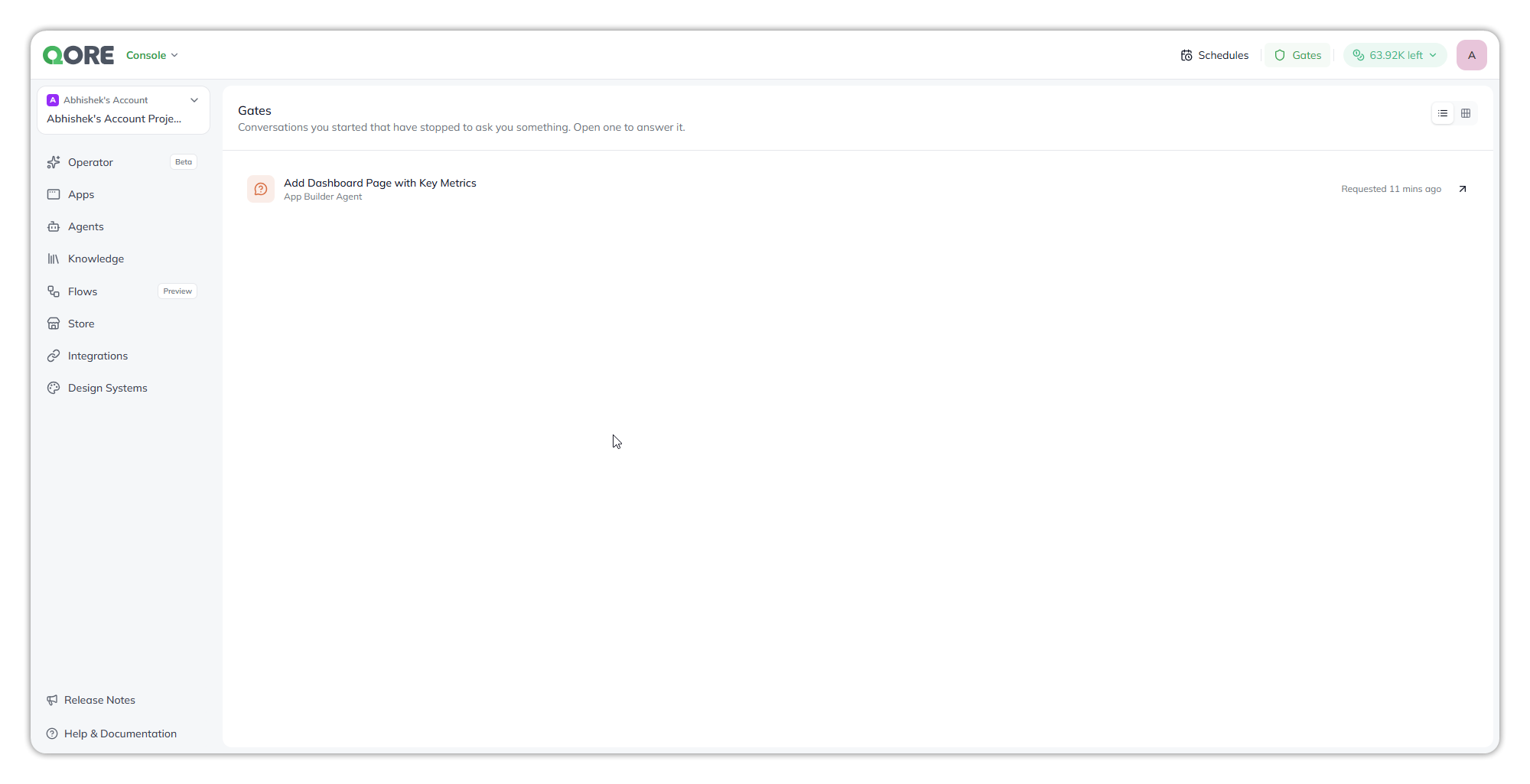
**Gates** lists the Operator conversations you started that ended on a question for you. An agent working for you needed a decision, and nothing moves until you answer.
Select **Gates** in the top bar. The page describes itself exactly: *"Conversations you started that have stopped to ask you something. Open one to answer it."* It is in both Console and Control Center, and the two are independent: Console's **Gates** lists only Console Operator conversations, and Control Center's lists only Governance Operator conversations.
A request waiting on you, and the agent that asked.
## What each request shows
| Part | What it tells you |
| ------------- | -------------------------------------------------------------------------------- |
| **Title** | The conversation it came from, for example `Add Dashboard Page with Key Metrics` |
| **Agent** | Who is asking, for example `App Builder Agent` |
| **Requested** | How long it has waited, for example `Requested 11 mins ago` |
Select a request, or its arrow, to open the conversation at the question. A request from another project opens in that project. The page refreshes on its own while it is open, so new requests appear without reloading. Switch between list and grid with the icons at the top right.
**Only your requests appear here, and only you can answer them.** A conversation you started waits for you, not for a colleague who happens to open it.
## Answer a request
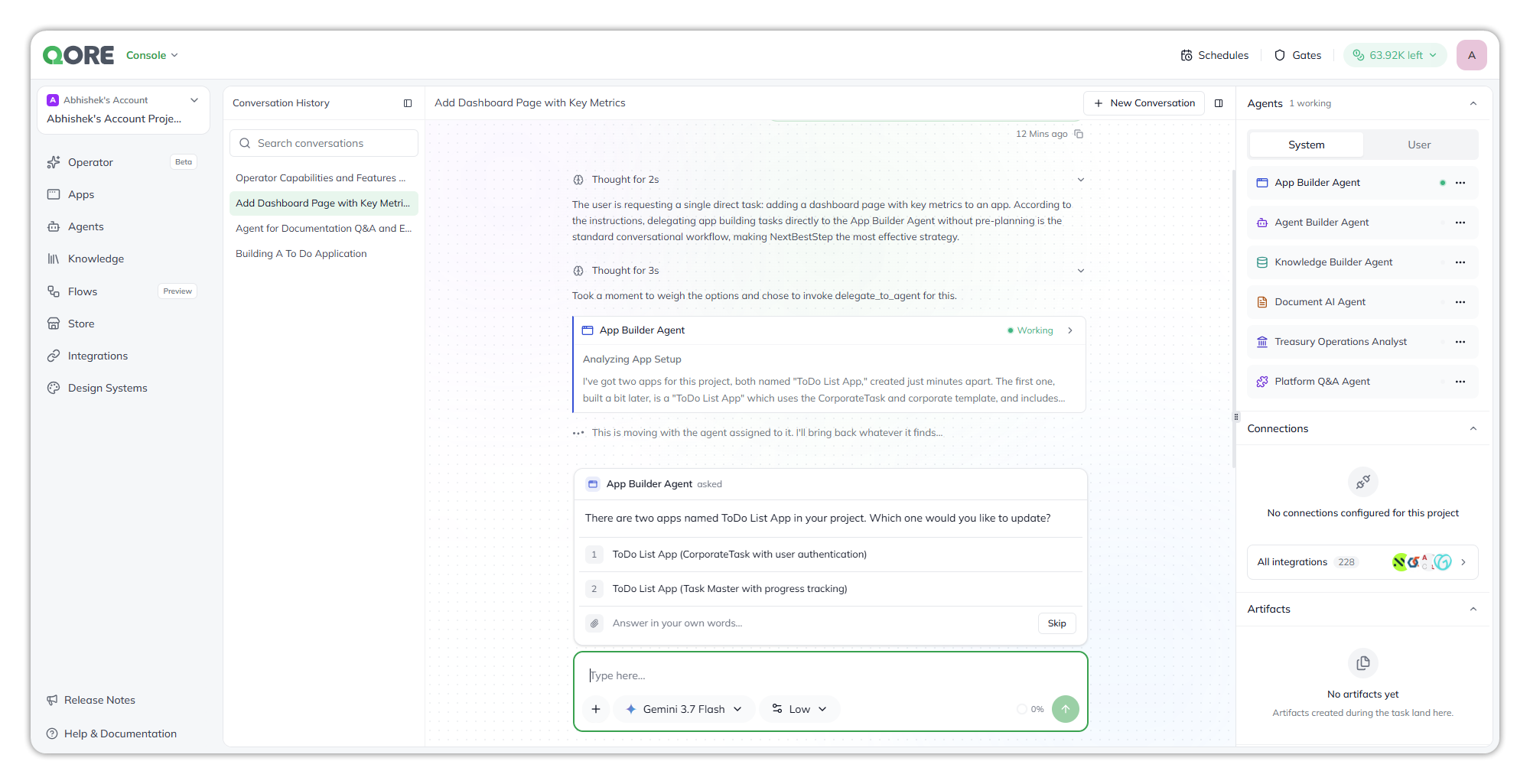
In the conversation, the question sits in a card above the composer, naming the agent that asked:
Pick an answer, write your own, attach a file, or skip.
* **Pick a numbered answer**, when the agent offers choices.
* **Write your own** in **Answer in your own words…**.
* **Attach a file**, when the agent asks for one, such as a brand guide or a spreadsheet. A question that offers numbered answers doesn't take a file.
* **Skip**, to let the agent carry on without an answer.
Once you answer, the request leaves **Gates** and the work continues.
## Notes and limitations
* **An unanswered request holds up the work.** A conversation that ends on a question waits until you answer. Check **Gates** when something you started hasn't finished.
* **Requests are per space.** Console's **Gates** doesn't show Control Center conversations, and the other way round.
### Related
Title
Description
Target
Console Operator
Conversations, the composer, and what the Operator does.
{% endcolumn %}
{% endcolumns %}
---
# Agent Instructions
This documentation is published with GitBook. GitBook is the documentation platform designed so that both humans and AI agents can read, navigate, and reason over technical content effectively. Learn more at gitbook.com.
## Querying This Documentation
If you need additional information that is not directly available in this page, you can query the documentation by asking a question.
Perform an HTTP GET request on the following URL with the `ask` and `goal` query parameters:
```
GET https://docs.uptiq.ai/ai-workbench-qore/console/console-operator/gates.md?ask=&goal=
```
`ask` is the immediate question: it should be specific, self-contained, and written in natural language.
`goal` is what the user is ultimately trying to achieve, the reason they need the answer. Sharing it helps GitBook give you a better, more relevant answer. A goal is most helpful when it describes the outcome the user wants rather than restating the question. For example, with `ask=how do I create an API token`, a goal like `automate deployments from our CI pipeline` lets GitBook tailor the answer to that use case.
The response will contain a direct answer to the question and relevant excerpts and sources from the documentation.
Use this mechanism when the answer is not explicitly present in the current page, you need clarification or additional context, or you want to retrieve related documentation sections.