> For the complete documentation index, see [llms.txt](https://docs.uptiq.ai/llms.txt). Markdown versions of documentation pages are available by appending `.md` to page URLs; this page is available as [Markdown](https://docs.uptiq.ai/readme.md).
# UPTIQ Knowledgebase
Welcome to UPTIQ's centralised documentation for the Qore platform, UPTIQ Document AI, and UPTIQ Solutions.
UPTIQ Knowledgebase is the documentation hub for Qore, UPTIQ Document AI, and UPTIQ Solutions. It brings platform guidance, document intelligence, and solution documentation together in one place.
UPTIQ helps financial institutions turn complex workflows into intelligent, scalable experiences. Qore, Document AI, and UPTIQ Solutions combine to build, automate, and operate trusted AI workflows.
Get help
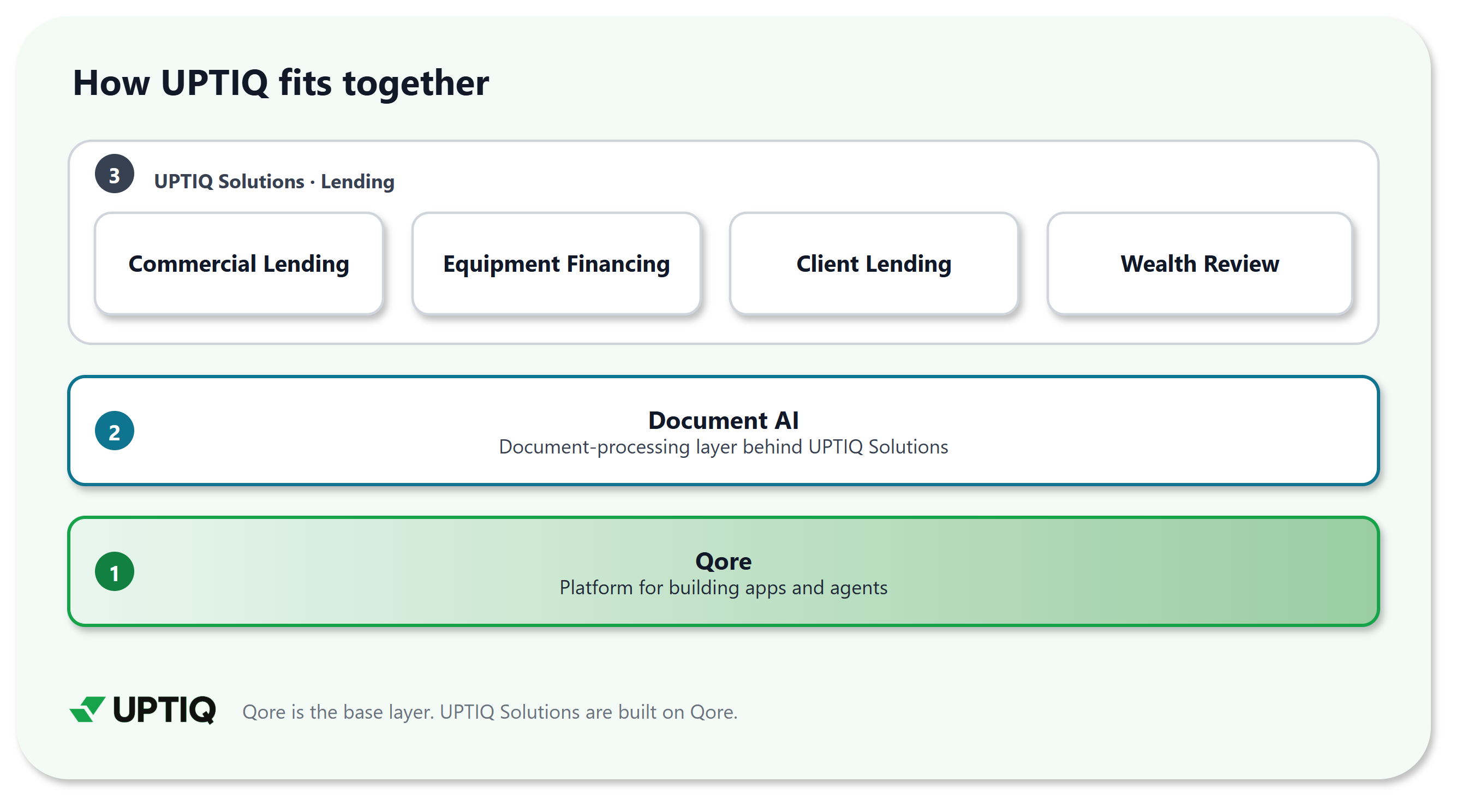
### :layer-group: The UPTIQ AI stack
{% columns %}
{% column width="33.33333333333333%" %}
\
**Qore** is the platform for building apps and agents.
**Document AI** is the document-processing layer behind UPTIQ Solutions. It classifies, extracts, validates, and delivers document intelligence.
**UPTIQ Solutions** are products built on Qore. Today they serve lending.
{% endcolumn %}
{% column width="66.66666666666667%" %}
{% endcolumn %}
{% endcolumns %}
### :rocket: Qore Platform
Qore unifies Agentic AI and app creation, so you can build secure, production-ready apps and agents in one place. You build and run them in **Console**, and operate them across your account in **Control Center**.
Read Qore documentation
:rocket:
What is Qore
Core concepts: what Qore is and how an agent works.
### :file-lines: Document AI
UPTIQ Document AI is the document-processing layer behind UPTIQ Solutions. It turns raw files into structured, reviewable, and actionable data.
Teams use it to classify incoming documents, extract fields, detect fraud signals, generate outputs, measure accuracy, and send results to downstream systems.
:file-lines:
Document AI overview
Classifies, extracts, validates, and delivers document intelligence across UPTIQ Solutions.
### :compass: Find docs for your role
| If you are | Start here |
| -------------------------------------- | ----------------------------------------------------------------------------------------------------------------------------------------------------------------------------------------------------------------------------------------------------------------------------------------------------------------------------------------------------------------------------------------------------------------------------- |
| Evaluating UPTIQ | [The UPTIQ AI stack](#the-uptiq-ai-stack), then [UPTIQ Solutions](#uptiq-solutions) |
| An admin setting up your organization | [Platform Guides](https://integrations.gitbook.com/v1/integrations/VA-Azure/installations/e225e56ca772be2c3176b129f445a091bd373c04c414c8915cad8cbd482bde0b/sites/site_YkKEL/visitor-auth?location=/platform-guides) |
| A builder creating agents or apps | [What is Qore](https://docs.uptiq.ai/ai-workbench-qore/start-here/what-is-qore), then [Core concepts](https://docs.uptiq.ai/ai-workbench-qore/start-here/core-concepts) |
| A developer integrating with UPTIQ | [API Reference](https://integrations.gitbook.com/v1/integrations/VA-Azure/installations/e225e56ca772be2c3176b129f445a091bd373c04c414c8915cad8cbd482bde0b/sites/site_YkKEL/visitor-auth?location=/api-reference), then [Cookbooks](https://integrations.gitbook.com/v1/integrations/VA-Azure/installations/e225e56ca772be2c3176b129f445a091bd373c04c414c8915cad8cbd482bde0b/sites/site_YkKEL/visitor-auth?location=/cookbooks) |
| A technical architect | [Object Model](https://integrations.gitbook.com/v1/integrations/VA-Azure/installations/e225e56ca772be2c3176b129f445a091bd373c04c414c8915cad8cbd482bde0b/sites/site_YkKEL/visitor-auth?location=/qore-object-model), then [Deployment options](https://docs.uptiq.ai/ai-workbench-qore/start-here/deployment-options) |
| An implementation or security reviewer | [Implementation and Security](https://integrations.gitbook.com/v1/integrations/VA-Azure/installations/e225e56ca772be2c3176b129f445a091bd373c04c414c8915cad8cbd482bde0b/sites/site_YkKEL/visitor-auth?location=/qore-implementation-and-security) |
### :lock: Documentation access
Sign in with your Microsoft account to open protected documentation. Public documentation opens without signing in.
View documentation access requirements
| Documentation | Access |
| --------------------------- | ---------------- |
| What is Qore | Public |
| Document AI overview | Public |
| Platform Guides | Sign in required |
| API Reference | Sign in required |
| Object Model | Sign in required |
| Cookbooks | Sign in required |
| Implementation and Security | Sign in required |
| Commercial Lending | Sign in required |
| Equipment Financing | Sign in required |
| Client Lending | Sign in required |
| Wealth Review | Sign in required |
### :life-ring: Get help and support
#### Ask AI
The assistant answers your questions from the Qore and Document AI documentation on this site, and links to the pages it uses.
{% hint style="info" %}
**Beta.** Ask AI may contain mistakes. Use the page feedback form when an answer doesn't match the documentation.
{% endhint %}
To open it, select **Ask** next to search. Ask in your own words, then select **Send**. Each answer links to the pages it used.
About Ask Assistant
#### Giving feedback
Pages in the Qore docs include a feedback form. Use it to tell us what helped, what was missing, or what was unclear. The form starts with **Was this helpful?**
{% stepper %}
{% step %}
#### Choose a reaction
Under **Was this helpful?**, select a smiling face (yes), a neutral face (not sure), or a frowning face (no).
{% endstep %}
{% step %}
#### Add details
In **Anything you'd like to add?**, describe what helped, or what was missing or unclear.
{% endstep %}
{% step %}
#### Submit
Select **Submit**.
{% endstep %}
{% endstepper %}
We review feedback and update documentation when needed.
About feedback
#### More resources
* [Release notes](https://docs.uptiq.ai/ai-workbench-qore/release-notes/2026) — Qore, UPTIQ Document AI, and each UPTIQ Solution have separate changelogs for product-specific updates and improvements.
***
{% columns %}
{% column width="65%" %}
{% endcolumn %}
{% column width="26%" %}
Maintained by Abhishek Paul AI-assisted, human-approved
{% endcolumn %}
{% column width="9%" %}
{% endcolumn %}
{% endcolumns %}
---
# Agent Instructions
This documentation is published with GitBook. GitBook is the documentation platform designed so that both humans and AI agents can read, navigate, and reason over technical content effectively. Learn more at gitbook.com.
## Querying This Documentation
If you need additional information that is not directly available in this page, you can query the documentation by asking a question.
Perform an HTTP GET request on the following URL with the `ask` and `goal` query parameters:
```
GET https://docs.uptiq.ai/readme.md?ask=&goal=
```
`ask` is the immediate question: it should be specific, self-contained, and written in natural language.
`goal` is what the user is ultimately trying to achieve, the reason they need the answer. Sharing it helps GitBook give you a better, more relevant answer. A goal is most helpful when it describes the outcome the user wants rather than restating the question. For example, with `ask=how do I create an API token`, a goal like `automate deployments from our CI pipeline` lets GitBook tailor the answer to that use case.
The response will contain a direct answer to the question and relevant excerpts and sources from the documentation.
Use this mechanism when the answer is not explicitly present in the current page, you need clarification or additional context, or you want to retrieve related documentation sections.