> For the complete documentation index, see [llms.txt](https://docs.uptiq.ai/llms.txt). Markdown versions of documentation pages are available by appending `.md` to page URLs; this page is available as [Markdown](https://docs.uptiq.ai/task-guides/use-the-governance-operator.md).
# Use the Governance Operator
Every Governance Operator task in Control Center: ask about the account, approve staged changes, schedule runs, and answer gates.
This guide is organized by task. Find what you want to do in the list below, then follow the steps. Each task links to the reference page it comes from.
The Governance Operator is the chat surface in Control Center. It answers questions about account activity, usage, cost, access, guardrails, and change history by coordinating governance-review agents. Unlike the Console Operator, **it doesn't act on its own**: it stages each proposed change for your approval.
| Task | Go to |
| -------------------------------------------- | ------------------------------------------------------------ |
| Ask a question about the account | [Ask a question](#ask-a-question-about-the-account) |
| Narrow the question to one project | [One project](#narrow-the-question-to-one-project) |
| See which agents are working on the request | [Agents](#see-which-agents-are-working-on-the-request) |
| Approve a change the Operator proposes | [Approve a change](#approve-a-change-the-operator-proposes) |
| Run the Governance Operator on a schedule | [Schedule a run](#run-the-governance-operator-on-a-schedule) |
| Answer a conversation that is waiting for me | [Gates](#answer-a-conversation-that-is-waiting-for-me) |
***
## :circle-question: Ask
### Ask a question about the account
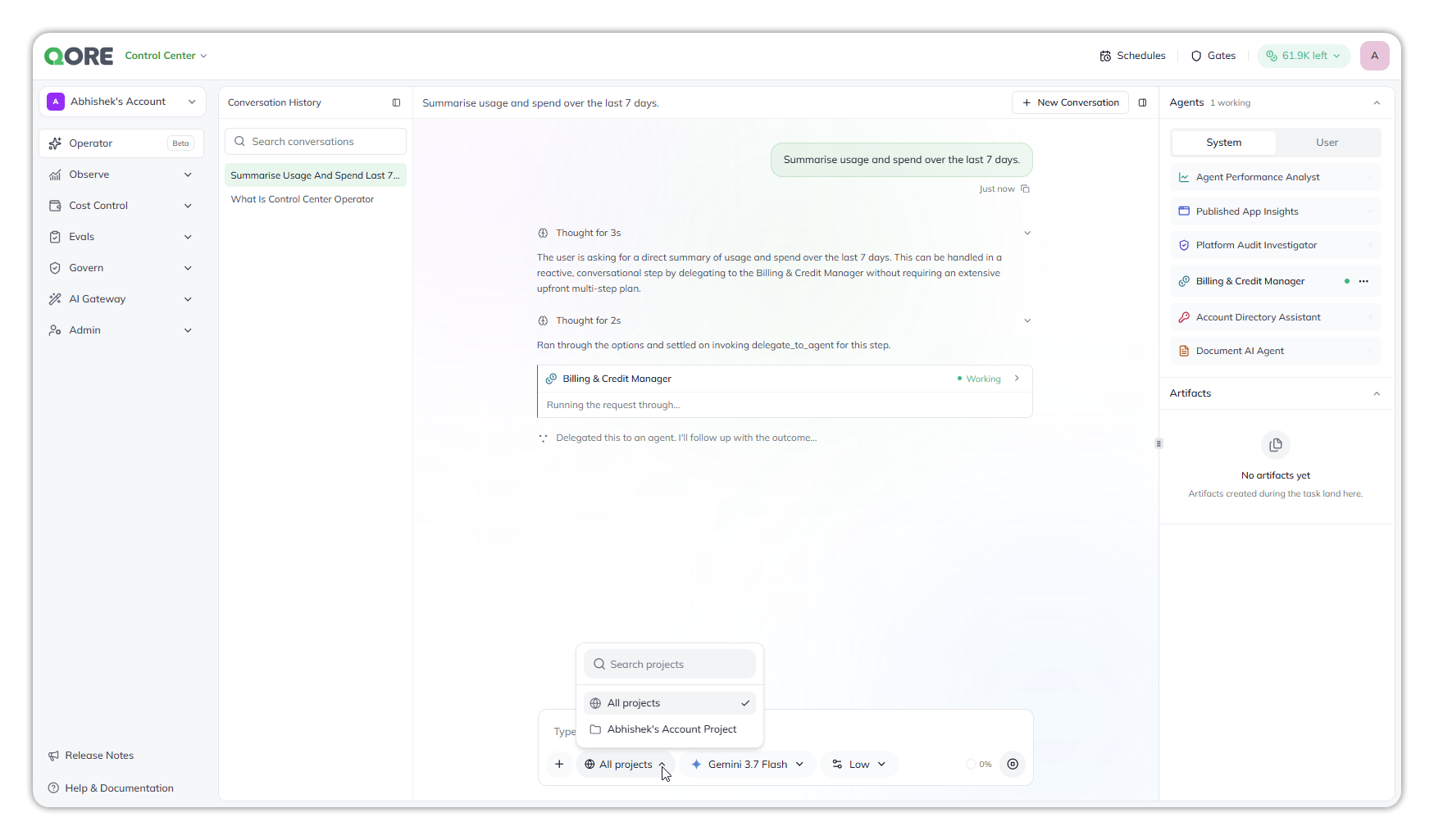
Select **Operator** in the Control Center navigation, then type your question. For example, ask what drove this month's cost, which agents were created recently, or which apps were published. It can also fetch the account's design systems and branding. The Operator breaks the request into tasks, assigns each to a governance-review agent, and returns one combined response.
The Governance Operator delegating a request.
Reference: [Governance Operator](/control-center/governance-operator.md).
### Narrow the question to one project
Control Center screens are account-wide. The Operator has its own project selection: choose a project in its project picker (**All projects** by default) to investigate one project without changing the wider view.
### See which agents are working on the request
The **Agents** panel lists the governance-review agents the Operator dispatches to, such as **Billing & Credit Manager**, with a count of how many are working, for example `1 working`. The agent also shows as **Working** in the chat.
In Control Center, the Governance Operator's agents are always available: you can't turn any of them on or off. Reference: [Agents & connections › Notes and limitations](/console/console-operator/agents-and-connections.md#notes-and-limitations).
***
## :bolt: Act
### Approve a change the Operator proposes
The Operator never acts on its own. It records the proposed fix and stages it; nothing runs until you approve it.
***
## :calendar-check: Schedules and gates
### Run the Governance Operator on a schedule
{% stepper %}
{% step %}
#### Open Schedules
Select **Schedules** in Control Center's top bar, then **+ Add Schedule**. Schedules made in Control Center run the Governance Operator.
{% endstep %}
{% step %}
#### Fill in the schedule
* **Name** — required. A name of only spaces isn't accepted.
* **Schedule** — **Preset** (a **Frequency** of **Hourly**, **Daily**, **Weekly**, or **Monthly**, and a **Time (UTC)**), or **Custom cron** with a **Cron Expression**.
* **Instructions** — required, in **Plain Text** or **JSON**.
* **Agents this run may use** — governance agents such as **Agent Performance Analyst**, **Billing & Credit Manager**, or **Platform Audit Investigator**. Leave it empty to let the run reach every agent in the pool.
{% endstep %}
{% step %}
#### Save
Check the footer summary, such as **Runs every day at 09:00 UTC**, then select **Add Schedule**.
{% endstep %}
{% endstepper %}
The schedule's **⋯** menu has **Pause**, **Resume**, **Edit**, and **Delete**. Times are set in UTC. Reference: [Schedules](/console/console-operator/schedules.md).
### Answer a conversation that is waiting for me
Select **Gates** in Control Center's top bar. It lists the Governance Operator conversations you started that stopped to ask you something, each with its title, the agent asking, and how long it has waited. Select one to open the conversation at the question, then pick an answer, write your own, attach a file when asked, or **Skip**.
Control Center's **Gates** lists only Governance Operator conversations; Console's lists only Console Operator conversations. Reference: [Gates](/console/console-operator/gates.md).
***
## :link: Related pages
* [Governance Operator](/control-center/governance-operator.md) and [Operator](/core-concepts/operator.md)
* [Schedules](/console/console-operator/schedules.md) and [Gates](/console/console-operator/gates.md)
* The Console counterpart: [Use the Console Operator](/task-guides/use-the-console-operator.md)
***
{% columns %}
{% column width="83.33333333333334%" %}
Maintained by Abhishek Paul AI-assisted, human-approved
{% endcolumn %}
{% endcolumns %}
---
# Agent Instructions
This documentation is published with GitBook. GitBook is the documentation platform designed so that both humans and AI agents can read, navigate, and reason over technical content effectively. Learn more at gitbook.com.
## Querying This Documentation
If you need additional information that is not directly available in this page, you can query the documentation dynamically by asking a question.
Perform an HTTP GET request on the current page URL with the `ask` query parameter, and the optional `goal` query parameter:
```
GET https://docs.uptiq.ai/task-guides/use-the-governance-operator.md?ask=&goal=
```
`ask` is the immediate question: it should be specific, self-contained, and written in natural language.
`goal` is optional and describes the broader end goal you are ultimately trying to accomplish on behalf of the user. GitBook uses it to tailor the answer towards what is most useful for that goal.
The response will contain a direct answer to the question and relevant excerpts and sources from the documentation.
Use this mechanism when the answer is not explicitly present in the current page, you need clarification or additional context, or you want to retrieve related documentation sections.