> For the complete documentation index, see [llms.txt](https://docs.uptiq.ai/llms.txt). Markdown versions of documentation pages are available by appending `.md` to page URLs; this page is available as [Markdown](https://docs.uptiq.ai/task-guides/govern-agents-and-models.md).
# Govern agents and models
Every Govern and AI Gateway task in Control Center: stop agents, review connectors, load a governed graph, and configure model access.
This guide is organized by task. Find what you want to do in the list below, then follow the steps. Each task links to the reference page it comes from.
| Task | Go to |
| ------------------------------------------------- | --------------------------------------------------------- |
| See which agents are running | [Agent Controls](#see-which-agents-are-running) |
| Stop one agent | [Stop an agent](#stop-one-agent) |
| Stop every agent in an emergency | [Stop all](#stop-every-agent) |
| Open an agent from Agent Controls | [View Agent](#open-an-agent-from-agent-controls) |
| See which integrations agents may use | [Integrations](#see-which-integrations-agents-may-use) |
| See which MCP servers agents connect to | [MCP servers](#see-which-mcp-servers-agents-connect-to) |
| See which platform skills agents use | [Platform skills](#see-which-platform-skills-agents-use) |
| Upload a governed graph | [Upload a graph](#upload-a-governed-graph) |
| View, download, or rename a graph | [Manage graphs](#view-download-or-rename-a-graph) |
| Explore a graph and trace where a fact came from | [Inside a graph](#explore-a-graph-and-trace-a-fact) |
| Let an agent use a governed graph | [Use in agents](#let-an-agent-use-a-governed-graph) |
| Fix a failed graph upload | [Failed upload](#fix-a-failed-graph-upload) |
| Review the AI Gateway configuration | [Summary](#review-the-ai-gateway-configuration) |
| Enable a model family | [Enable a family](#enable-a-model-family) |
| Change the default family | [Default family](#change-the-default-family) |
| Choose the gateway and provider keys for a family | [Gateway and keys](#choose-the-gateway-and-provider-keys) |
| Change the model behind a tier | [Tiers](#change-the-model-behind-a-tier) |
| Check whether a model is available | [Model Catalog](#check-whether-a-model-is-available) |
| Call the AI Gateway from my own code | [Connect](#call-the-ai-gateway-from-my-own-code) |
***
## :circle-stop: Agent Controls
Agent Controls shows the runtime state of every agent in the account, including system agents such as the Console Operator and the builder agents. It doesn't build, edit, disable, delete, or deactivate agents.
### See which agents are running
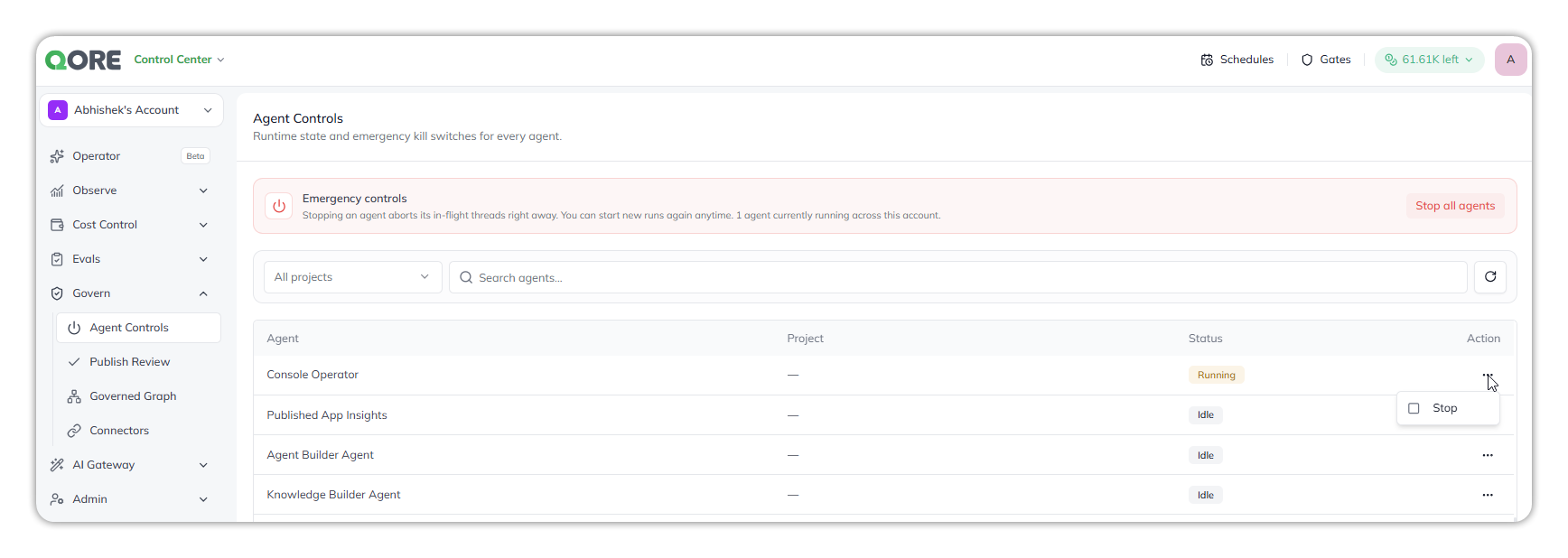
Open **Govern** › **Agent Controls**. The **Emergency controls** banner shows how many agents are running. Each row shows the **Agent**, its **Project** (system agents show `—`), its **Status** (**Running** or **Idle**), and **More Actions** (`⋯`).
Choose **All projects** or one project, and use **Search agents…** to find agents by name (it ignores case and accepts part of a name). The search is saved in the URL as `?search=`. Select refresh to reload the runtime state.
Agent Controls.
### Stop one agent
Open the agent's **More Actions** (`⋯`), then **Stop**. It takes effect immediately, with no confirmation, and interrupts the agent's active runs; work in progress is lost. The agent runs again after its next trigger.
* Stopping a system agent also stops every run and helper agent it started.
* `Stopping the agent's executions` can stay visible or appear twice; the request runs once.
### Stop every agent
In the **Emergency controls** banner, select **Stop all agents**, then confirm. The confirmation warns it can't be undone; **Cancel** leaves work running. New runs can start immediately afterwards.
{% hint style="warning" %}
Narrow the list with **Search agents…** before stopping work. Stopping selected agents in bulk isn't available.
{% endhint %}
### Open an agent from Agent Controls
For one of your own agents, open **More Actions** (`⋯`), then **View Agent**. It opens the agent in Agent Builder in a new tab. System agents offer **Stop** only.
Reference: [Agent Controls](/control-center/govern/agent-controls.md).
***
## :plug: Connectors
Connectors is the account-wide register of what agents may reach outside themselves. Every agent inherits it as its outer limit. Open **Govern** › **Connectors**. Each tab has its own **Search connectors** box.
### See which integrations agents may use
On **Integrations**, each third-party connector shows its **Connector**, **Description**, **Standing** (currently **Allowed**), and **Tags** (such as **Banking**, **CRM**, or **Productivity**). It's the same catalog as Integrations Hub.
Connectors, Integrations tab.
### See which MCP servers agents connect to
On **MCP servers**, there's one row per connection an agent has made: the **Connector** with its URL, **Standing**, **Project**, and **Used by**.
{% hint style="warning" %}
The server URL is shown in full. If it carries a key as a query parameter, anyone who can open Connectors can read it.
{% endhint %}
### See which platform skills agents use
On **Platform skills**, Qore's built-in skills are listed once per skill per agent that used it, with **Standing**, **Project**, and **Used by**. Search by the skill's name.
Reference: [Connectors](/control-center/govern/connectors.md).
***
## :diagram-project: Governed Graph
A governed graph holds an institution's knowledge graph, loaded from a JSON **graph package**. Each fact keeps its source, owner, confidence, and effective date. Graphs are account-scoped. Open **Govern** › **Governed Graph**.
| Action | Roles |
| ------------------------------------------ | --------------------------------------------------------------- |
| View governed graphs | Approver, Governance Manager, Auditor, Account Admin, Org Admin |
| Upload, rename, and manage governed graphs | Governance Manager, Account Admin, Org Admin |
| Attach a governed graph to an agent | Developer, Account Admin, Org Admin |
### Upload a governed graph
{% stepper %}
{% step %}
#### Open the upload dialog
Select **Upload Govern Graph**.
{% endstep %}
{% step %}
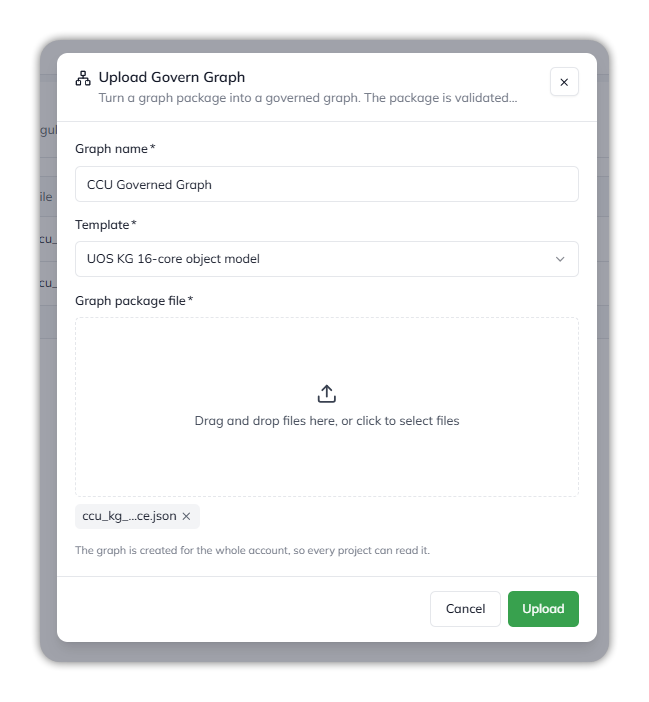
#### Fill it in
* **Graph name** — such as `CCU Governed Graph`.
* **Template** — the template the package follows, such as **UOS KG 16-core object model**.
* **Graph package file** — one `.json` file, up to 80 MB.
{% endstep %}
{% step %}
#### Upload
Select **Upload**. The row shows **Processing** and the stage — *Queued*, *Validating the package*, *Writing nodes*, *Writing relationships* — then **Completed** or **Failed**.
{% endstep %}
{% endstepper %}
Upload Govern Graph.
Edges whose `from` or `to` isn't a node in the package are skipped, so a graph can have fewer relationships than its package. Reference: [Governed Graph › What the template decides](/control-center/govern/governed-graph.md#what-the-template-decides).
### View, download, or rename a graph
The row's **⋮** menu has **View** (opens the uploaded package), **Download** (downloads the package file), and **Edit** (renames the graph). There's no delete. To update a graph, upload the revised package as a new graph.
### Explore a graph and trace a fact
Select a completed graph. It opens on five tabs:
* **Overview** — the institution profile, headline counts, graph composition, attestation and confidence, and regulatory coverage.
* **Ingest & Map** — each source with the nodes it produced, and how nodes fill the foundation catalog layers.
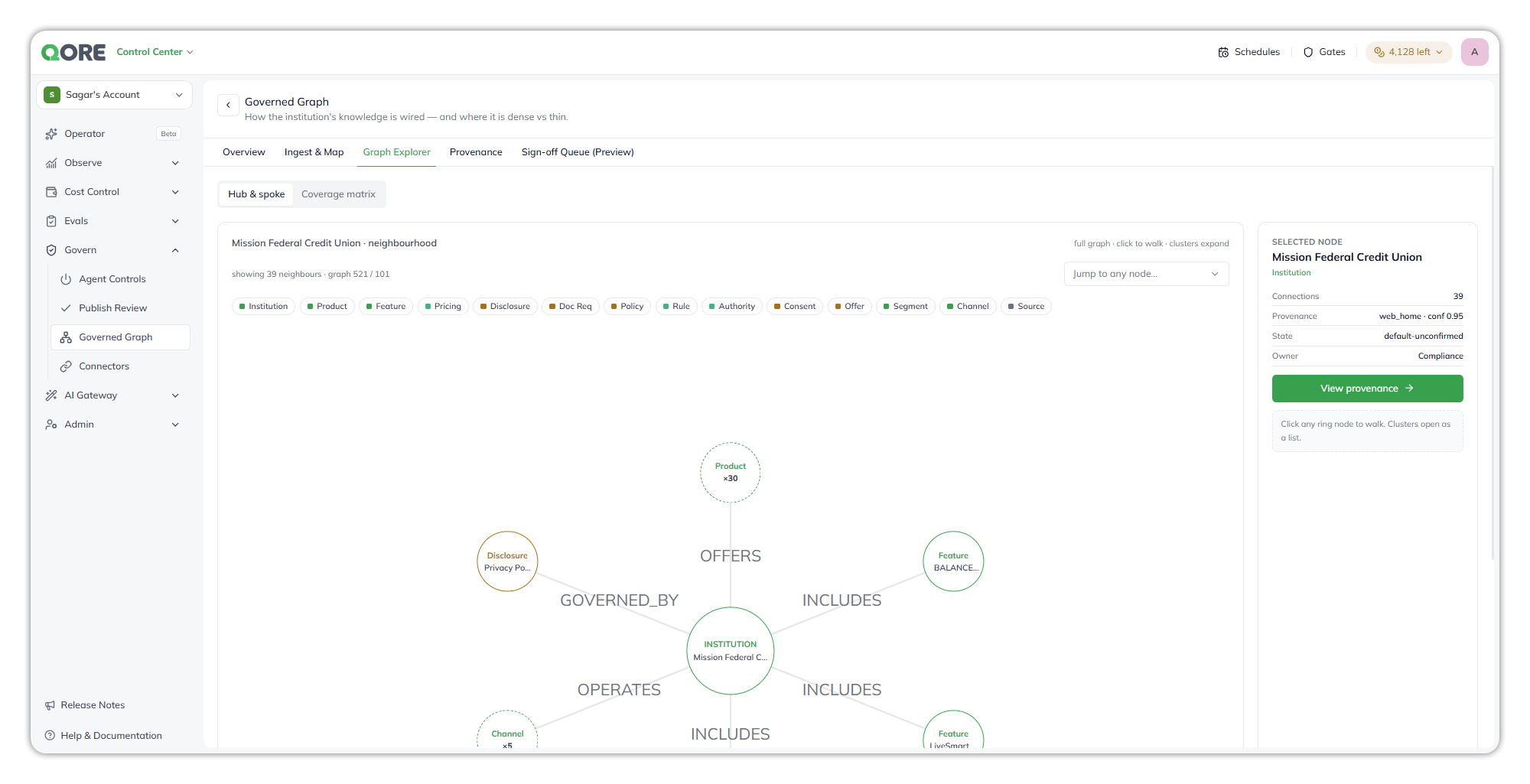
* **Graph Explorer** — **Hub & spoke** around one node, **Jump to any node**, the **selected node** panel with **View provenance**, and the **Coverage matrix**.
* **Provenance** — one fact's trace from **Source** to **Extracted field** to **Graph node** to **Status**, with its owner, effective-from date, as-of version, and PII classification, above the source register.
* **Sign-off Queue (Preview)** — attestations made here aren't saved yet.
Provenance.
### Let an agent use a governed graph
A completed graph becomes knowledge in the account. In Agent Builder, select **+ Add Knowledge**, tick the graph in **Use Existing Knowledge**, and select **Add**. The agent queries it with the **Knowledge Graph Search** skill, which returns up to 25 rows per query. See [Create an agent › Attach existing knowledge or a governed graph](/task-guides/create-an-agent.md#attach-existing-knowledge-or-a-governed-graph).
{% hint style="warning" %}
Agents read unconfirmed nodes. Until sign-off is saved, nothing is attested, and Knowledge Graph Search doesn't filter by sign-off state.
{% endhint %}
### Fix a failed graph upload
Hover over the **Failed** badge for the reason, fix the package, and upload it again. For each reason and its fix, see [Governed Graph › The upload failed](/control-center/govern/governed-graph.md#the-upload-failed).
***
## :network-wired: AI Gateway
Every model request an agent makes passes through AI Gateway. Agents request a capability **tier** — Economy, Smart, or Premium — rather than naming a model, and each family maps a model to each tier.
### Review the AI Gateway configuration
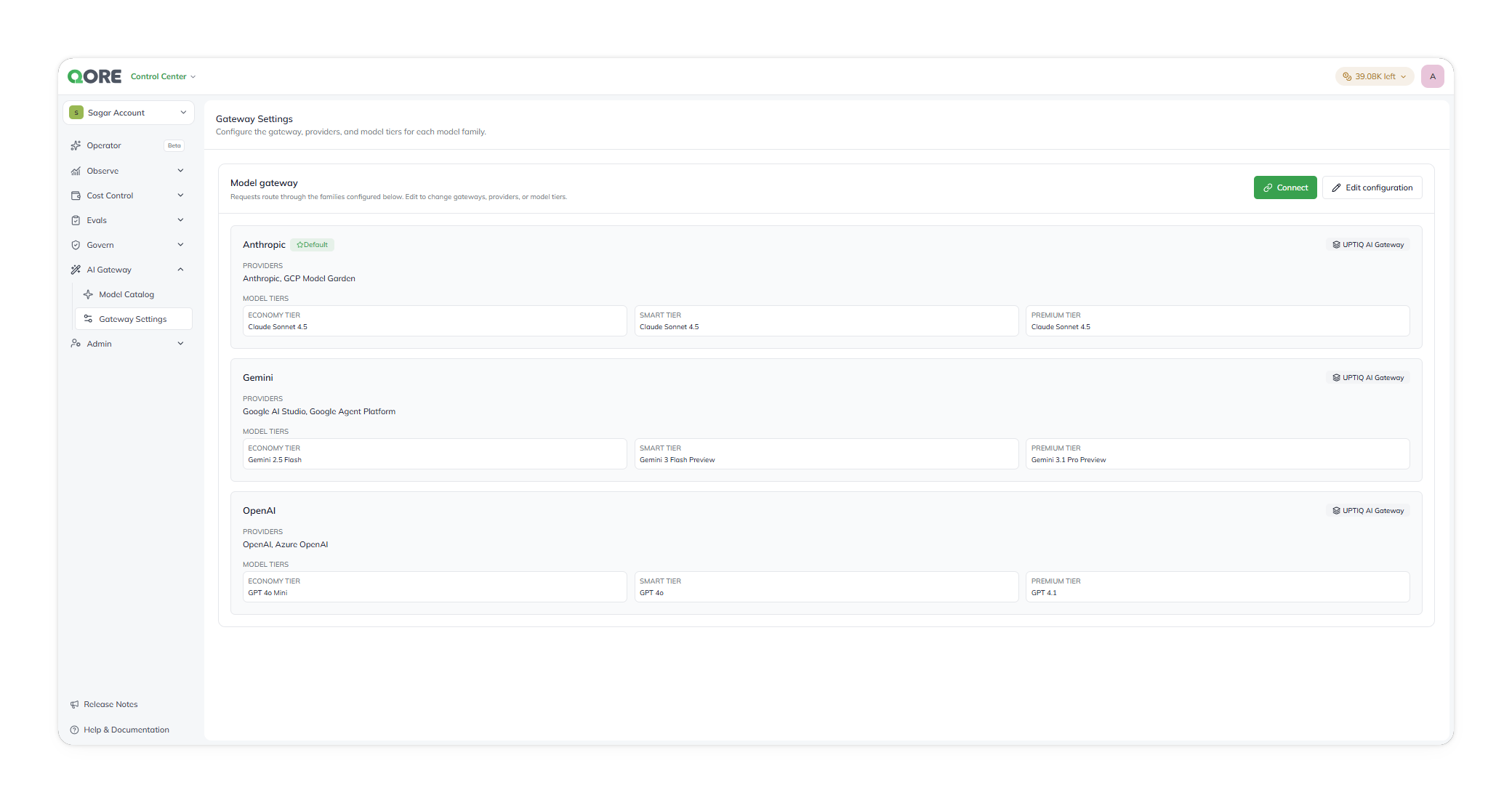
Open **AI Gateway** › **Gateway Settings**. The **Model gateway** summary is read-only: a card for each family with its default status, gateway, providers, and tier models. Select **Edit configuration** to change it, or **Connect** to call the gateway from your code.
The Model gateway summary.
### Enable a model family
{% stepper %}
{% step %}
#### Start configuration
On the summary, select **Edit configuration**.
{% endstep %}
{% step %}
#### Enable the family
Under **Enable model families**, turn on **Anthropic**, **Gemini**, or **OpenAI**.
{% endstep %}
{% step %}
#### Configure it
Select the family, choose its gateway and provider keys, and assign its tier models. See the next two tasks.
{% endstep %}
{% step %}
#### Save the family
Select **Save** for that family, such as **Save Gemini**, before you select another family. Then select **Back to summary** to check it.
{% endstep %}
{% endstepper %}
{% hint style="warning" %}
Save applies to one family. Changing families before saving discards pending changes. There's no **Save all**.
{% endhint %}
### Change the default family
In **Edit configuration**, select **Set as default** for the family, then save that family. Exactly one enabled family is the default; setting a new one removes the previous one. The default serves any request that doesn't name a family.
### Choose the gateway and provider keys
In **Edit configuration**, select the family, then:
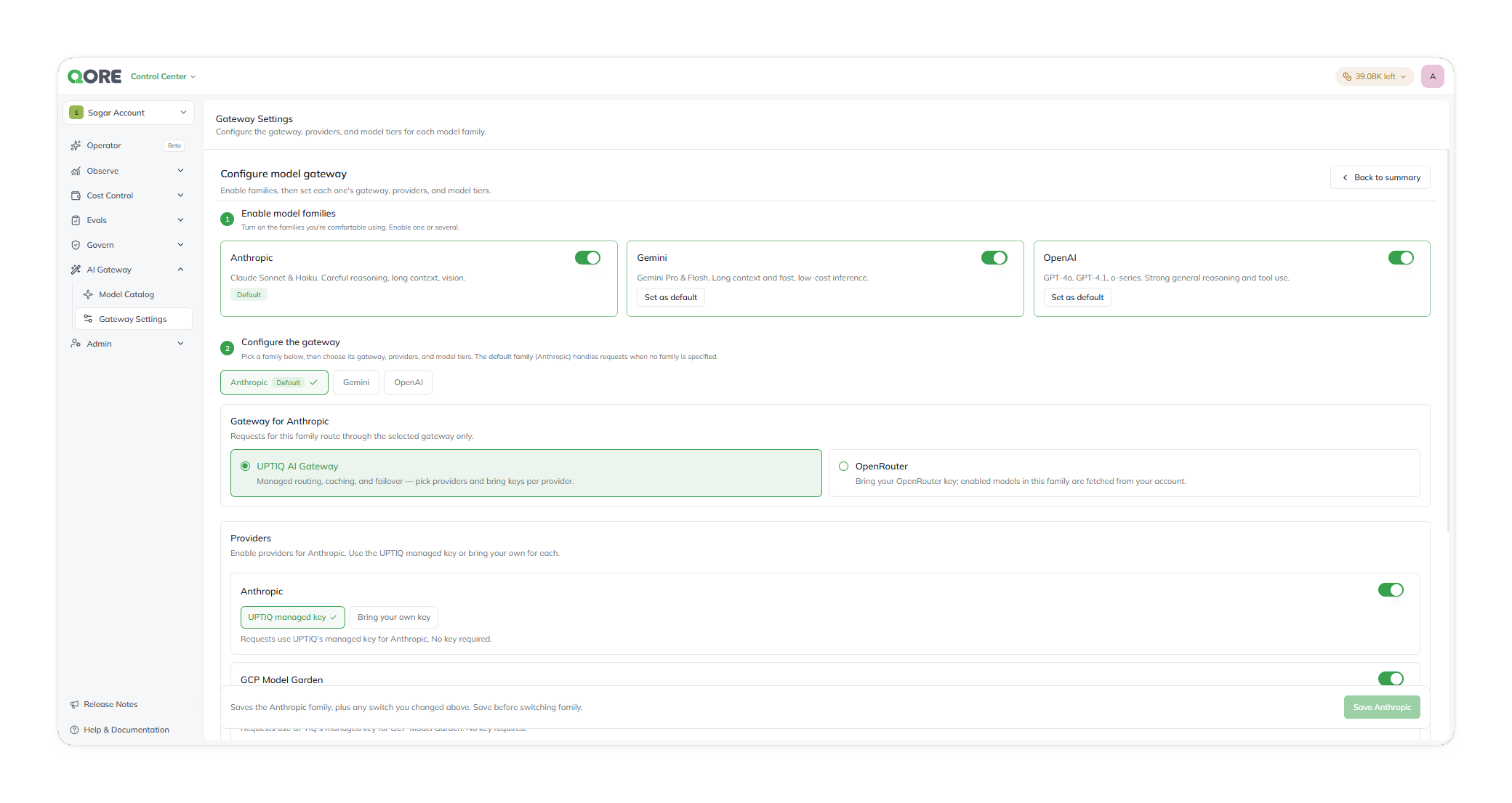
* **Gateway** — **UPTIQ AI Gateway** (the default: managed routing, retries, caching, failover, and observability) or **OpenRouter** (your organization's own OpenRouter key; enter it, then fetch the models enabled on that account).
* **Provider authentication** — for each provider, **UPTIQ managed key** (usage draws on your credit balance) or **Bring your own key** (the provider bills you directly).
| Family | Providers |
| --------- | --------------------------------------- |
| Anthropic | Anthropic direct; GCP Model Garden |
| Gemini | Google AI Studio; Google Agent Platform |
| OpenAI | OpenAI direct; Azure OpenAI |
Keys you bring are held in the deployment's cloud secret manager and are write-only. To rotate one, enter the new key against the same provider.
Configure model gateway.
{% hint style="warning" %}
OpenRouter chooses the upstream provider itself, so you don't control which one serves a request or where it runs.
{% endhint %}
### Change the model behind a tier
{% stepper %}
{% step %}
#### Confirm the model is available
Open **AI Gateway** › **Model Catalog** and confirm the model is `Enabled` on at least one provider. A tier using a `Not configured` provider fails at request time.
{% endstep %}
{% step %}
#### Assign it
In **Gateway Settings** › **Edit configuration**, select the family and assign the model to **Economy**, **Smart**, or **Premium**.
{% endstep %}
{% step %}
#### Save and verify
Save the family, then select **Back to summary** and confirm the tier's model.
{% endstep %}
{% endstepper %}
Every agent that requests the tier picks up the change; no agent is edited. The product doesn't warn when several tiers use the same model. Reference: [Gateway Settings](/control-center/ai-gateway/gateway-settings.md).
### Check whether a model is available
Open **AI Gateway** › **Model Catalog**. Select a family to see its models, each with its context window and a status per provider: `Enabled` (authentication configured) or `Not configured`. Model Catalog is read-only.
* Search with **Search models, families, providers…**; the search is kept in the URL as `?search=`.
* Filter by family and by status (**All statuses**, **Enabled**, **Not configured**), and select **Refresh**.
Model Catalog labels the Gemini family **Google**; it's the same family. Reference: [Model Catalog](/control-center/ai-gateway/model-catalog.md).
Model Catalog.
### Call the AI Gateway from my own code
{% stepper %}
{% step %}
#### Open Connect to AI Gateway
On the **Gateway Settings** summary, select **Connect**. Only **Account Admin** and **Org Admin** can create and revoke gateway API keys.
{% endstep %}
{% step %}
#### Create a key
Under **Gateway API keys**, select **Add Key**. You can revoke a key at any time.
{% endstep %}
{% step %}
#### Send a request
Copy the example from the dialog; it contains your deployment's address. Send the key in the `x-platform-key` header, and set `tier` (`economy`, `smart`, or `premium`) or `model`. The body is OpenAI-compatible.
{% endstep %}
{% endstepper %}
A `response_format` asking for JSON is a preference, not a guarantee; validate the reply. Reference: [Gateway Settings › Connect to AI Gateway](/control-center/ai-gateway/gateway-settings.md#connect-to-ai-gateway).
***
## :link: Related pages
* [Govern](/control-center/govern.md), [Agent Controls](/control-center/govern/agent-controls.md), [Connectors](/control-center/govern/connectors.md), and [Governed Graph](/control-center/govern/governed-graph.md)
* [AI Gateway](/control-center/ai-gateway.md), [How model routing works](/control-center/ai-gateway/how-model-routing-works.md), [Gateway Settings](/control-center/ai-gateway/gateway-settings.md), and [Model Catalog](/control-center/ai-gateway/model-catalog.md)
***
{% columns %}
{% column width="83.33333333333334%" %}
Maintained by Abhishek Paul AI-assisted, human-approved
{% endcolumn %}
{% endcolumns %}
---
# Agent Instructions
This documentation is published with GitBook. GitBook is the documentation platform designed so that both humans and AI agents can read, navigate, and reason over technical content effectively. Learn more at gitbook.com.
## Querying This Documentation
If you need additional information that is not directly available in this page, you can query the documentation dynamically by asking a question.
Perform an HTTP GET request on the current page URL with the `ask` query parameter, and the optional `goal` query parameter:
```
GET https://docs.uptiq.ai/task-guides/govern-agents-and-models.md?ask=&goal=
```
`ask` is the immediate question: it should be specific, self-contained, and written in natural language.
`goal` is optional and describes the broader end goal you are ultimately trying to accomplish on behalf of the user. GitBook uses it to tailor the answer towards what is most useful for that goal.
The response will contain a direct answer to the question and relevant excerpts and sources from the documentation.
Use this mechanism when the answer is not explicitly present in the current page, you need clarification or additional context, or you want to retrieve related documentation sections.