> For the complete documentation index, see [llms.txt](https://docs.uptiq.ai/llms.txt). Markdown versions of documentation pages are available by appending `.md` to page URLs; this page is available as [Markdown](https://docs.uptiq.ai/control-center/cost-control/usage-limits.md).
# Usage Limits
Set credit spending caps and receive threshold alerts.
Set hard caps for credit consumption and alerts for administrators. Open **Billing → Usage Limits**.
{% hint style="info" %}
**Credit limits exist at three levels**, and the strictest applicable one wins: an organization-wide cap, the per-account limits and alerts this page configures, and a per-agent credit guardrail set in Agent Builder. Every account also starts with a default weekly hard limit, until you replace it with your own.
{% endhint %}
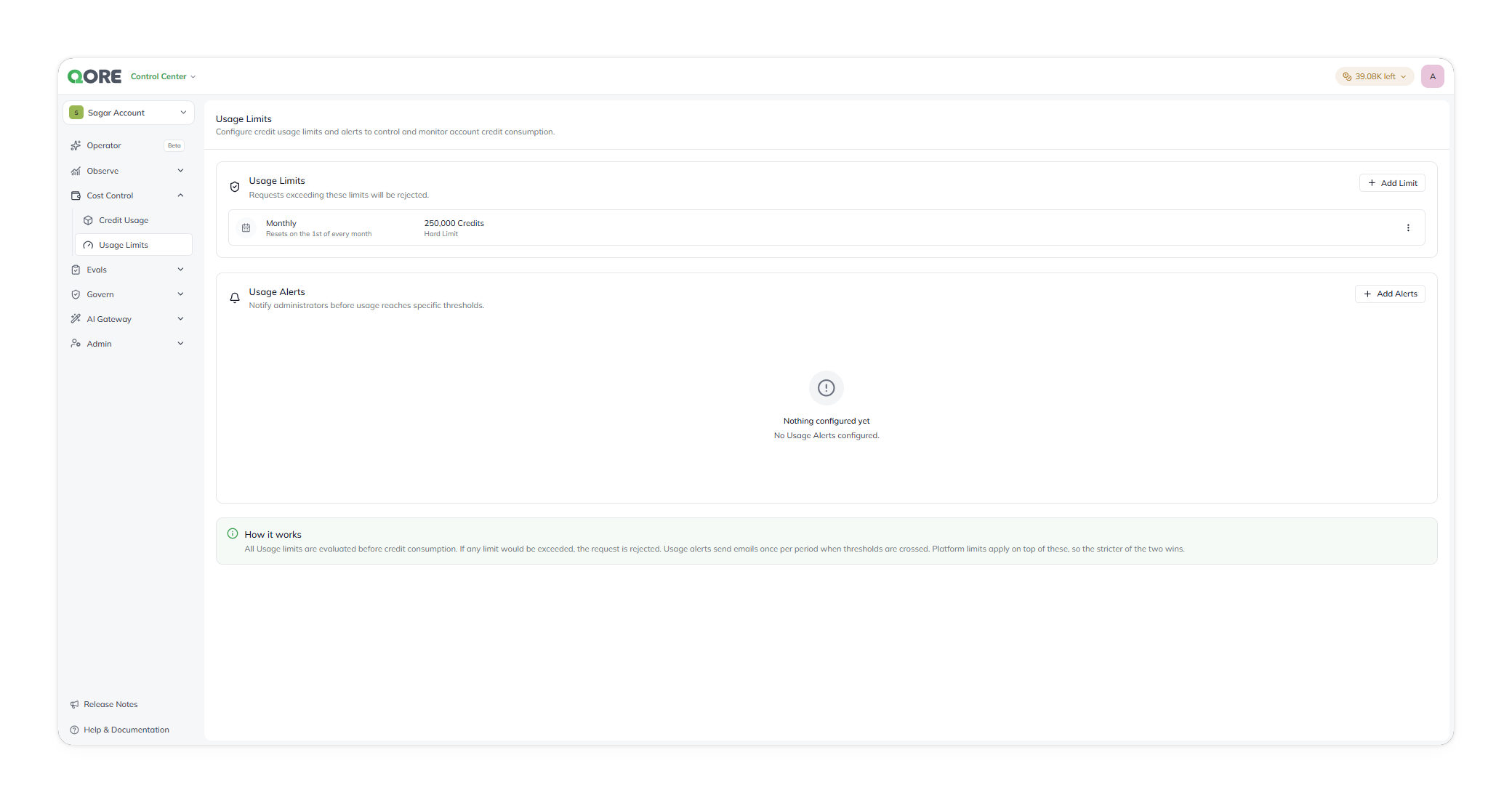
Usage Limits, with configured limits and alerts.
### Create usage limits
Usage limits are hard caps. Requests that would exceed a limit are rejected.
Each limit shows its period, cap, and type. For example, a **Monthly** limit of `80,000 Credits` can be a **Hard Limit**. It resets on the first day of each month.
Select **+ Add Limit** to create a limit. Use a row's menu to edit or remove it.
### Add an alert
Usage alerts email every **Account Admin** role holder on the account once per period after usage crosses a threshold — not every administrator on the platform. Select **+ Add Alerts** to create one.
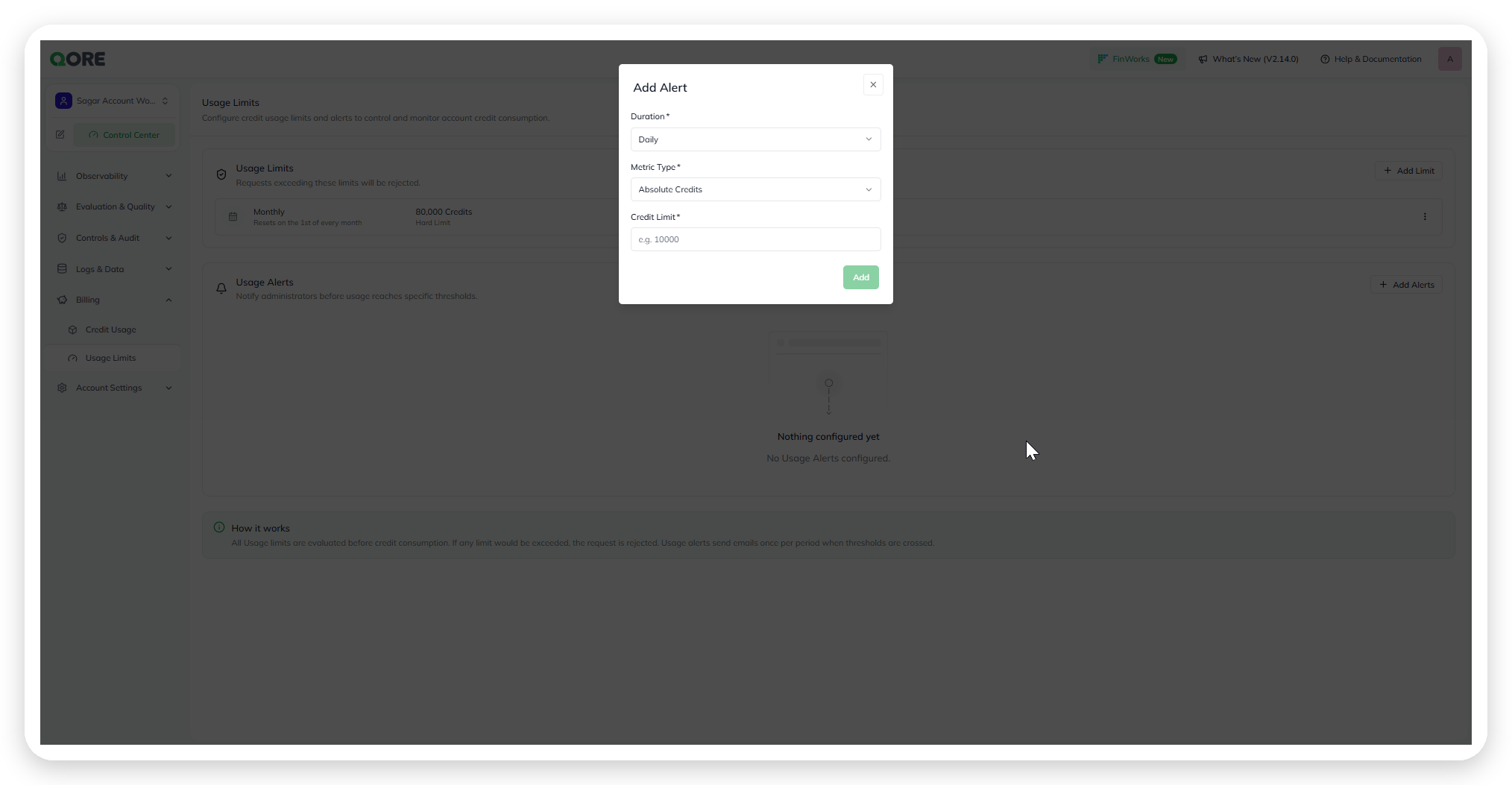
**+ Add Alerts** opens the **Add Alert** dialog:
* **Duration**—required. The alert period, such as **Daily**
* **Metric Type**—required. **Absolute Credits** uses a credit count. **Percentage of Limit** uses a share of a configured limit
* **Credit Limit** or threshold—required. Enter a credit count for **Absolute Credits**. Enter a percentage for **Percentage of Limit**
The Add Alert dialog.
Choose **Absolute Credits** or **Percentage of Limit** as the alert metric.
{% hint style="info" %}
**How it works:** The platform evaluates every usage limit before consumption. If a request exceeds any limit, the platform rejects it.
{% endhint %}
### Related
Review consumption and credit history in [Credit Usage](/control-center/cost-control/credit-usage.md).
{% content-ref url="/pages/807cab861e090edd0ce825909db3db1b28f73799" %}
[Control Center](/start-here/control-center.md)
{% endcontent-ref %}
---
# Agent Instructions
This documentation is published with GitBook. GitBook is the documentation platform designed so that both humans and AI agents can read, navigate, and reason over technical content effectively. Learn more at gitbook.com.
## Querying This Documentation
If you need additional information that is not directly available in this page, you can query the documentation dynamically by asking a question.
Perform an HTTP GET request on the current page URL with the `ask` query parameter, and the optional `goal` query parameter:
```
GET https://docs.uptiq.ai/control-center/cost-control/usage-limits.md?ask=&goal=
```
`ask` is the immediate question: it should be specific, self-contained, and written in natural language.
`goal` is optional and describes the broader end goal you are ultimately trying to accomplish on behalf of the user. GitBook uses it to tailor the answer towards what is most useful for that goal.
The response will contain a direct answer to the question and relevant excerpts and sources from the documentation.
Use this mechanism when the answer is not explicitly present in the current page, you need clarification or additional context, or you want to retrieve related documentation sections.