> For the complete documentation index, see [llms.txt](https://docs.uptiq.ai/llms.txt). Markdown versions of documentation pages are available by appending `.md` to page URLs; this page is available as [Markdown](https://docs.uptiq.ai/control-center/admin/api-keys.md).
# API Keys
API keys provide programmatic access to the platform. Open **Admin → API Keys**.
{% hint style="info" %}
**This page covers one of three key types.** The account-wide platform key you create here (sent as `x-platform-key`) is not accepted by agent runtime routes. To call a specific agent, use the **agent key** (`x-api-key` plus its secret) or the **widget key** (`x-widget-key` plus a whitelisted domain), both issued from that agent's own Deploy tab — see [Integrate Agent](/console/agent-builder/deploy/agent-integration.md). Older projects may still carry a legacy project key, which continues to work. None of the four key types expire or support rotation today. To stop a platform key from being used, [revoke it](#manage-a-key).
{% endhint %}
Search by name or key ID. Each key shows how many permissions it carries, for example *1 permission*, and an **Actions** menu. Select **+ Create API Key** to issue a key.
### Create an API key
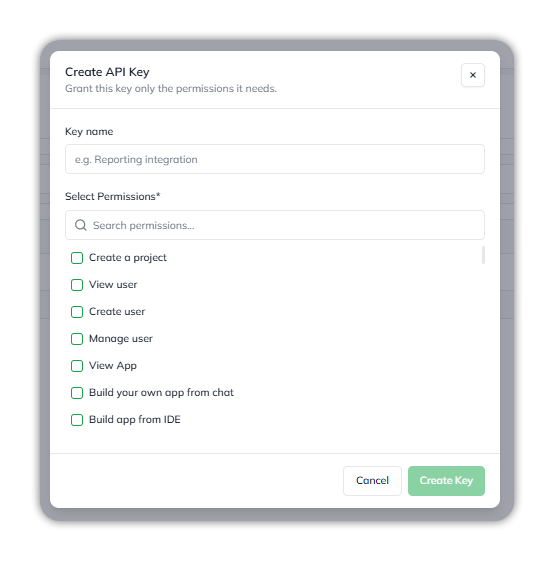
**+ Create API Key** opens a dialog that asks you to grant the key only the permissions it needs.
* **Key name** — a label, such as *Reporting integration*.
* **Select Permissions** — required. Search the list and check each permission the key needs.
Name the key and check the permissions it needs.
The permissions are the account's capabilities: the same set that [roles](/control-center/admin/roles.md) carry, such as *Create a project*, *View user*, and *Manage user*. For what each capability covers and which roles hold it, see [Capabilities by role](/control-center/admin/roles.md#capabilities-by-role).
Select **Create Key** to issue the key. The button stays unavailable until you enter a name and select a permission.
### Copy the key
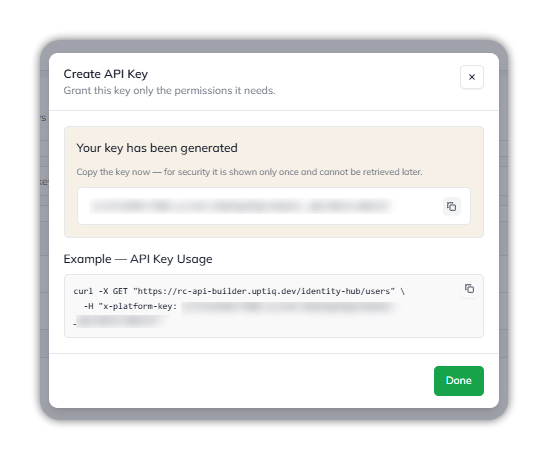
When the key is created, the dialog shows **Your key has been generated**. Copy the key now: for security, it's shown only once and can't be retrieved later. Select the copy icon beside the key.
Below it, **Example — API Key Usage** shows a sample `curl` request that sends the key in the `x-platform-key` header. Select **Done** to close the dialog.
The new key, shown once, with a sample request.
{% hint style="warning" %}
API keys can carry account-management permissions. Grant only required permissions. Store the key value securely.
{% endhint %}
### Manage a key
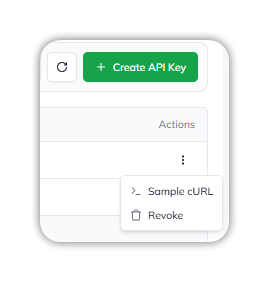
Each key's **Actions** menu has two options:
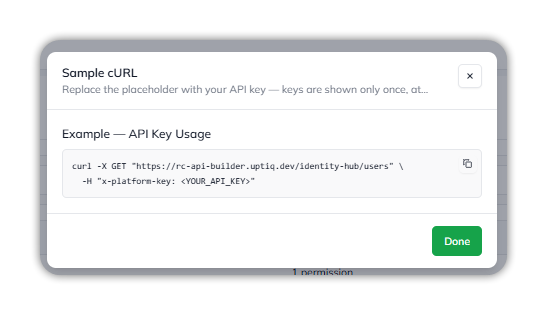
* **Sample cURL** — show a sample `curl` request for the key, with a `` placeholder in the `x-platform-key` header. Replace the placeholder with the key you copied when you created it.
* **Revoke** — revoke the key.
Each key's Actions menu.
The sample request, with a placeholder where your key goes.
---
# Agent Instructions
This documentation is published with GitBook. GitBook is the documentation platform designed so that both humans and AI agents can read, navigate, and reason over technical content effectively. Learn more at gitbook.com.
## Querying This Documentation
If you need additional information that is not directly available in this page, you can query the documentation dynamically by asking a question.
Perform an HTTP GET request on the current page URL with the `ask` query parameter, and the optional `goal` query parameter:
```
GET https://docs.uptiq.ai/control-center/admin/api-keys.md?ask=&goal=
```
`ask` is the immediate question: it should be specific, self-contained, and written in natural language.
`goal` is optional and describes the broader end goal you are ultimately trying to accomplish on behalf of the user. GitBook uses it to tailor the answer towards what is most useful for that goal.
The response will contain a direct answer to the question and relevant excerpts and sources from the documentation.
Use this mechanism when the answer is not explicitly present in the current page, you need clarification or additional context, or you want to retrieve related documentation sections.