> For the complete documentation index, see [llms.txt](https://docs.uptiq.ai/llms.txt). Markdown versions of documentation pages are available by appending `.md` to page URLs; this page is available as [Markdown](https://docs.uptiq.ai/console/agent-builder/deploy/guardrails/pii-masking.md).
# PII masking
PII masking protects sensitive data before it reaches a model. The guardrail detects selected entity types and replaces their values with opaque tokens.
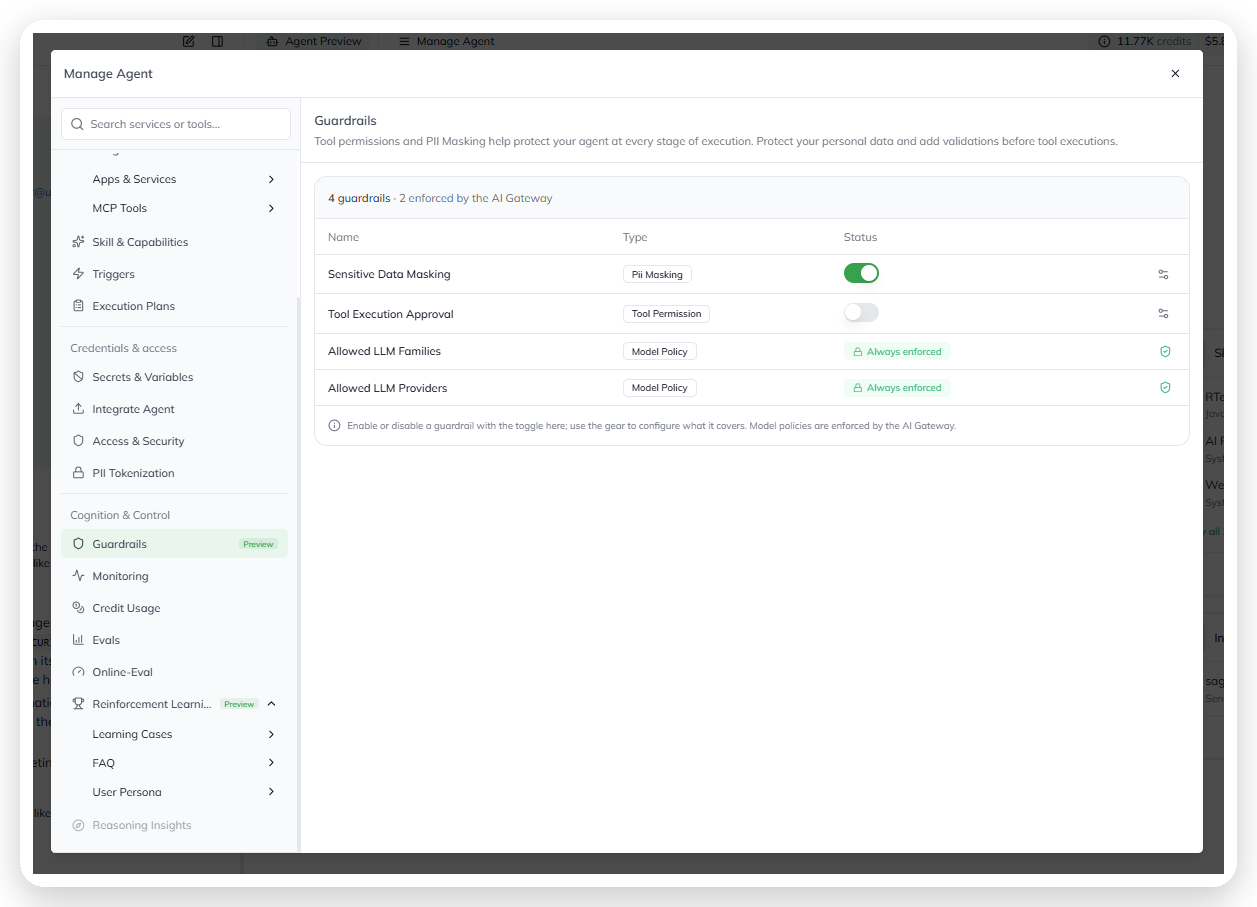
To configure it, open **Manage Agent → Guardrails**. Turn on **Sensitive Data Masking**, then select the **gear** in that row.
Turning on Sensitive Data Masking.
{% hint style="warning" %}
When this guardrail is off, content reaches the model unmasked. Enable it whenever the agent handles PII.
{% endhint %}
## Choose a masking provider
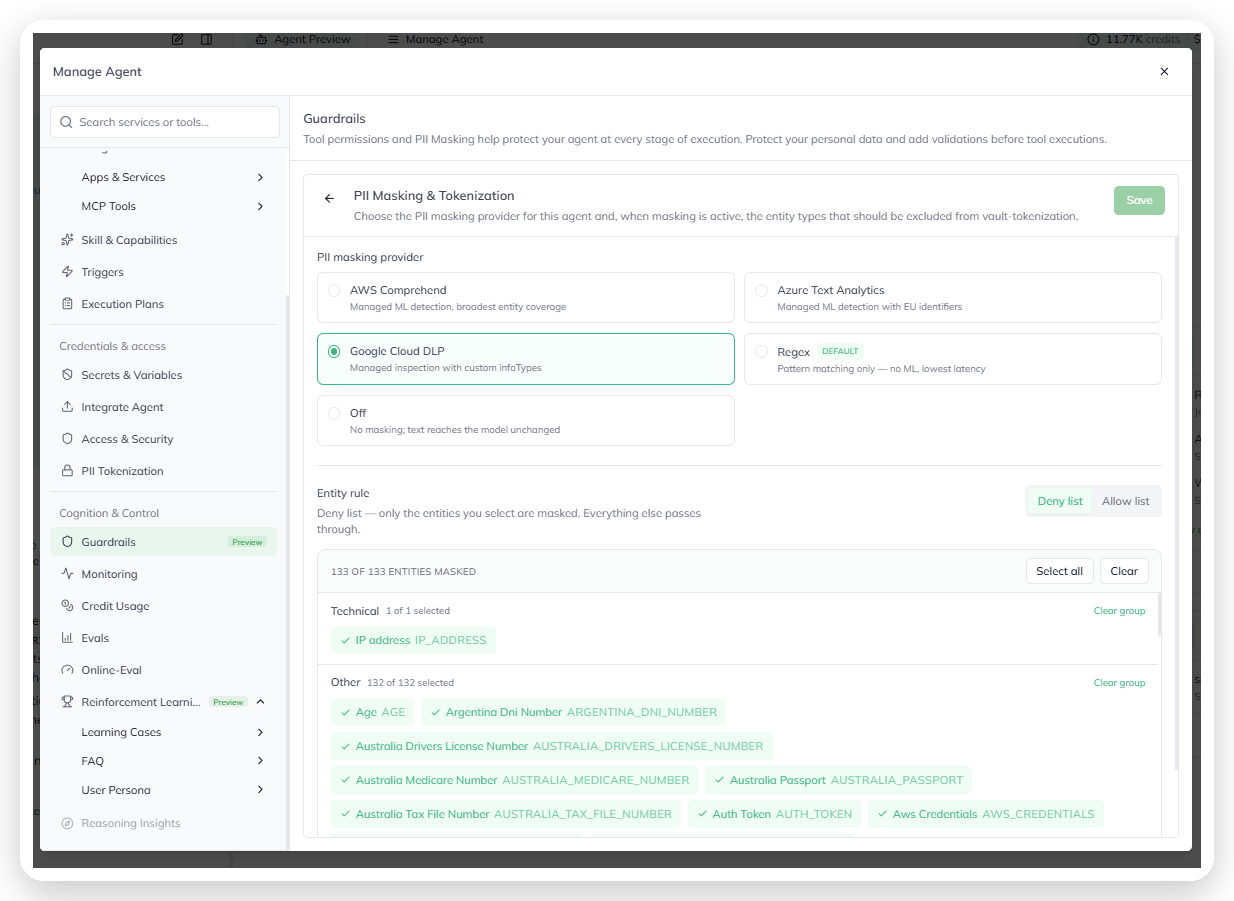
A provider detects PII in agent content. Choose one based on its coverage, accuracy, and latency.
| Provider | What it does | Use it when |
| ------------------------ | ----------------------------------------------- | ------------------------------------------------------------------------- |
| **AWS Comprehend** | Managed ML detection with broad entity coverage | You need the widest catalog and can use a managed ML service |
| **Azure Text Analytics** | Managed ML detection with EU identifiers | You need EU-specific identifiers |
| **Google Cloud DLP** | Managed inspection with custom infoTypes | You need a large catalog or custom infoTypes |
| **Regex** | Pattern matching without ML | You need low latency for structured values, such as SSNs and card numbers |
| **Off** | Does not mask content | No PII flows through the agent |
Choosing a masking provider.
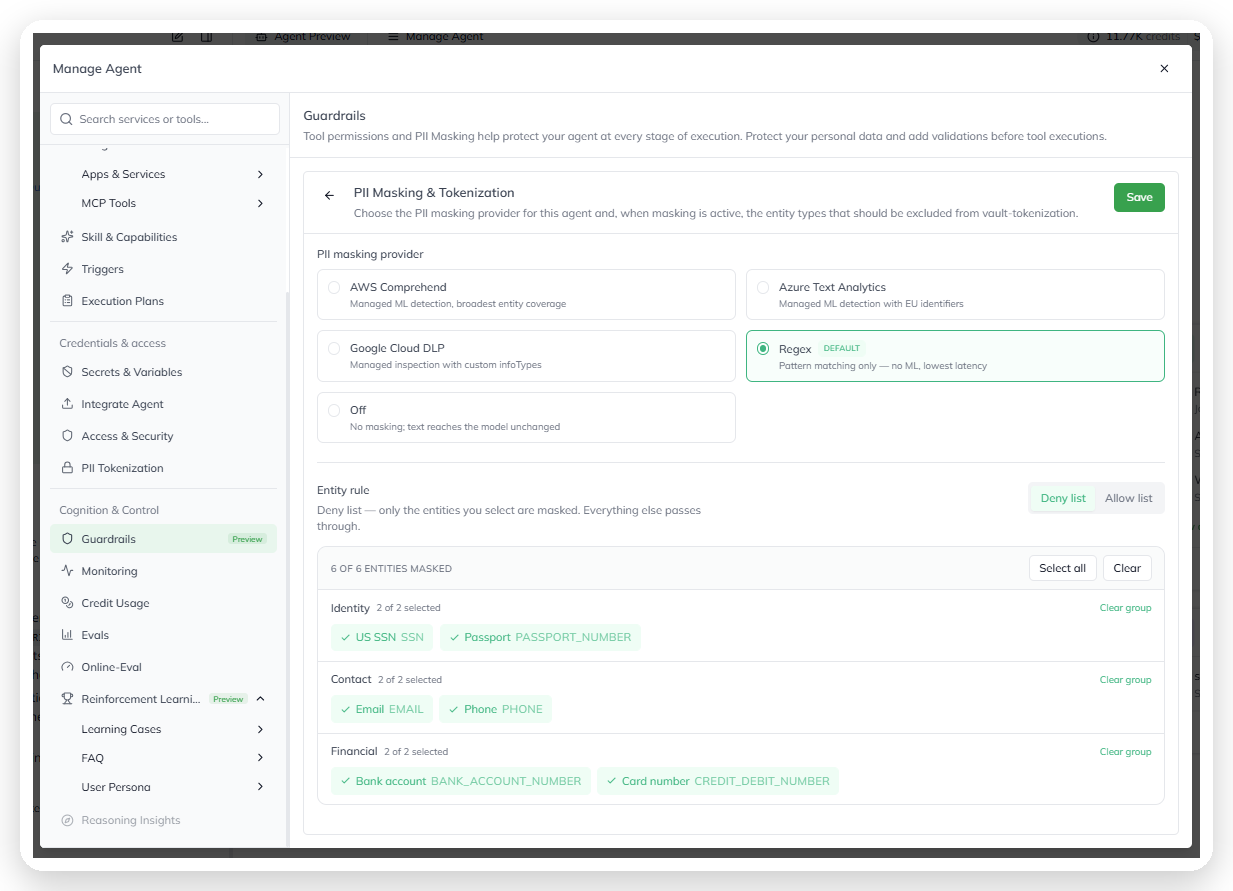
The selected provider controls the available entity types. **Regex** exposes six types. **Google Cloud DLP** exposes 133 types. Managed-provider coverage reflects your tenant configuration.
## Set the entity rule
Use **Entity rule** to choose which detected entities are masked.
* **Deny list** masks only selected entity types. Add each type that needs protection.
* **Allow list** passes selected entity types through unchanged. It masks every other detected type.
Use **Select all** or **Clear** to update every entity. Use **Clear group** to reset one group. The page shows how many entity types are masked.
Setting the entity rule and selecting entity types.
### Entity groups
Entity groups vary by provider. Use **Search** to find a specific type.
{% tabs %}
{% tab title="Regex (6 entities)" %}
* **Identity**: US SSN (`SSN`) and Passport (`PASSPORT_NUMBER`)
* **Contact**: Email (`EMAIL`) and Phone (`PHONE`)
* **Financial**: Bank account (`BANK_ACCOUNT_NUMBER`) and Card number (`CREDIT_DEBIT_NUMBER`)
{% endtab %}
{% tab title="Google Cloud DLP (133 entities)" %}
Examples include:
* **Technical**: IP address (`IP_ADDRESS`)
* **Other**: Age (`AGE`) and Auth Token (`AUTH_TOKEN`)
* **Country-specific identifiers**: Argentina DNI, Australia Medicare, and Australia Tax File Number
{% endtab %}
{% endtabs %}
Select **Save** to apply provider or entity-selection changes.
## Understand tokenization
PII masking uses tokenization. The platform replaces a detected value with an opaque token before a model receives the content. The mapping is stored in a secure vault. A permitted downstream step can restore the original value when needed.
Selected entities are tokenized. Unselected entities bypass tokenization and reach the model unchanged. Tokenize all detected entities unless a clear requirement needs the original value.
Exclude an entity type only when:
* A downstream system requires the original value.
* A secure downstream step de-tokenizes the response.
* Detection for that type obscures required context.
{% hint style="info" %}
Tokenization requires a compatible executor version. When the agent uses an unsupported version, the entity list is read-only. Update the executor version in **Runtime & Versioning**.
{% endhint %}
## Review your configuration
Review the entity list when the agent’s responsibilities change. Every excluded type reaches the model in clear text.
For the parent-level overview, see [Guardrails](/console/agent-builder/deploy/guardrails.md).
---
# Agent Instructions
This documentation is published with GitBook. GitBook is the documentation platform designed so that both humans and AI agents can read, navigate, and reason over technical content effectively. Learn more at gitbook.com.
## Querying This Documentation
If you need additional information that is not directly available in this page, you can query the documentation dynamically by asking a question.
Perform an HTTP GET request on the current page URL with the `ask` query parameter, and the optional `goal` query parameter:
```
GET https://docs.uptiq.ai/console/agent-builder/deploy/guardrails/pii-masking.md?ask=&goal=
```
`ask` is the immediate question: it should be specific, self-contained, and written in natural language.
`goal` is optional and describes the broader end goal you are ultimately trying to accomplish on behalf of the user. GitBook uses it to tailor the answer towards what is most useful for that goal.
The response will contain a direct answer to the question and relevant excerpts and sources from the documentation.
Use this mechanism when the answer is not explicitly present in the current page, you need clarification or additional context, or you want to retrieve related documentation sections.