> For the complete documentation index, see [llms.txt](https://docs.uptiq.ai/llms.txt). Markdown versions of documentation pages are available by appending `.md` to page URLs; this page is available as [Markdown](https://docs.uptiq.ai/ai-workbench-qore/control-center/govern/governed-graph.md).
# Governed Graph
Load an institution's knowledge graph from a graph package, see where every fact came from, and let agents query it.
**Governed Graph** holds one knowledge graph per institution: its products, pricing, features, channels, policies, disclosures, document requirements, rules and thresholds, and the regulatory packs behind them. You load it from a **graph package**, a JSON file that follows a graph template. Each fact in the graph keeps its source, owner, confidence and effective date, so you can trace where a value came from. Once uploaded, a graph becomes **knowledge** in the account, so you attach it to agents the same way as any other knowledge, and they query it for structured answers.
Governed graphs are **account-scoped**: a graph you upload is created for the whole account, and every project in it can read it.
To open it, go to **Control Center → Govern → Governed Graph**.
{% hint style="warning" %}
**Sign-off is a preview.** The **Sign-off Queue (Preview)** tab shows how attestation will work, but attestations made there aren't saved yet. Every node stays **default-unconfirmed**, and agents read every node whether or not it has been signed off. See [Use the graph in agents](#use-the-graph-in-agents).
{% endhint %}
### Who can do what
| Action | Roles |
| ----------------------------------------- | --------------------------------------------------------------- |
| View governed graphs | Approver, Governance Manager, Auditor, Account Admin, Org Admin |
| Upload, rename and manage governed graphs | Governance Manager, Account Admin, Org Admin |
| Attach a governed graph to an agent | Developer, Account Admin, Org Admin |
See [Roles](/ai-workbench-qore/control-center/admin/roles.md) for the full capability matrix.
### Upload a graph
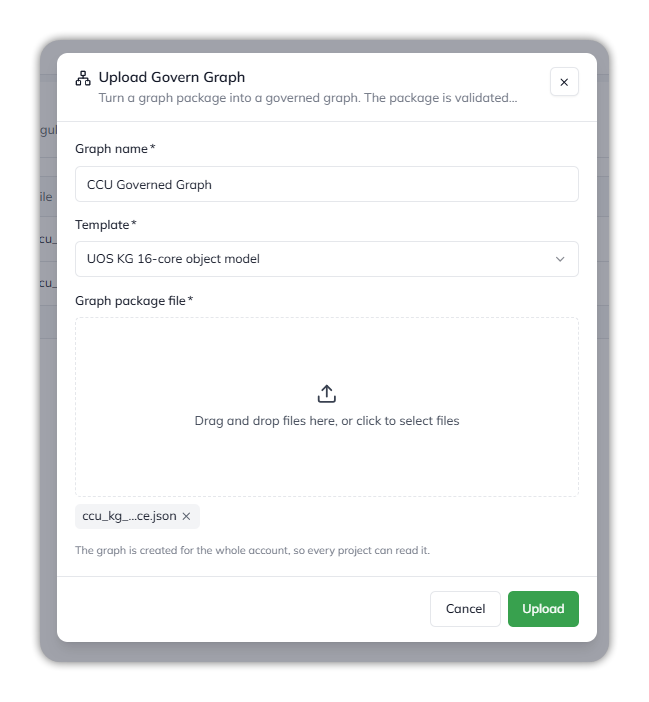
Uploading a graph package.
1. Select **Upload Govern Graph**.
2. Enter a **Graph name**, for example `CCU Governed Graph`.
3. Choose the **Template** the package follows, for example **UOS KG 16-core object model**.
4. Add the **Graph package file**: one `.json` file, up to 80 MB.
5. Select **Upload**.
The package is checked against the template, then written into the graph. While it builds, the row shows **Processing** and the current stage: *Queued*, *Validating the package*, *Writing nodes*, then *Writing relationships*. It ends as **Completed** or **Failed**. Hover over a **Failed** badge for the reason.
#### What the template decides
The template is the contract for the package. It decides what's accepted, what's skipped and what's stored.
| In the package | What happens |
| ------------------------------------------------------------------ | ------------------------------------------------------------------------------------------------------------------------------------------------------------------------------------ |
| A node category the template doesn't allow | The upload fails. |
| A relationship type the template doesn't allow | The upload fails. |
| A node with no `id` | The upload fails. |
| An edge whose `from` or `to` isn't a node in the package | The edge is skipped. With the **UOS KG 16-core object model** template, this includes every edge from a regulatory obligation ID, because obligations appear only as edge endpoints. |
| A field the template ignores | Not stored. The **UOS KG 16-core object model** template ignores `seeded_by`, which repeats the `seeds` edges. |
| An empty value (`null` or an empty list) | Not stored. |
| Field names | Stored in camelCase: `effective_from` becomes `effectiveFrom`. |
| Relationship types | Stored in upper snake case: `governed_by` becomes `GOVERNED_BY`. |
| Package details (`package`, `version`, `fi`, `coverage` and so on) | Kept as the graph's envelope and shown on **Overview**. |
{% hint style="info" %}
**Expect fewer relationships than the package lists.** A package built with regulatory seeding can have far more edges than the graph keeps. For example, a credit union package with 445 nodes and 781 edges produced a graph with all 445 nodes and 166 relationships: the 614 `seeds` edges from obligation IDs, and one cross-graph edge, pointed at nodes outside the package.
{% endhint %}
{% hint style="warning" %}
**The graph keeps where a fact was read from, but not which regulatory obligation requires it.** These are two different links:
* **Source** (kept): each node's source document. It's the **Source** link on the **Provenance** tab, and it opens the original page or PDF.
* **Obligation** (not kept): the regulatory obligations that seeded the node. With the **UOS KG 16-core object model** template, a package records these only as `seeds` edges and in `seeded_by`, and neither is stored.
For example, the Truth in Savings disclosure node `DISC:tis_account` keeps its **Source** link to the institution's account disclosure PDF, but loses its links to the ten Reg DD obligations (`DEP-OBL-707-01` to `-10`) that require it. No screen shows the loss; only the package itself does. What survives is the envelope's summary (the packs seeded and the node counts), shown on **Overview** under **Regulatory coverage**. The template has no node type for obligations, so adding them to the package as nodes makes the upload fail instead.
{% endhint %}
### Manage graphs
The list shows each graph's name, its package file, when it was created, and its status. The `⋮` menu on a row has:
* **View**: opens the uploaded package.
* **Download**: downloads the package file.
* **Edit**: renames the graph.
Select a completed graph to open it.
### Inside a graph
A graph opens on five tabs.
{% tabs %}
{% tab title="Overview" %}
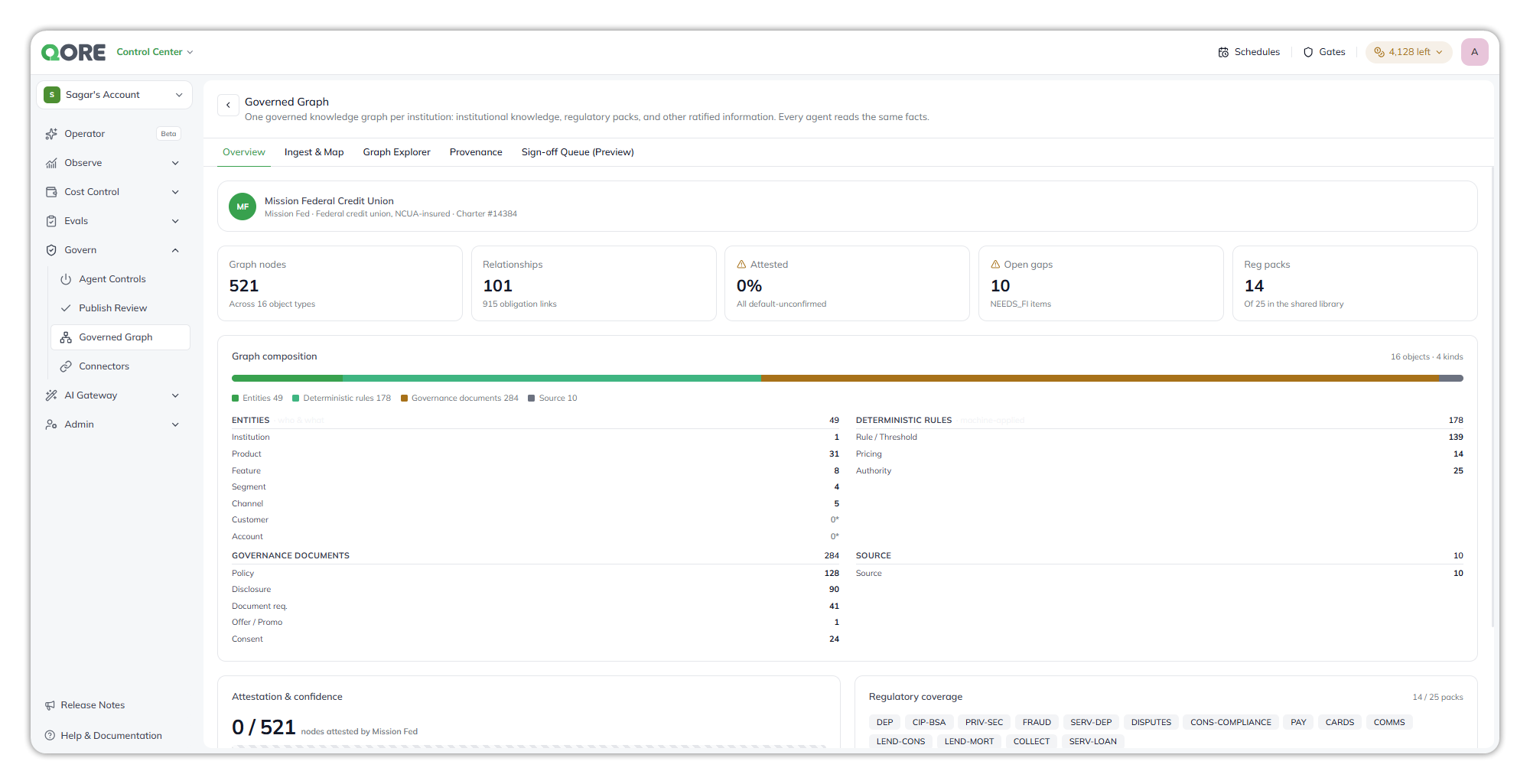
Overview.
* **Institution profile**: the institution's name, type and charter.
* **Headline counts**: graph nodes, relationships, the share attested, open gaps (items the institution still has to supply), and the regulatory packs loaded.
* **Graph composition**: the nodes grouped into entities, deterministic rules, governance documents and sources, with a count per object type. **Customer** and **Account** are empty by design: member data is never collected into the graph; it's resolved at run time from the core systems.
* **Attestation & confidence**: how many nodes the institution has attested, and the spread of source confidence.
* **Regulatory coverage**: which regulatory packs are loaded, out of the shared library.
{% endtab %}
{% tab title="Ingest & Map" %}
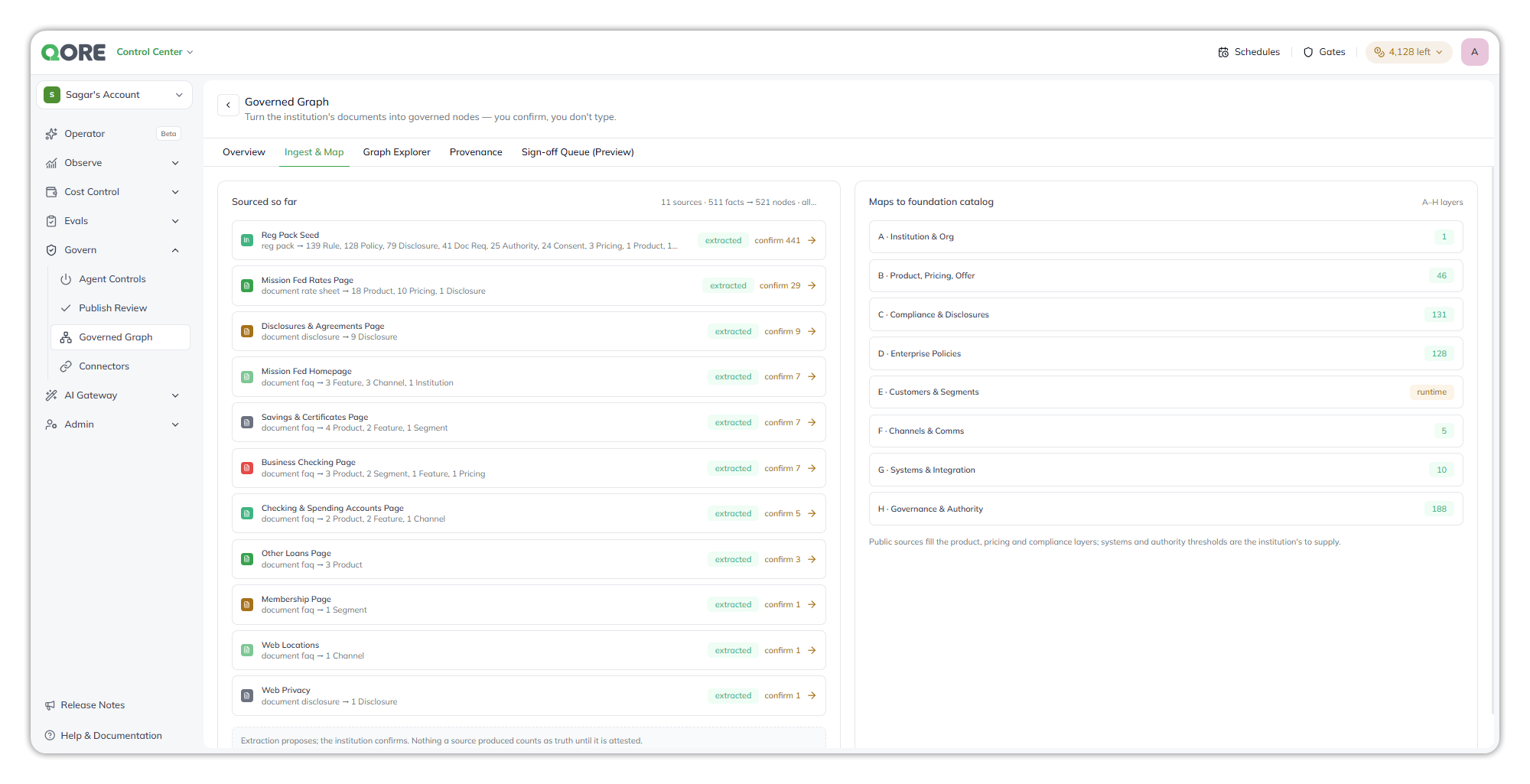
Ingest & Map.
* **Sourced so far**: each source, such as a regulatory pack seed or a web page, with the nodes it produced by type and how many are waiting to be confirmed.
* **Maps to foundation catalog**: how the nodes fill the catalog layers, from *A · Institution & Org* to *H · Governance & Authority*. Public sources fill the product, pricing and compliance layers; systems and authority thresholds are for the institution to supply.
Extraction proposes; the institution confirms. Nothing a source produced counts as fact until it's attested.
{% endtab %}
{% tab title="Graph Explorer" %}
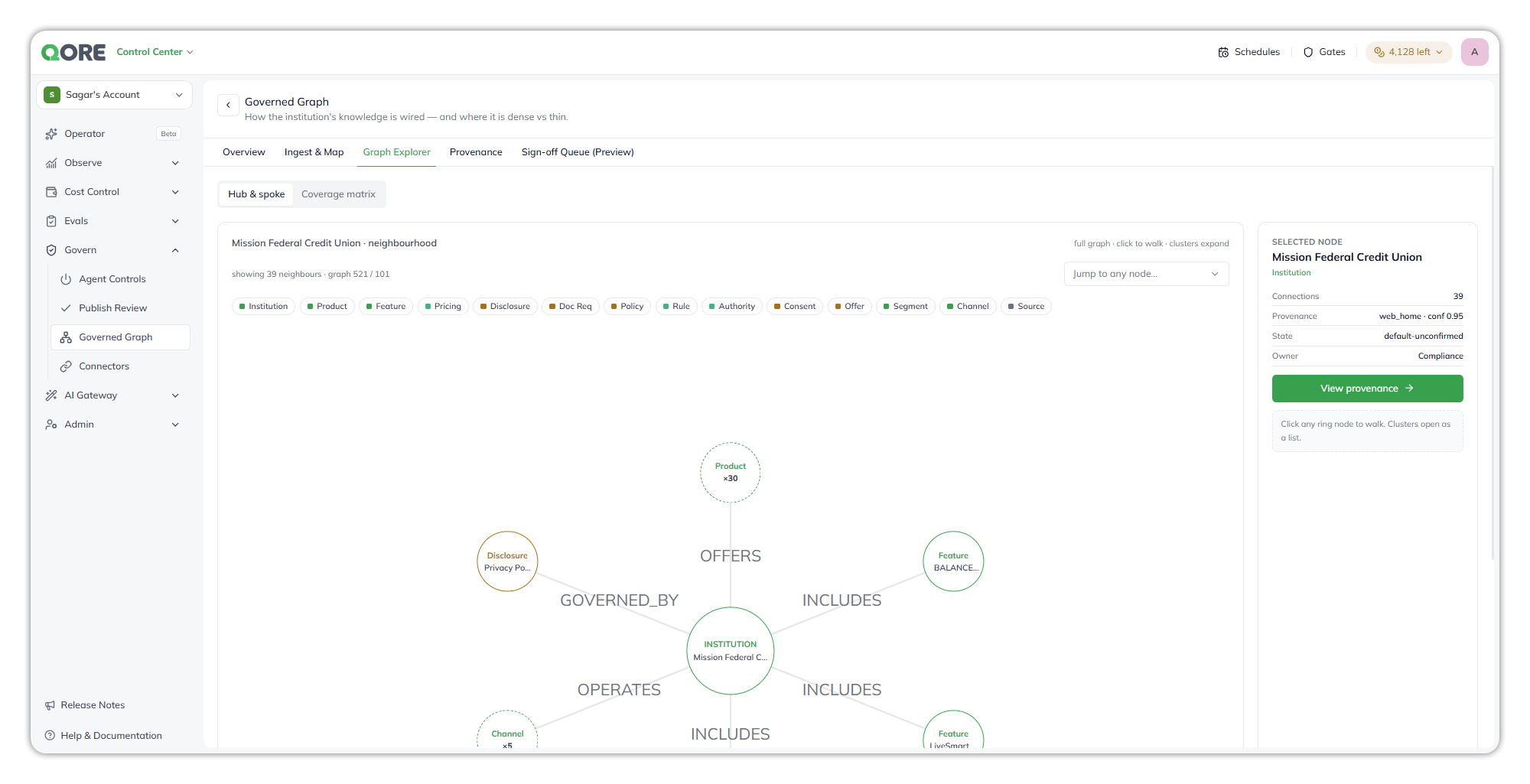
Graph Explorer, Hub & spoke view.
* **Hub & spoke** shows one node and its neighbours, labelled by relationship. Select any node to walk to it. More than four neighbours of one type roll up into a cluster, which opens as a list. Use **Jump to any node** to go straight to one, and the type chips to filter.
* The **selected node** panel shows its type, number of connections, provenance, state and owner. **View provenance** opens its trace.
* **Coverage matrix** shows which object types are present: *ready for sign-off*, *needs institution input*, or *not present*.
{% endtab %}
{% tab title="Provenance" %}
Provenance.
The trace follows one fact from end to end. Select a step for an explanation.
1. **Source**: the document it was read from, with a link to the original.
2. **Extracted field**: the value pulled from that document, and the field it came from.
3. **Graph node**: the node type and version it was stored as, and the confidence with which it was placed.
4. **Status**: whether it has been signed off.
Below the trace are the fact's **owner**, **effective from** date, the **as-of** graph version, and its **PII classification**. Effective time (when the value took effect) and as-of time (which graph version an agent read) are tracked separately, so you can always answer "which rate did the agent quote, and was it current?"
The **source register** lists every source with its type, the nodes it produced, its confidence and when it last synced.
{% endtab %}
{% tab title="Sign-off Queue (Preview)" %}
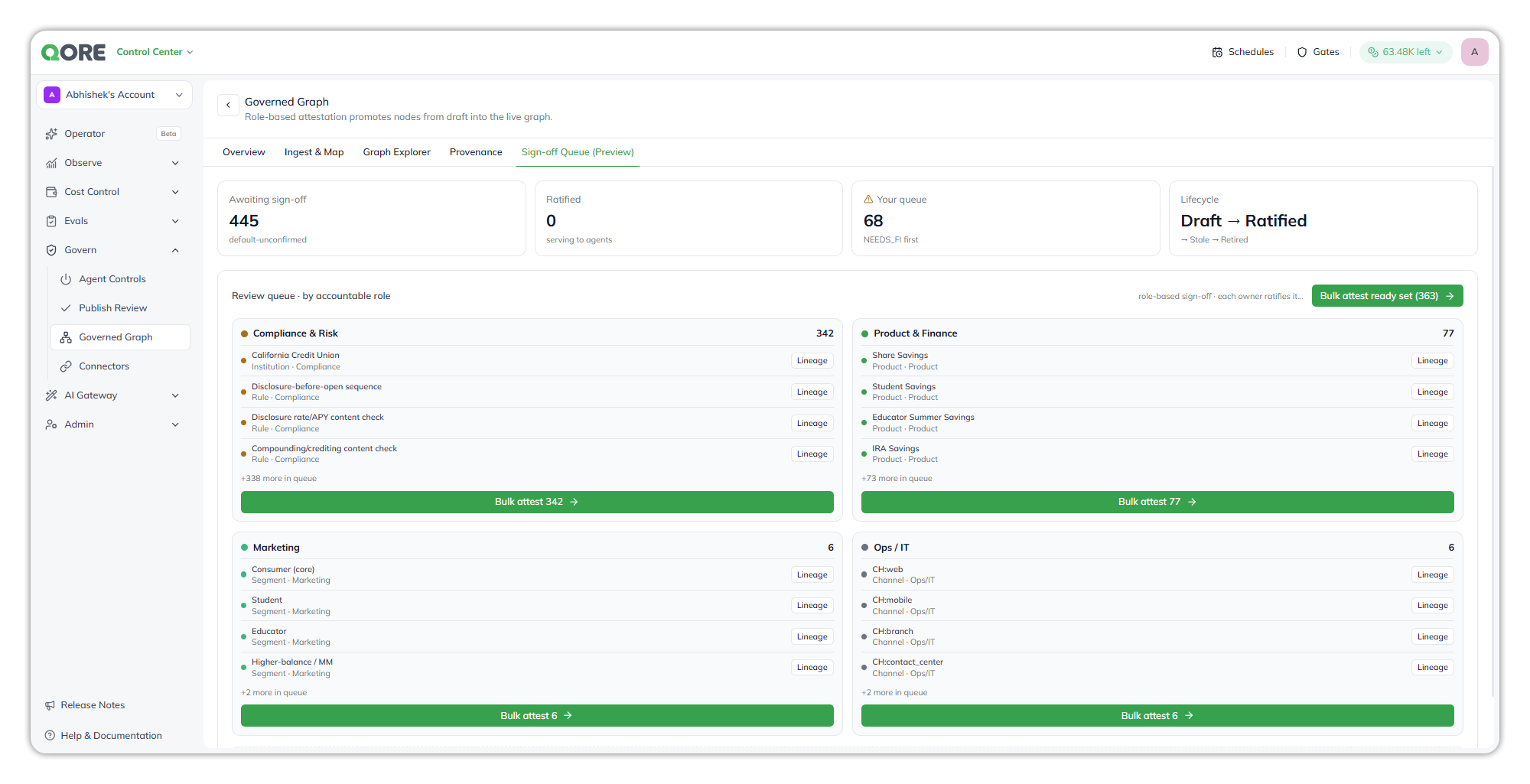
Sign-off Queue (Preview).
Sign-off is how a node moves from *Draft* to *Ratified* (and later to *Stale* and *Retired*). The queue groups nodes by the accountable role that owns them, such as Compliance & Risk, Product & Finance, Marketing, and Ops / IT, with **Lineage** for each node and **Bulk attest** per role.
{% hint style="warning" %}
This tab is a preview. **Bulk attest** updates the screen only and isn't saved: reload and every node is unconfirmed again.
{% endhint %}
{% endtab %}
{% endtabs %}
### Use the graph in agents
A graph that has finished uploading becomes **knowledge** in the account.
* **In Agent Builder**, select **+ Add Knowledge** on the canvas, tick the graph in **Use Existing Knowledge**, and select **Add**. See [Attaching a governed graph](/ai-workbench-qore/console/agent-builder/build/attaching-knowledge-to-an-agent.md#attaching-a-governed-graph).
* **From the Console Operator**, the Operator reaches it through the Knowledge Builder agent it calls.
You can't create or attach a graph by attaching the package JSON in the Agent Builder chat. Upload it here first.
When a governed graph is attached to an agent, the agent queries it with the **Knowledge Graph Search** skill. The skill answers structured and relational questions, such as which documents a product requires or which policy governs a disclosure. It turns the question into a read-only graph query and returns up to 25 rows.
{% hint style="warning" %}
**Agents read unconfirmed nodes.** Until sign-off is saved, nothing in the graph is attested, and Knowledge Graph Search doesn't filter by sign-off state. Review what an agent quotes from the graph before you rely on it with customers.
{% endhint %}
### Troubleshooting
#### The upload failed
Hover over the **Failed** badge for the reason, then fix the package and upload it again.
| Reason shown | What to fix |
| ---------------------------------------------------------------------------- | ------------------------------------------------------------------------------------------------------------------------------------------------------------------------------------------------------------------------------------------------------------------------------------------------------------------------------------------- |
| Graph package is missing a `nodes` object | Put the nodes in a top-level `nodes` object, keyed by category: `{ "nodes": { "Product": [ … ] } }`. |
| Graph package is missing an `edges` array | Add a top-level `edges` array, even an empty one. |
| The graph package holds node categories the template does not allow | Rename or remove the categories the template doesn't list, or choose the template the package was built for. The **UOS KG 16-core object model** allows Institution, Product, Feature, Segment, Channel, Pricing, Disclosure, Source, Customer, Account, Policy, RuleThreshold, OfferPromotion, Consent, DocumentRequirement and Authority. |
| The graph package uses relationship types the template does not allow | Change each edge's `rel` to one the template lists, or remove the edge. |
| A node in the graph package is missing its id | Give every node an `id`. |
| A nested field in the graph package uses a name the graph structure reserves | Rename the nested field. Names such as `governance` or `nested` are reserved. |
| The build failed without recording a reason | Upload again. If it fails the same way, contact your Uptiq administrator with the graph name and time. |
| Connection environment variables are not set | The graph store isn't configured for your environment. Contact your Uptiq administrator; the package isn't at fault. |
You can't select a file that isn't `.json` or is larger than 80 MB.
#### Common questions
| Symptom | Cause | What to do |
| ----------------------------------------------------------------- | --------------------------------------------------------------------------------------------------------------------------------------------------- | ------------------------------------------------------------------------------------------------------------------------------------------------------------------------------------------------ |
| The graph has far fewer relationships than the package | Edges whose `from` or `to` isn't a node in the package are skipped. | Expected for obligation `seeds` edges. For other edges, check that both endpoints are nodes in the same package. See [What the template decides](#what-the-template-decides). |
| A field from the package is missing on a node | The template ignores it (such as `seeded_by`), or its value was `null` or an empty list. | Give it a value if it matters. Ignored fields aren't stored under any value. |
| Field or relationship names look different | Fields are stored in camelCase and relationship types in upper snake case. | Nothing to fix: `effective_from` is `effectiveFrom`, and `governed_by` is `GOVERNED_BY`. |
| Customer and Account show 0 | Member data is never collected into the graph, by design. | Nothing to fix. |
| Attestations disappeared after a reload | **Sign-off Queue** is a preview and doesn't save attestations yet. | None for now. |
| **Upload Govern Graph** isn't available, or the upload is refused | Uploading needs the **Manage govern graphs** capability: Governance Manager, Account Admin or Org Admin. Approver and Auditor can view graphs only. | Ask an administrator for one of those roles. See [Roles](/ai-workbench-qore/control-center/admin/roles.md). |
| The agent says it has no governance graph to query | No governed graph is attached to the agent. | Attach the graph to the agent as knowledge. See [Attaching Knowledge to an Agent](/ai-workbench-qore/console/agent-builder/build/attaching-knowledge-to-an-agent.md#attaching-a-governed-graph). |
| An agent's answer looks incomplete | Knowledge Graph Search returns at most 25 rows per query, and tells the agent when more matches exist. | Ask a narrower question, such as one product or one policy domain. |
### FAQ Does the graph keep the links between regulatory obligations and the rules they seeded?
No. With the **UOS KG 16-core object model** template, obligation IDs appear only as edge endpoints, so their `seeds` edges are skipped, and `seeded_by` is ignored. The graph keeps the rules, policies and disclosures themselves, each with its **Source** link to the document it was read from, plus the envelope's summary of which packs were seeded. It can't answer "which obligation requires this disclosure?" See the note under [What the template decides](#what-the-template-decides).
Why does my graph have fewer relationships than my package?
Any edge that points at something that isn't a node in the package is skipped rather than failing the upload. For a package built with regulatory seeding, that's mostly the obligation `seeds` edges: a credit union package with 781 edges kept 166.
Do agents only use facts that have been signed off?
No. Sign-off isn't saved yet, so every node is default-unconfirmed, and Knowledge Graph Search doesn't filter by sign-off state. Treat answers from the graph as unattested.
Who can see a graph I upload?
Everyone in the account with permission to view governed graphs. A graph belongs to the account, not to a project. See [Who can do what](#who-can-do-what).
Does the graph hold customer or member data?
No. **Customer** and **Account** are empty by design. Member data is resolved at run time from the core systems, never collected into the graph.
How do I update a graph?
Upload the revised package as a new graph. **Edit** changes only the graph's name.
Can I delete a graph?
Not from this page. The row menu has View, Download and Edit only.
Where does the graph show up outside this page?
As **knowledge**: a completed graph becomes knowledge in the account, which is how you attach it to agents. The datasets and data sources it creates behind the scenes are hidden from the datasets pages. Upload, rename and download the graph here, in **Control Center → Govern → Governed Graph**.
Can I attach the graph package JSON in the Agent Builder chat?
No. Attaching the JSON file in the Agent Builder chat doesn't create or attach a governed graph. Upload the package on this page, then attach the resulting knowledge to the agent.
### Why this matters
An agent that answers from documents can quote a rate without knowing which rate sheet it came from or whether that sheet was still current. A governed graph gives every fact a source, an owner, a confidence and an effective date, and keeps them attached to the answer. When someone asks "where did that number come from?", the Provenance tab answers it in one trace.
***
{% columns %}
{% column width="83.33333333333334%" %}
Maintained by Abhishek Paul AI-assisted, human-approved
{% endcolumn %}
{% endcolumns %}
---
# Agent Instructions
This documentation is published with GitBook. GitBook is the documentation platform designed so that both humans and AI agents can read, navigate, and reason over technical content effectively. Learn more at gitbook.com.
## Querying This Documentation
If you need additional information that is not directly available in this page, you can query the documentation by asking a question.
Perform an HTTP GET request on the following URL with the `ask` and `goal` query parameters:
```
GET https://docs.uptiq.ai/ai-workbench-qore/control-center/govern/governed-graph.md?ask=&goal=
```
`ask` is the immediate question: it should be specific, self-contained, and written in natural language.
`goal` is what the user is ultimately trying to achieve, the reason they need the answer. Sharing it helps GitBook give you a better, more relevant answer. A goal is most helpful when it describes the outcome the user wants rather than restating the question. For example, with `ask=how do I create an API token`, a goal like `automate deployments from our CI pipeline` lets GitBook tailor the answer to that use case.
The response will contain a direct answer to the question and relevant excerpts and sources from the documentation.
Use this mechanism when the answer is not explicitly present in the current page, you need clarification or additional context, or you want to retrieve related documentation sections.