> For the complete documentation index, see [llms.txt](https://docs.uptiq.ai/llms.txt). Markdown versions of documentation pages are available by appending `.md` to page URLs; this page is available as [Markdown](https://docs.uptiq.ai/ai-workbench-qore/control-center/evals/evaluators.md).
# Evaluators
Create scoring methods and configure confidence-based review routing.
An evaluator is a named scoring method backed by a judge model, defined **at the account level**. Open **Control Center → Evals → Evaluators** to view, edit, or create evaluators. Use **Agent enablement** to attach an account's evaluators to individual agents — an evaluator isn't created per agent or per project, so the same one can serve every agent that enables it.
At the top, the page summarizes your setup:
* **Evaluators**: how many exist, and how many are active
* **Judge models**: how many models are available to judge, and their providers (such as Anthropic, Google, and OpenAI)
* **Online eval agents**: agents scoring live traffic out of all agents, such as `9 / 71`
Use **Evaluators** to manage scoring methods. Use **Agent enablement** to enable evaluators for each agent.
Evaluators are the named scoring methods available to your agents.
### Evaluator fields
| Field | What it shows |
| ------------------------ | ----------------------------------------------------------------------------------------------------------------------------------------------- |
| **Evaluator** | The evaluator name and its **Active** status, with its method and the number of agents using it beneath. |
| **Framework** | The scoring approach: **Single judge** (one model) or **Jury** (several models, weighted vote), shown with its model count, such as *Jury (5)*. |
| **Judge model(s)** | The model or models that score, such as *Claude Haiku 4.5*. |
| **Confidence Threshold** | The confidence below which a score can route to Human Review, such as `95%`. |
| **Actions** | A menu for editing or removing the evaluator. |
### Create an evaluator
{% stepper %}
{% step %}
#### Open the creation dialog
Select **+ New evaluator**. You need the **Build Evals** capability; without it the button is disabled.
{% endstep %}
{% step %}
#### Configure the evaluator
Complete the following fields:
* **Evaluator name** — Required. Use a label such as *Answer relevancy*.
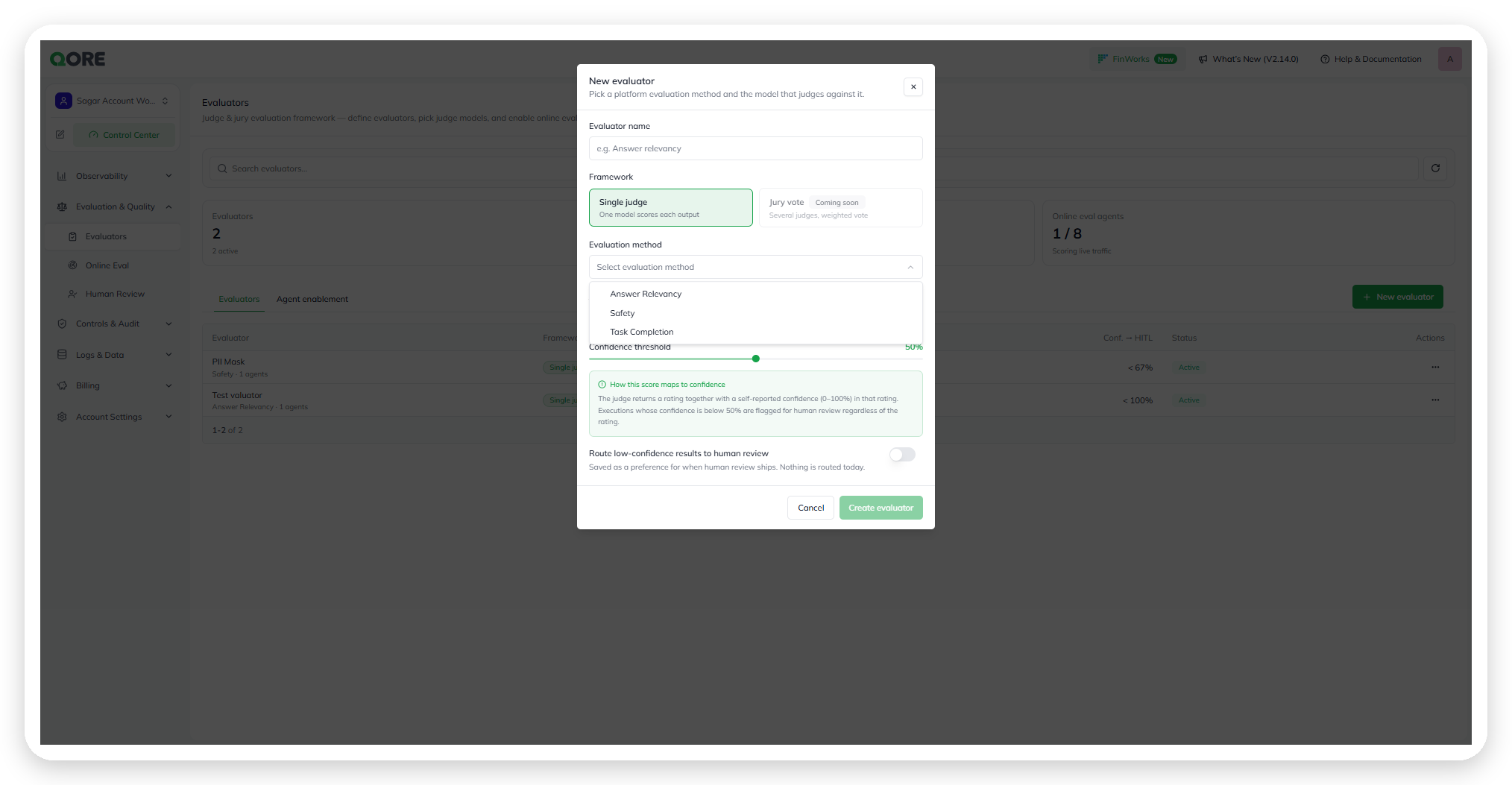
* **Framework** — **Single judge** scores each output with one model. **Jury** scores it with several judge models and takes a weighted vote. See [Choose a framework](#choose-a-framework) below.
* **Evaluation method** — Select **Answer Relevancy**, **Faithfulness**, **Safety**, or **Task Completion**. See [Faithfulness](#faithfulness) below.
Configure a new evaluator.
Select an evaluation method.
* **Judge model** (Single judge) or **Jury models** (Jury) — Required. Select one model, or **2 to 5** for a jury. A jury's models can come from different providers.
A jury takes 2 to 5 models.
* **Confidence threshold** — Defaults to `50%`. The judge (or jury) returns a rating and a confidence from 0–100%. Results below this threshold are flagged for human review, regardless of rating.
* **Route low-confidence results to human review** — Off by default. Turn it on to send below-threshold results to [Human Review](/ai-workbench-qore/control-center/evals/human-review.md). While it's off, low-confidence results are still scored but are auto-accepted.
{% endstep %}
{% step %}
#### Save the evaluator
Select **Create** to save the evaluator, or **Create & assign agents** to save it and go straight to choosing the agents it scores. Both buttons are enabled once you set a name, a method, and the judge model or jury models.
{% endstep %}
{% endstepper %}
### Faithfulness
**Faithfulness** rates how much of what the agent said is supported by the context it was given: the retrieved context for a turn, the results of the tools it called, and what the user said in the conversation. Nothing else counts as support.
The judge breaks each agent response into its individual factual claims. A claim is supported if the context states it or directly entails it, and unsupported if the context contradicts it or is silent on it. The score is the number of supported claims divided by the total number of factual claims, shown in Online Eval as a percentage.
* **It judges support, not usefulness or correctness.** A claim that is true but absent from the context is unsupported.
* **Some replies aren't counted either way.** Questions, clarifications, refusals, and statements about what the agent itself is doing carry no factual claim. If the agent correctly says it doesn't know something, that is supported.
* **A turn with no retrieved context and no tool results isn't scored as a failure on that basis alone.** The judge evaluates whatever the user supplied and reports a lower certainty.
### Choose a framework
| Framework | Judge models | Scoring | Best for |
| ---------------- | -------------- | --------------------------------------------------------------------------------------------------------------------------------- | --------------------------------------------------------------------------------------------------- |
| **Single judge** | One model | That model scores each output directly. | Fast, low-cost scoring where one capable model's judgment is enough. |
| **Jury** | Several models | Each judge model scores independently and reports its own confidence (0–100%). Qore combines the votes into one weighted verdict. | Higher-stakes evaluation methods, where no single model's judgment should decide the outcome alone. |
A Jury evaluator with five judge models and its own confidence threshold.
A Single judge evaluator, for comparison.
{% hint style="info" %}
A Jury evaluator's confidence threshold is independent of every other evaluator's. In the table above, **Jury Answer Relevancy** routes below `95%` while the **Single judge** evaluator **Test** on the same page routes below `100%`. Set each evaluator's threshold for its own judge model(s), not to match its neighbors.
{% endhint %}
## Agent enablement
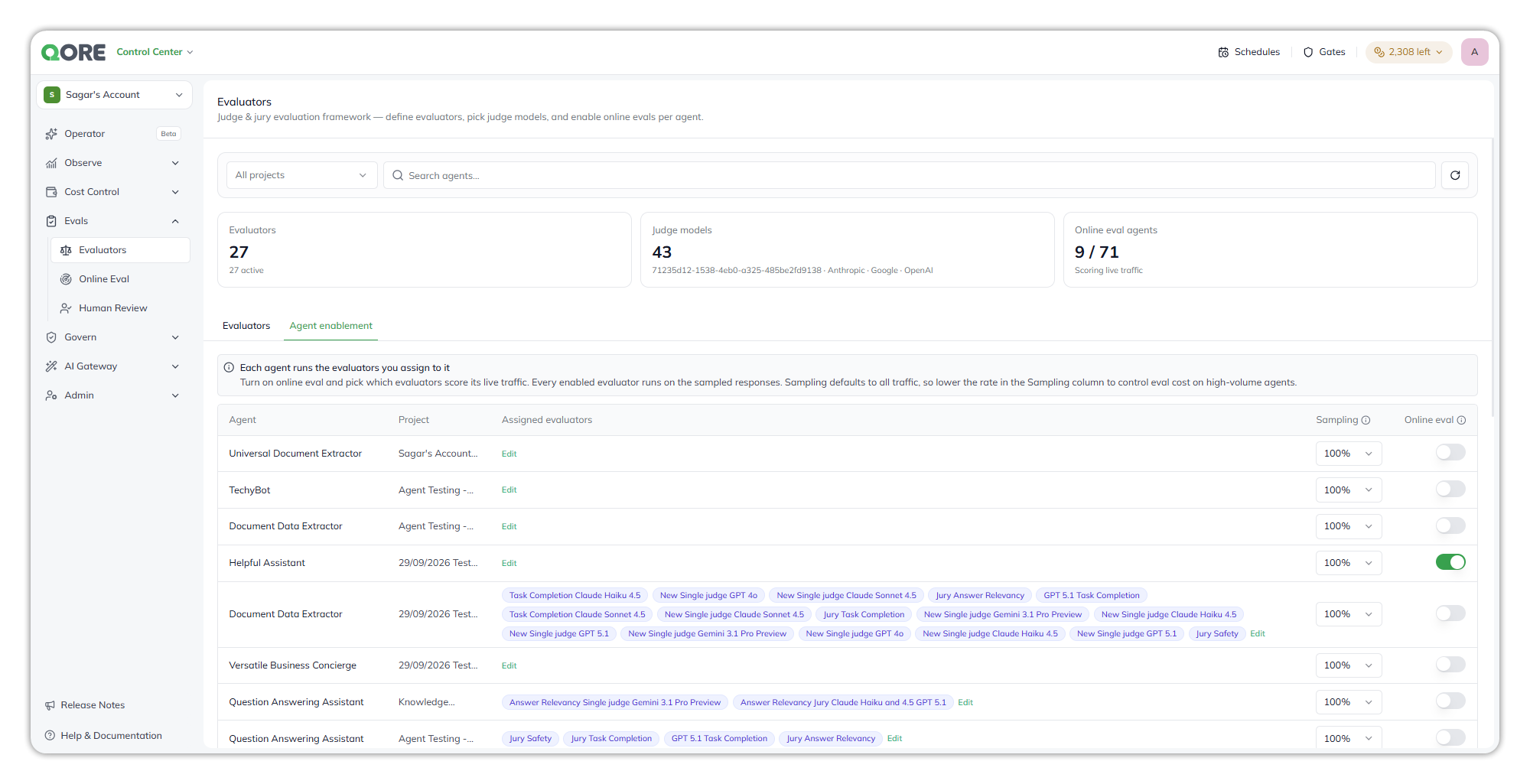
Use the **Agent enablement** tab to turn on Online Eval for an agent and choose which evaluators score its live traffic. Each agent runs only the evaluators you assign to it. Filter the list by project, or search for an agent.
Turn on Online Eval per agent and choose its evaluators.
Each row shows:
| Field | What it shows |
| ----------------------- | -------------------------------------------------------------------------------------------------------------------------------------------------------------------------------- |
| **Agent** | The agent this row configures. |
| **Project** | The project the agent belongs to. An agent with the same name in two projects has two rows. |
| **Assigned evaluators** | The evaluators assigned to this agent, as chips. Select **Edit** to change them. |
| **Sampling** | The chance that each live conversation is evaluated. Defaults to `100%`; lower it on high-traffic agents to keep judge costs down. |
| **Online eval** | The toggle that turns live-traffic scoring on or off for this agent. While it's on, every enabled evaluator assigned to the agent scores the sampled share of its conversations. |
### Assign evaluators to an agent
Select **Edit** in the agent's **Assigned evaluators** cell. The **Assign evaluators** dialog lists every evaluator in the account. Tick the ones that should score this agent, then select **Save**. The chips in the row update to match.
Pick the evaluators that score this agent.
Assigning evaluators doesn't start scoring on its own. Turn on the agent's **Online eval** toggle as well.
{% hint style="info" %}
An agent can show **Unsupported** instead of a sampling control and toggle. That agent's type doesn't support Online Eval yet — its **Edit** link still lets you pre-assign evaluators for when support ships.
{% endhint %}
***
{% columns %}
{% column width="83.33333333333334%" %}
Maintained by Abhishek Paul AI-assisted, human-approved
{% endcolumn %}
{% endcolumns %}
---
# Agent Instructions
This documentation is published with GitBook. GitBook is the documentation platform designed so that both humans and AI agents can read, navigate, and reason over technical content effectively. Learn more at gitbook.com.
## Querying This Documentation
If you need additional information that is not directly available in this page, you can query the documentation by asking a question.
Perform an HTTP GET request on the following URL with the `ask` and `goal` query parameters:
```
GET https://docs.uptiq.ai/ai-workbench-qore/control-center/evals/evaluators.md?ask=&goal=
```
`ask` is the immediate question: it should be specific, self-contained, and written in natural language.
`goal` is what the user is ultimately trying to achieve, the reason they need the answer. Sharing it helps GitBook give you a better, more relevant answer. A goal is most helpful when it describes the outcome the user wants rather than restating the question. For example, with `ask=how do I create an API token`, a goal like `automate deployments from our CI pipeline` lets GitBook tailor the answer to that use case.
The response will contain a direct answer to the question and relevant excerpts and sources from the documentation.
Use this mechanism when the answer is not explicitly present in the current page, you need clarification or additional context, or you want to retrieve related documentation sections.