> For the complete documentation index, see [llms.txt](https://docs.uptiq.ai/llms.txt). Markdown versions of documentation pages are available by appending `.md` to page URLs; this page is available as [Markdown](https://docs.uptiq.ai/ai-workbench-qore/console/app-builder/build.md).
# Build
Generate, customize, and connect production-ready apps from your requirements.
**Build** is where the App Builder converts your blueprint into a functional, production-ready React application, and where you shape how it looks and what it can reach.
**Build Mode is the default.** Every prompt you send initializes active code execution rather than strategic discussion — you do not need to turn it on. Switch to [Plan Mode](/ai-workbench-qore/console/app-builder/plan.md) from the header dropdown only when you want to align on logic before executing changes.
## Initialising the build
Transitioning from a concept to a functional React application depends on whether you are starting fresh or iterating on a saved project.
* **New Apps**: Enter your intent into the dashboard prompt bar and select **Build** to trigger immediate generative execution.
* **Existing Apps**: Locate the project in the **My Apps** section of your dashboard. Clicking the app restores the workspace for further iterative shaping.
A successfully initialized personal finance tracker showing the live functional prototype, transaction logging, and implemented visual analytics.
### What generation does
* **Prompt-Driven Development:** Describe what you need — for example, *"Build a loan calculator that adjusts interest rates based on credit score inputs."*
* **High-Velocity Infrastructure:** The engine writes the frontend React components, structures application state management, and implements persistent `localStorage` out of the box.
* **Real-Time Preview:** Production-ready code compiles into an interactive mockup side by side with your chat timeline. If something isn't right, send a follow-up prompt to tweak the layout or logic.
The default Build Mode executing text instructions into full-stack code instantly
{% hint style="info" %}
**Fix with AI** sends the reported issue to Qore's build agent. Review the rebuilt preview before you continue.
{% endhint %}
## Attach assets
Sometimes a text prompt isn't enough. Provide deep context by attaching business documentation or visual references directly into your workspace.
Utilizing the Attach Assets dropdown within the prompt bar to attach reference documentation or import standalone application packages.
Clicking the **Plus (+)** icon in the prompt bar reveals:
* **Attach File**: Upload custom data layers, spreadsheets, or wireframes to serve as an explicit structural guide for the layout.
* **Import App Package:** Upload whole legacy project files, to iterate on previously compiled builds without starting from zero.
What the builder does with them:
* **PRD Integration**: Upload your Product Requirements Document. The builder analyses your technical specs — such as lending compliance rules — and ensures the app's logic adheres to every requirement.
* **Visual Reference Mapping**: Attach a screenshot of a dashboard you admire. The builder uses it as a wireframe to map out where buttons, charts, and data tables live.
* **Natural Language Synergy:** Combine text with attachments — *"Use the logic in the attached PRD, but follow the layout of this screenshot."*
## Design-aware generation
In the financial sector, brand consistency isn't optional — it's trust. **Design-Aware Generation** ensures your new app looks like your internal design team built it from day one.
Clicking the **Color Palette (Branding)** icon in the prompt box opens **Design and Branding Preferences**: *Customize the visual style, branding and appearances of your app.* Choose a design from **Choose from project designs** or **Create new project design**, pick a **Visual Style** such as **Auto (Recommended)**, **Minimal**, or **Modern SaaS**, upload **Brand Logos** (**Full Logo**, **Small Logo**, **Favicon**), then select **Apply**. Changes here apply to this app only; the saved project design stays unchanged. In an existing app, the same settings are in [App Config › Brand Guidelines](/ai-workbench-qore/console/app-builder/build/app-config.md#brand-guidelines).
Design and Branding Preferences.
### Image mapping and asset uploads
Upload your core visual identity markers. The App Builder extracts and scales your design language across logos, favicons, and primary and secondary colours.
The 'Set Your Branding' workspace in Light Mode, featuring asset upload inputs, primary color configurations, and a live user interface preview canvas.
**Originality at scale:** Because the builder understands the generalized visual style rather than a static layout template, it generates original pages that remain on-brand through every structural expansion.
### Dual-theme optimization
The platform supports native theme switching directly inside the configuration panel.
* **Light Mode Framework**: Optimizes high-contrast visibility using light background fields (`#ffffff`) paired with soft neutral borders and inputs.
* **Dark Mode Architecture:** Restructures container logic to use dark, eye-strain-reducing panels (`#27272a`) while preserving your defined Primary Brand Color highlights.
Toggling the native Dark Theme configuration selector to preview the adaptive behaviors of branding colors on dark system layers.
### Advanced customization
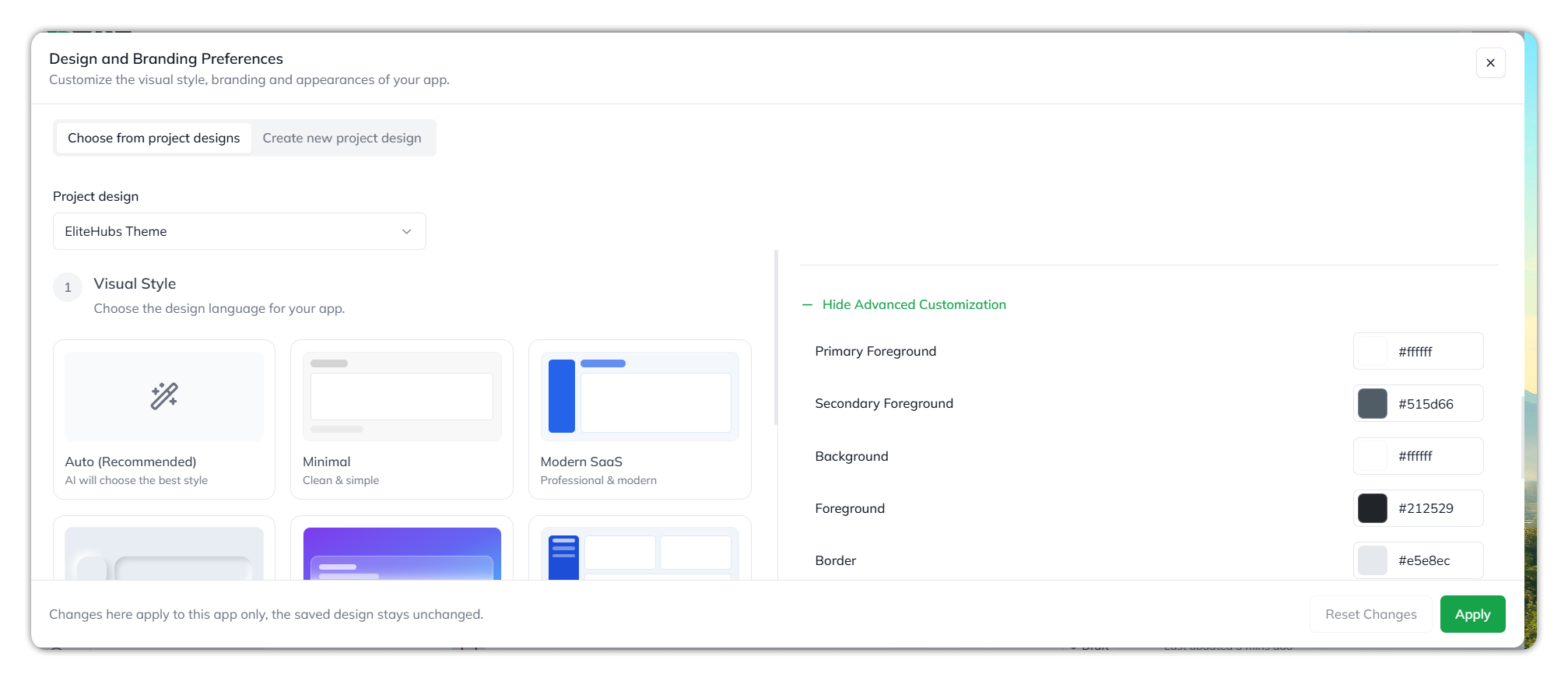
In **Design and Branding Preferences**, expand **Advanced Customization** to set individual colours: **Primary Foreground**, **Secondary Foreground**, **Background**, **Foreground**, **Border**, **Input**, **Muted**, **Muted Foreground**, **Accent**, **Accent Foreground**, **Sidebar**, and **Sidebar Foreground**. Each takes a colour, as a swatch or a hex value. Select **Hide Advanced Customization** to collapse it. **Create new project design** has the same fields.
Advanced Customization.
More Advanced Customization fields.
## Building for mobile
Select **Mobile (Beta)** in the app type menu **before** generation, and the engine targets touch-optimized environments.
* **Responsive Initialization:** The engine prioritizes touch-friendly components, such as bottom-sheet menus and thumb-optimized button placement.
Defining a mobile-first project by selecting the Mobile (Beta) platform before initializing the generative prompt.
* **Mobile-Enriched Codebase:** Mobile-first generation produces a codebase optimized for smaller devices, including responsive breakpoints and efficient data-fetching patterns.
The generative engine prioritizing mobile-enriched code (e.g., expense.data.ts) based on the project’s platform parameters.
Validating a mobile build on a real handset is covered in [Test](/ai-workbench-qore/console/app-builder/test.md).
## Service extensions
A polished interface needs a secure data layer and operational intelligence to do useful work. Once your build initializes, the context panel exposes quick-action extension buttons.
A sample chat interface log showing successful initialization of the base application with direct execution links to connect infrastructure and attach automated agents.
### Database integration
To move from a static mock state to permanent persistence, the platform integrates with **Supabase**, giving your application an enterprise-grade PostgreSQL backend.
* **Zero-Config Connection**: Click **Connect Supabase** in the workspace log panel to open the modal manager.
* **Bring Your Own Key (BYOK) Linking**: Authenticate your organization layer, connect to your workspace environments, and map your database URL and Anon Keys without writing manual API endpoints or SQL schemas.
* **Granular Record Control:** Capture, isolate, and read financial data records — transaction histories, loan status modifications — directly through the compiled frontend.
* **Real-Time PostgreSQL Sync**: Updates made by users are immediately reflected across admin dashboards and analytics charts.
The database configuration window, guiding users through organization setup and project connection parameters to initialize the Supabase data mapping layer.
### Autonomous workspace agents
Beyond storage, attach task-specific agents to monitor compliance, validate parameters, or review strategic goals within your build.
* **Modular Intelligence Assignment:** Click **Attach Agent(s)** to access the agent workspace marketplace.
* **Specialized System Handlers:** Check the agents you want, to deploy oversight directly onto your app's processing loop.
The Attach Agent(s) selection modal displaying custom, pre-built autonomous assistants available to deploy onto the compiled application instance.
Agents attached here are built and configured in the [Agent Builder](/ai-workbench-qore/console/agent-builder.md), and they travel with the app when you export it — see [Deploy](/ai-workbench-qore/console/app-builder/deploy.md).
***
When the app does what you intended, validate it on a real device in [Test](/ai-workbench-qore/console/app-builder/test.md).
***
{% columns %}
{% column width="83.33333333333334%" %}
Maintained by Abhishek Paul AI-assisted, human-approved
{% endcolumn %}
{% endcolumns %}
---
# Agent Instructions
This documentation is published with GitBook. GitBook is the documentation platform designed so that both humans and AI agents can read, navigate, and reason over technical content effectively. Learn more at gitbook.com.
## Querying This Documentation
If you need additional information that is not directly available in this page, you can query the documentation by asking a question.
Perform an HTTP GET request on the following URL with the `ask` and `goal` query parameters:
```
GET https://docs.uptiq.ai/ai-workbench-qore/console/app-builder/build.md?ask=&goal=
```
`ask` is the immediate question: it should be specific, self-contained, and written in natural language.
`goal` is what the user is ultimately trying to achieve, the reason they need the answer. Sharing it helps GitBook give you a better, more relevant answer. A goal is most helpful when it describes the outcome the user wants rather than restating the question. For example, with `ask=how do I create an API token`, a goal like `automate deployments from our CI pipeline` lets GitBook tailor the answer to that use case.
The response will contain a direct answer to the question and relevant excerpts and sources from the documentation.
Use this mechanism when the answer is not explicitly present in the current page, you need clarification or additional context, or you want to retrieve related documentation sections.