> For the complete documentation index, see [llms.txt](https://docs.uptiq.ai/llms.txt). Markdown versions of documentation pages are available by appending `.md` to page URLs; this page is available as [Markdown](https://docs.uptiq.ai/ai-workbench-qore/console/agent-builder/deploy/authentication-1.md).

# Authentication

Verify agent callers through your identity provider and pass their identity to MCP connections.

Authentication verifies a caller's Microsoft Entra ID or Google token before an agent run. Verified tokens are available to MCP connections as `$auth.token`, so downstream tools can apply the caller's permissions and audit trail.

Use Authentication with [Access & Security](/ai-workbench-qore/console/agent-builder/deploy/authentication.md).

* Authentication identifies the person.
* Access & Security authorizes the calling application.

{% hint style="warning" %}
Authentication does not require a token. Requests without one still run, but `$auth.token` is unavailable. Requests with an invalid token are rejected.
{% endhint %}

### Configure authentication

Register an application with your identity provider before you begin:

* **Microsoft Entra ID** — Register an application in your Entra directory.
* **Google** — Create an OAuth client in your Google Cloud project.

{% stepper %}
{% step %}

#### Enable authentication

Turn on **Enable Authentication**.
{% endstep %}

{% step %}

#### Select a provider

Choose a provider from **Authentication Provider**. The available fields update for that provider.
{% endstep %}

{% step %}

#### Enter provider details

Enter the required identifiers. See [provider requirements](#provider-requirements).
{% endstep %}

{% step %}

#### Save changes

Select **Save**. The control becomes available after a change.
{% endstep %}
{% endstepper %}

Turning Authentication off retains your provider details. The agent does not use them until you enable Authentication again.

### Provider requirements

{% tabs %}
{% tab title="Microsoft Entra ID" %}

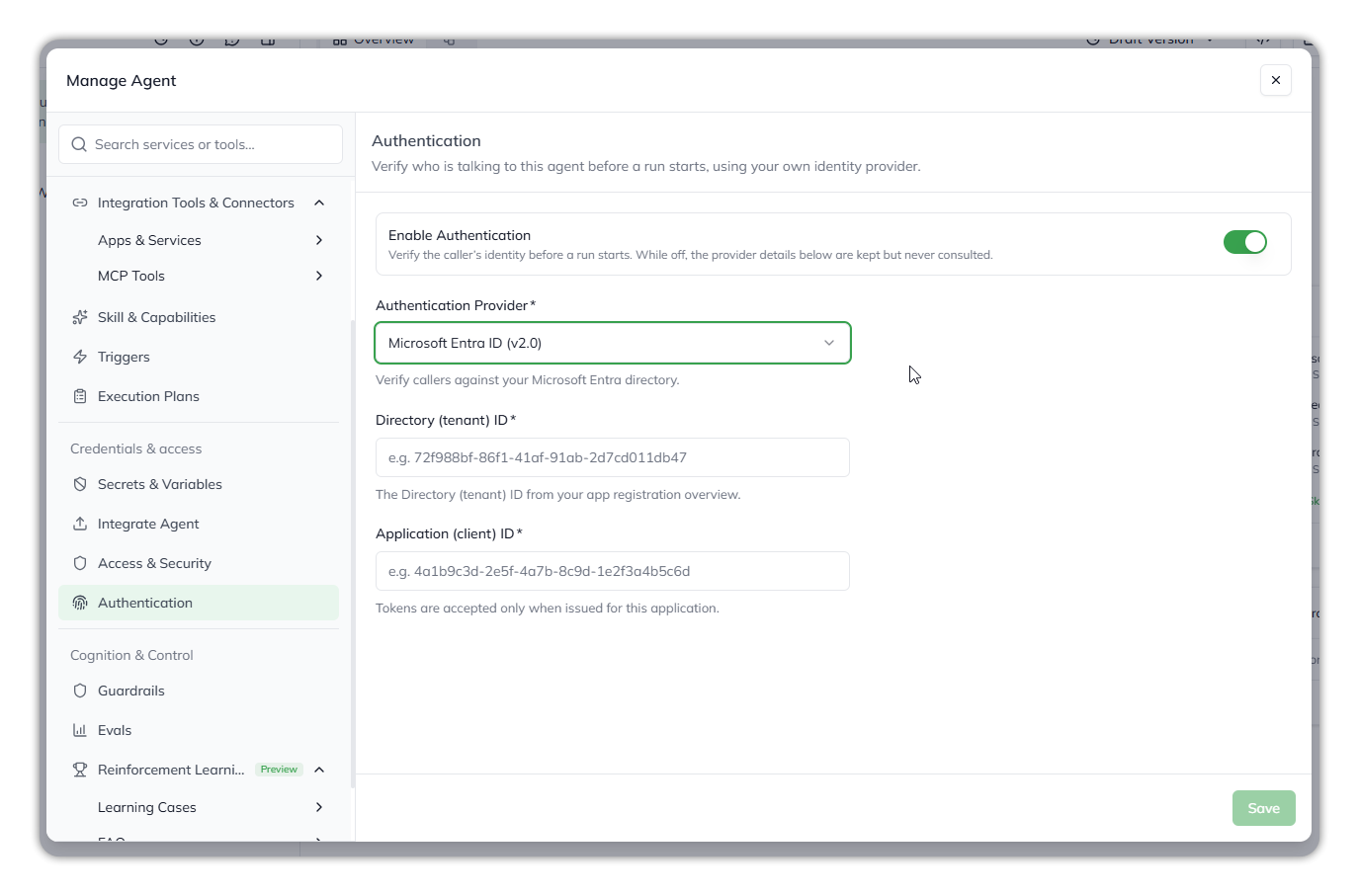
<figure><img src="https://1326225582-files.gitbook.io/~/files/v0/b/gitbook-x-prod.appspot.com/o/spaces%2F0qmgQjJ5aArDTj2ACFHG%2Fuploads%2Fgit-blob-bb544e5791b5e4327000f9824dbce153b365a1c9%2Fqore_agent-builder_manage-agent-authentication-entra_rounded_shadow.png?alt=media" alt="Authentication configured with Microsoft Entra ID, showing the Directory tenant ID and Application client ID fields."><figcaption><p>Authentication configured for Microsoft Entra ID.</p></figcaption></figure>

| Required value              | Where to find it                                      |
| --------------------------- | ----------------------------------------------------- |
| **Directory (tenant) ID**   | The **Overview** page for the Entra app registration. |
| **Application (client) ID** | The same **Overview** page.                           |

Qore accepts a token only when it is:

* Signed by your Entra directory.
* Issued by that directory's v2.0 endpoint.
* Intended for the configured application client ID.
  {% endtab %}

{% tab title="Google" %}

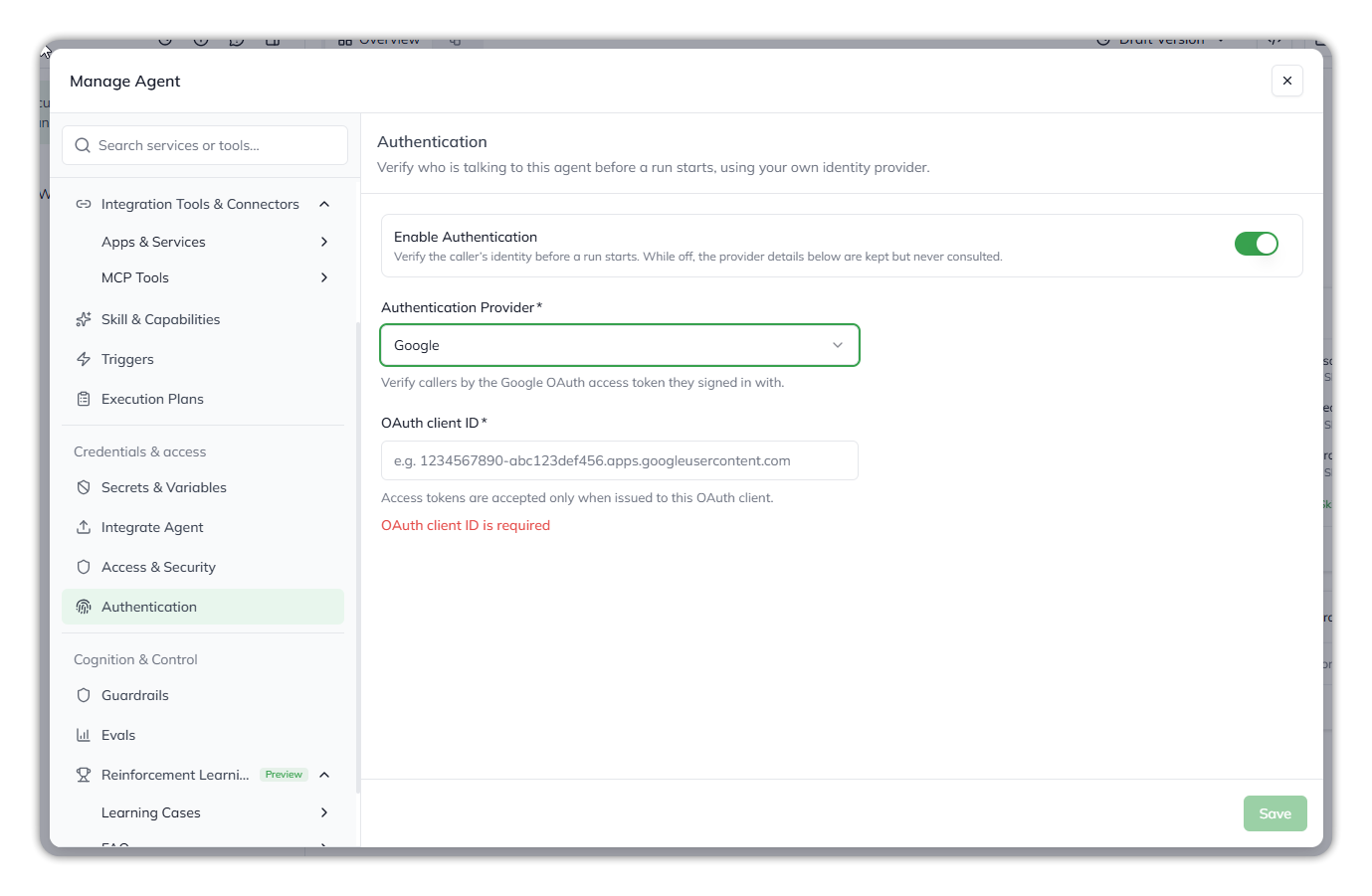
<figure><img src="https://1326225582-files.gitbook.io/~/files/v0/b/gitbook-x-prod.appspot.com/o/spaces%2F0qmgQjJ5aArDTj2ACFHG%2Fuploads%2Fgit-blob-2bd48db653d1394a849a1eb9e9a0bcb104507373%2Fqore_agent-builder_manage-agent-authentication-google_rounded_shadow.png?alt=media" alt="Authentication configured with Google, showing the OAuth client ID field."><figcaption><p>Authentication configured for Google.</p></figcaption></figure>

| Required value      | Where to find it                                                                         |
| ------------------- | ---------------------------------------------------------------------------------------- |
| **OAuth client ID** | The OAuth client in your Google Cloud project. It ends in `.apps.googleusercontent.com`. |

Send the Google OAuth access token from the user's sign-in. Qore verifies that Google issued it for the configured OAuth client ID.
{% endtab %}
{% endtabs %}

### Send the caller token

Send the caller's token with every agent request. Qore verifies it and exposes it to MCP connections as `$auth.token`.

{% tabs %}
{% tab title="Agent API" %}
Add `token` beside `message` in the trigger request body.

```bash
curl -X POST "<BASE_URL>/agent-executor/1.4/agents/:agentId/trigger" \
  -H "x-api-key: YOUR_AGENT_API_KEY" \
  -H "x-api-key-secret: YOUR_AGENT_API_KEY_SECRET" \
  -H "Content-Type: application/json" \
  -d '{"message": "List my open approvals", "token": "<the caller'\''s identity token>"}'
```

{% endtab %}

{% tab title="Embedded Chat widget" %}
Pass the signed-in user's token using `authToken` in React or `auth-token` in HTML.

The widget sends it with new chats, follow-up turns, and permission or credential requests. A headless instance supports `setAuthToken()` for refreshed tokens.
{% endtab %}
{% endtabs %}

#### Setup Identity Token <a href="#setup-identity-token" id="setup-identity-token"></a>

{% hint style="warning" %}
**Available on request.** Setup Identity Token is switched on only for the clients who have asked for it. If your widget doesn't show **Developer Mode**, it isn't enabled for you.
{% endhint %}

Setup Identity Token lets you try an agent as a specific signed-in person by pasting their token by hand. When a widget is created with `allowDeveloperMode`, its sidebar shows a **Developer Mode** switch. Switch it on and, for an agent with authentication enabled, a **Setup Identity Token** action appears under **Start New Chat**. Paste a token there to try the agent as that person.

* The token lasts for the session and is never stored.
* A token passed as `authToken` replaces one entered by hand.
* In the Agent Playground, Developer Mode is not available in production.

#### Use the token in MCP connections

Reference `$auth.token` in an MCP connection configuration where the downstream server expects a user credential. Qore replaces it with the verified token during the run.

> `$auth.token` works only in MCP connection configurations. Skills and agent instructions cannot access it.

{% hint style="info" %}
If a request has no token, `$auth.token` resolves to an empty value. The downstream server receives an anonymous request.
{% endhint %}

Use `$auth.token` like the `$secret.` and `$agent.` values described in [Secrets & Variables](/ai-workbench-qore/console/agent-builder/build/secrets-and-variables.md). Ensure every caller sends a token when the downstream system requires a signed-in user.

### Request outcomes and token security

| Authentication                       | Token                                                | Result                                                                                              |
| ------------------------------------ | ---------------------------------------------------- | --------------------------------------------------------------------------------------------------- |
| Off                                  | Any, or none                                         | The run proceeds. Qore ignores the token.                                                           |
| On                                   | None                                                 | The run proceeds without `$auth.token`.                                                             |
| On                                   | Valid                                                | The run proceeds. `$auth.token` contains the token.                                                 |
| On                                   | Invalid, or issued for another application or client | Rejected with `AGENT_AUTHENTICATION_FAILED`.                                                        |
| On                                   | Expired Microsoft Entra ID token                     | Rejected with `TOKEN_EXPIRED`.                                                                      |
| On                                   | Expired Google token                                 | Rejected with `AGENT_AUTHENTICATION_FAILED`. Google reports expired and invalid tokens identically. |
| On, with incomplete provider details | Any token                                            | Rejected with `AGENT_AUTHENTICATION_CONFIG_INVALID`. Update the agent configuration.                |
| On, when Google is unavailable       | Any token                                            | Fails with `GOOGLE_IDENTITY_SERVICE_UNAVAILABLE` and HTTP `503`. Retry the request.                 |

If Microsoft Entra ID is unavailable, Qore rejects the request with `AGENT_AUTHENTICATION_FAILED`.

#### Token security

* Qore encrypts the token before queuing the run.
* Qore decrypts it only to verify the token.
* Qore never stores the raw token.
* Execution-status responses exclude the raw token.
* The embedded widget keeps the token only in session memory.

{% hint style="warning" %}
Send tokens only from your application's authenticated session. Do not accept tokens from URLs, form fields, or other user-controlled inputs.
{% endhint %}

***

{% columns %}
{% column width="83.33333333333334%" %}

<p align="right"><em>Maintained by</em> <mark style="color:green;">Abhishek Paul</mark><br><code>AI-assisted, human-approved</code></p>
{% endcolumn %}

{% column width="16.666666666666664%" %}

<div align="left"><img src="https://1326225582-files.gitbook.io/~/files/v0/b/gitbook-x-prod.appspot.com/o/spaces%2F0qmgQjJ5aArDTj2ACFHG%2Fuploads%2Fgit-blob-d034645b4f8f8ee661985f5306b60ded3289653c%2Fmaintainer-abhishek-paul.png?alt=media" alt="" width="60"></div>
{% endcolumn %}
{% endcolumns %}


---

# Agent Instructions
This documentation is published with GitBook. GitBook is the documentation platform designed so that both humans and AI agents can read, navigate, and reason over technical content effectively. Learn more at gitbook.com.

## Querying This Documentation
If you need additional information that is not directly available in this page, you can query the documentation by asking a question.

Perform an HTTP GET request on the following URL with the `ask` and `goal` query parameters:

```
GET https://docs.uptiq.ai/ai-workbench-qore/console/agent-builder/deploy/authentication-1.md?ask=<question>&goal=<user_goal>
```

`ask` is the immediate question: it should be specific, self-contained, and written in natural language.
`goal` is what the user is ultimately trying to achieve, the reason they need the answer. Sharing it helps GitBook give you a better, more relevant answer. A goal is most helpful when it describes the outcome the user wants rather than restating the question. For example, with `ask=how do I create an API token`, a goal like `automate deployments from our CI pipeline` lets GitBook tailor the answer to that use case.

The response will contain a direct answer to the question and relevant excerpts and sources from the documentation.

Use this mechanism when the answer is not explicitly present in the current page, you need clarification or additional context, or you want to retrieve related documentation sections.