> For the complete documentation index, see [llms.txt](https://docs.uptiq.ai/llms.txt). Markdown versions of documentation pages are available by appending `.md` to page URLs; this page is available as [Markdown](https://docs.uptiq.ai/ai-workbench-qore/console/agent-builder/build/secrets-and-variables.md).
# Secrets & Variables
Manage encrypted secrets and runtime variables used throughout your agent.
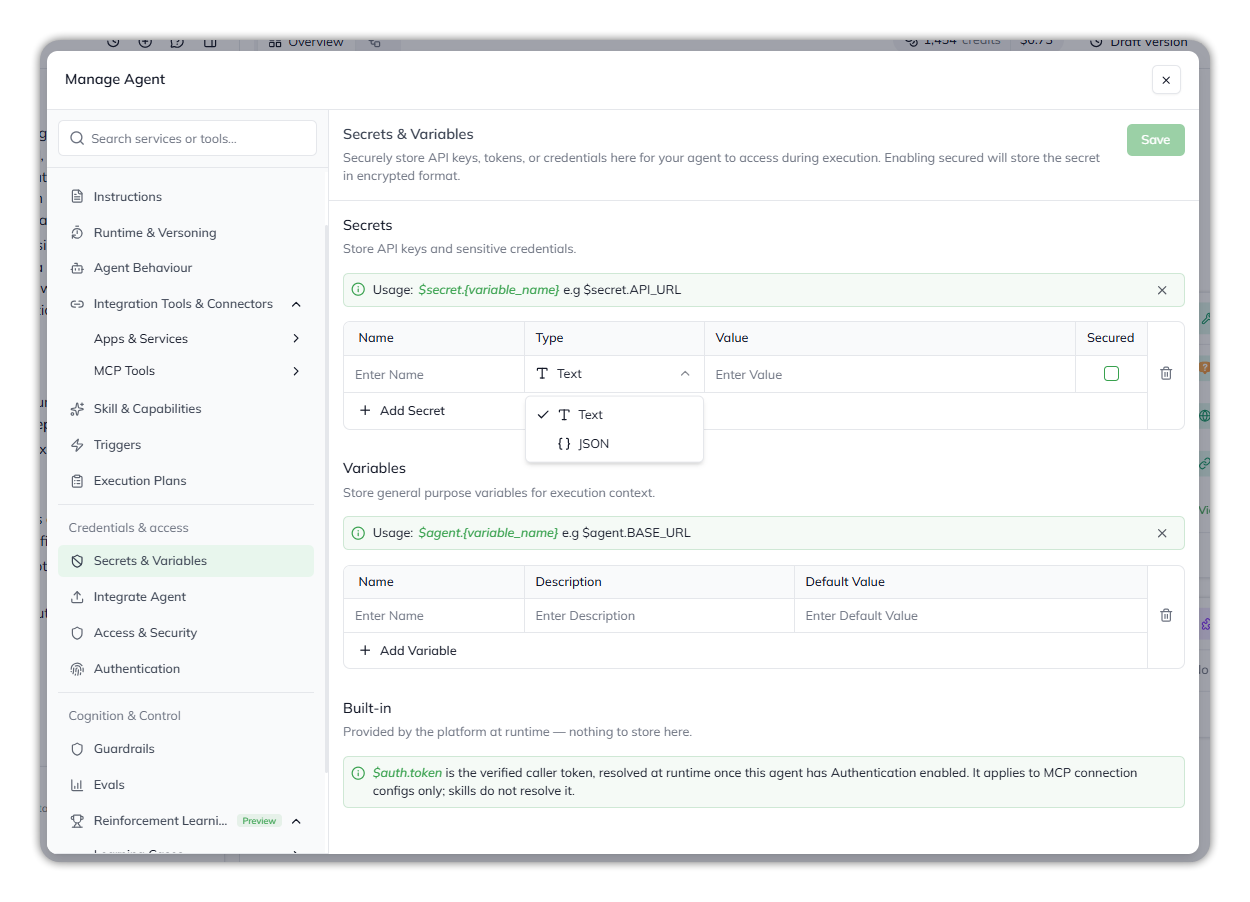
**Secrets & Variables** is the agent's keychain and configuration store. The page holds two parallel tables: **Secrets** (API keys, tokens, credentials — encrypted when **Secured** is on) and **Variables** (general-purpose values like base URLs, IDs, default parameters — stored in clear). Everywhere else in the builder that needs a value the agent will resolve at runtime — a skill's API endpoint, a credential in an instruction, an integration's auth header — references the value from this page through a `$secret.` or `$agent.` reference rather than pasting the value inline. Reach this page from **Agent Config → Secrets & Variables** in the left navigation.
Secrets & Variables.
### Secrets
Secrets hold sensitive values. Turn on **Secured** to store a secret in encrypted format. Leave it on for any value that would be a problem if it leaked.
> Store API keys and sensitive credentials.
**Usage syntax:** `$secret.{variable_name}` — for example, `$secret.API_URL`, `$secret.STRIPE_SECRET_KEY`.
Reference a secret by its `$secret.{name}` form anywhere the platform accepts dynamic values: skill configurations, trigger descriptions, instructions, integration settings.
Field
What it holds
Name
The identifier you reference. Becomes $secret.{name}.
Type
Text or JSON. A Text value can't contain spaces; a JSON value must be valid JSON.
Value
The secret's value.
Secured
When ticked, the value is stored encrypted and shows as ****** after you save. Off by default, so tick it for anything sensitive.
To add a secret, select **+ Add Secret**, fill in the row, and select **Save**.
A secret's name can't be changed once it's saved; delete the row and add it again under the new name. A secured value can't be edited in place either. To change one, untick **Secured** (this clears the value), enter the new value, tick **Secured** again, and save.
### Variables
Variables are non-sensitive values that change between environments or use cases, but don't need encryption.
> Store general purpose variables for execution context.
**Usage syntax:** `$agent.{variable_name}` — for example, `$agent.BASE_URL`, `$agent.DEFAULT_REGION`.
Field
What it holds
Name
The identifier you reference. Becomes $agent.{name}.
Description
A short note on what the variable is for. Useful when another team member opens the agent later.
Default Value
The variable's stored value. It can be left empty.
To add a variable, select **+ Add Variable**.
Select **Save** to keep your changes to either table.
### Rules for both tables
| Field | Obligation | Notes |
| ---------------------- | ---------- | ------------------------------------------------------ |
| Secret Name | Mandatory | See the naming rules below. |
| Secret Type | Mandatory | **Text** (no spaces) or **JSON** (must be valid JSON). |
| Secret Value | Mandatory | |
| Secret Secured | Optional | Off by default. Tick it for anything sensitive. |
| Variable Name | Mandatory | See the naming rules below. |
| Variable Description | Optional | Recommended. |
| Variable Default Value | Optional | |
**Naming rules.** A name starts with a letter or an underscore and contains only letters, numbers and underscores, so no spaces. Two secrets, or two variables, can't share a name.
### When to use a secret versus a variable
{% columns %}
{% column %}
Use a **secret** for anything that would be a problem if it leaked: API keys, OAuth client secrets, database passwords, internal endpoints not meant for public exposure.
{% endcolumn %}
{% column %}
Use a **variable** for anything that's safe to expose but useful to centralize: base URLs that differ between staging and production, default region or locale codes, identifiers that other parts of the agent reference repeatedly.
{% endcolumn %}
{% endcolumns %}
A useful rule: if you'd hesitate to paste the value into a public Slack channel, it belongs in Secrets. If you wouldn't hesitate, it belongs in Variables.
### How references resolve at runtime
When the agent runs, the platform resolves `$secret.{name}` and `$agent.{name}` references to their stored values before passing the substituted content to skills or to the model. The reference syntax stays in the *stored* configuration; only the runtime sees the resolved value.
This means:
* A skill configuration that references `$secret.STRIPE_SECRET_KEY` shows the literal `$secret.STRIPE_SECRET_KEY` in the configuration form, not the actual key.
* The same reference resolves to the real key when the skill executes.
* Updating the secret's value updates every skill that references it, immediately, without re-editing each skill.
This is the main reason secrets and variables belong on a single page rather than scattered through the skills that use them: one place to rotate a key when it changes.
### Built-in values
The **Built-in** section lists values the platform provides at run time. There's nothing to store for them.
* `$auth.token`: the verified caller's token, once the agent has [Authentication](/ai-workbench-qore/console/agent-builder/deploy/authentication-1.md) turned on. It resolves **only in MCP connection configurations**; skills don't receive it. When a request carries no token, it resolves empty.
### Why this matters
{% hint style="info" %}
This page is the boundary between *configuration* (what the agent's been told to do) and *credentials* (what the agent needs to actually do it). Keeping that boundary clean — every credential here, every reference elsewhere — gives you three things the alternative doesn't. First, secrets don't appear in Instructions, trigger descriptions, or skill configs that may be visible in traces or shared with other team members. Second, rotating a credential is a one-row edit rather than a scavenger hunt. Third, the same agent can be promoted across environments by changing the values here without touching anything else. Treat this page as the canonical source for anything the agent needs to authenticate or address an external system.
{% endhint %}
***
{% columns %}
{% column width="83.33333333333334%" %}
Maintained by Abhishek Paul AI-assisted, human-approved
{% endcolumn %}
{% endcolumns %}
---
# Agent Instructions
This documentation is published with GitBook. GitBook is the documentation platform designed so that both humans and AI agents can read, navigate, and reason over technical content effectively. Learn more at gitbook.com.
## Querying This Documentation
If you need additional information that is not directly available in this page, you can query the documentation by asking a question.
Perform an HTTP GET request on the following URL with the `ask` and `goal` query parameters:
```
GET https://docs.uptiq.ai/ai-workbench-qore/console/agent-builder/build/secrets-and-variables.md?ask=&goal=
```
`ask` is the immediate question: it should be specific, self-contained, and written in natural language.
`goal` is what the user is ultimately trying to achieve, the reason they need the answer. Sharing it helps GitBook give you a better, more relevant answer. A goal is most helpful when it describes the outcome the user wants rather than restating the question. For example, with `ask=how do I create an API token`, a goal like `automate deployments from our CI pipeline` lets GitBook tailor the answer to that use case.
The response will contain a direct answer to the question and relevant excerpts and sources from the documentation.
Use this mechanism when the answer is not explicitly present in the current page, you need clarification or additional context, or you want to retrieve related documentation sections.