> For the complete documentation index, see [llms.txt](https://docs.uptiq.ai/llms.txt). Markdown versions of documentation pages are available by appending `.md` to page URLs; this page is available as [Markdown](https://docs.uptiq.ai/ai-workbench-qore/console/agent-builder/build/runtime-and-versioning.md).
# Runtime & Versioning
Select, validate, and upgrade the Agent Executor version that runs your agent.
**Runtime & Versioning** controls the Agent Executor version that runs your agent. Executor releases add capabilities, address issues, and can deprecate earlier behavior. Pinning a version keeps runtime behavior predictable while you validate upgrades.
Open **Agent Config → Runtime & Versoning**. The navigation label currently uses `Versoning`.
### Executor Version
Use **Executor Version** to select the runtime for this agent.
| Field | Obligation | Default | Notes |
| ---------------- | ---------- | ---------------------------------------------------------- | -------------------------------------------------------------------- |
| Executor Version | Mandatory | The latest version available to your tenant, such as `1.4` | Switching versions can change agent behavior and available features. |
The dropdown lists versions available to your tenant. New agents use the latest available version by default. Existing agents remain on their current version until you migrate them.
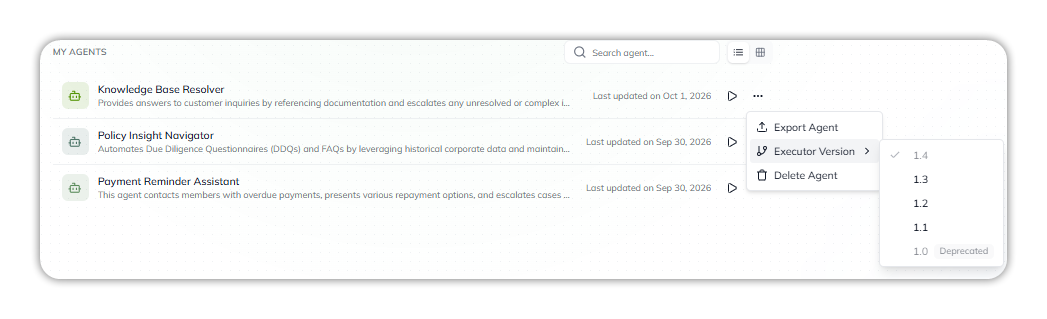
You can also change it from the agent list: in **My Agents**, select **•••** on the agent's row, then **Executor Version**. The current version is ticked, and **1.0** is marked **Deprecated**.
Executor Version, from My Agents.
{% hint style="info" %}
Agent Executor v1.4 is available. Migrate agents on earlier versions after validation.
{% endhint %}
### Migrate to v1.4
Agent Executor v1.4 is the current documented upgrade target. Migrate when you need its runtime capabilities or support for the current release.
1. In **Executor Version**, select `1.4`.
2. Select **Save**.
3. Test representative conversations, skills, and integrations.
Check expected outputs and execution behavior before you rely on the upgraded agent in production.
{% hint style="warning" %}
An executor upgrade can change agent behavior. Validate the agent before migrating production workloads.
{% endhint %}
See [September 12 release notes](/ai-workbench-qore/release-notes/2026/september-12.md) for the v1.4 announcement.
### When the executor version matters
Most agent configuration works across versions. Some capabilities require a newer executor version. For example, PII tokenization can be unavailable when an agent uses an older unsupported version.
If a builder section is unavailable, check the executor version. Upgrade and validate the agent when the feature requires a newer runtime.
### Draft versions and executor versions
**Executor Version** selects the platform runtime. **Draft Version** saves a snapshot of the agent configuration.
| Version type | Scope | Use it for |
| -------------------- | ------------------------ | ------------------------------------------------- |
| **Executor Version** | One runtime per agent | Control runtime behavior and feature availability |
| **Draft Version** | Many snapshots per agent | Compare or restore agent configuration |
The settings are independent. Saving a draft doesn't change the executor version. Changing the executor version doesn't save a draft.
### Why this matters
Version pinning makes agent behavior reproducible. Your agent remains on its tested runtime until you choose an upgrade. Use the latest supported version for new agents, then validate it before production use.
***
{% columns %}
{% column width="83.33333333333334%" %}
Maintained by Abhishek Paul AI-assisted, human-approved
{% endcolumn %}
{% endcolumns %}
---
# Agent Instructions
This documentation is published with GitBook. GitBook is the documentation platform designed so that both humans and AI agents can read, navigate, and reason over technical content effectively. Learn more at gitbook.com.
## Querying This Documentation
If you need additional information that is not directly available in this page, you can query the documentation by asking a question.
Perform an HTTP GET request on the following URL with the `ask` and `goal` query parameters:
```
GET https://docs.uptiq.ai/ai-workbench-qore/console/agent-builder/build/runtime-and-versioning.md?ask=&goal=
```
`ask` is the immediate question: it should be specific, self-contained, and written in natural language.
`goal` is what the user is ultimately trying to achieve, the reason they need the answer. Sharing it helps GitBook give you a better, more relevant answer. A goal is most helpful when it describes the outcome the user wants rather than restating the question. For example, with `ask=how do I create an API token`, a goal like `automate deployments from our CI pipeline` lets GitBook tailor the answer to that use case.
The response will contain a direct answer to the question and relevant excerpts and sources from the documentation.
Use this mechanism when the answer is not explicitly present in the current page, you need clarification or additional context, or you want to retrieve related documentation sections.