> For the complete documentation index, see [llms.txt](https://docs.uptiq.ai/llms.txt). Markdown versions of documentation pages are available by appending `.md` to page URLs; this page is available as [Markdown](https://docs.uptiq.ai/ai-workbench-qore/console/agent-builder/build/adding-a-skill-to-the-agent.md).
# Adding a skill to the agent
{% hint style="info" %}
Skills define what an agent can *do* at runtime. While knowledge gives the agent information to reference, skills allow it to take actions—such as calling APIs, executing code, querying databases, interacting with external systems, or invoking other agents.
{% endhint %}
> This flow allows you to attach new capabilities to an agent directly from the Builder Canvas through the **Add Skill to Agent** workflow.
### Understanding skills
Qore has seven kinds of skill. They differ in who provides them, how much you set up, and what they suit. Before adding a skill, find the kind that fits the job.
| Kind | Where you add it | Provided by | What you set up | Use it when | Details |
| --------------------------- | ----------------------------------------------------------- | ------------------------------------- | -------------------------------------- | -------------------------------------------------------------------------------------------------------------- | ---------------------------------------------------------------------------------------------------------------------------------------------------------------------------------- |
| **Built-in skills** | **Pre-attached Skills** tab | Uptiq, on every agent | Nothing. Enable the ones you need | The agent needs the basics: reasoning, web search, knowledge search, code, files, and documents | [General skills](/ai-workbench-qore/platform-resources/skill-library/general-skills.md), [Document skills](/ai-workbench-qore/platform-resources/skill-library/document-skills.md) |
| **Skill Library skills** | **Skill Library** tab | Uptiq | A form for each skill | The agent must reach your own systems or run your own logic: an HTTP API, code, an MCP server, or web crawling | [Skill Library](/ai-workbench-qore/platform-resources/skill-library.md) |
| **MCP Marketplace servers** | **MCP Marketplace** tab | Third parties, curated in the catalog | Connect the server | A catalog server already does the job, such as market data, SEC filings, search, or scraping | [MCP Tools](/ai-workbench-qore/console/agent-builder/build/mcp-tools.md) |
| **Integrations** | **Add Integrations** on the canvas, and **Apps & Services** | Integration Hub | Connect the service | The action involves a SaaS product with a pre-built connector, such as Stripe or Twilio | [Apps & Services](/ai-workbench-qore/console/agent-builder/build/apps-and-services.md) |
| **Custom skills** | **Custom Skills** tab | You | Upload a folder with a `SKILL.md` file | The agent should follow your own procedure or know-how, such as a house style or a review checklist | [Custom skills](/ai-workbench-qore/platform-resources/skill-library/custom-skills.md) |
| **Flows** | **Flows** tab | You, built in Flows | Choose a flow | The job is a fixed, multi-step process that should run as one step | [Use flows with agents](/ai-workbench-qore/console/flows/use-flows-with-agents.md) |
| **Agents** | **Agents** tab | You, as another agent in the project | Choose an agent | Another agent is better suited to part of the job, so this agent hands that part to it | [Add another agent](#add-another-agent-as-a-skill) |
{% hint style="info" %}
**Start with what already exists.** Enable a built-in skill, or connect a catalog server or integration, before you configure or build your own. Built-in skills and connectors need the least setup.
{% endhint %}
{% hint style="info" %}
If you are unsure where to begin, start with the **Skill Library** tab.
{% endhint %}
### Add a skill to the agent
{% stepper %}
{% step %}
#### Step 1—Open the Add Skill flow
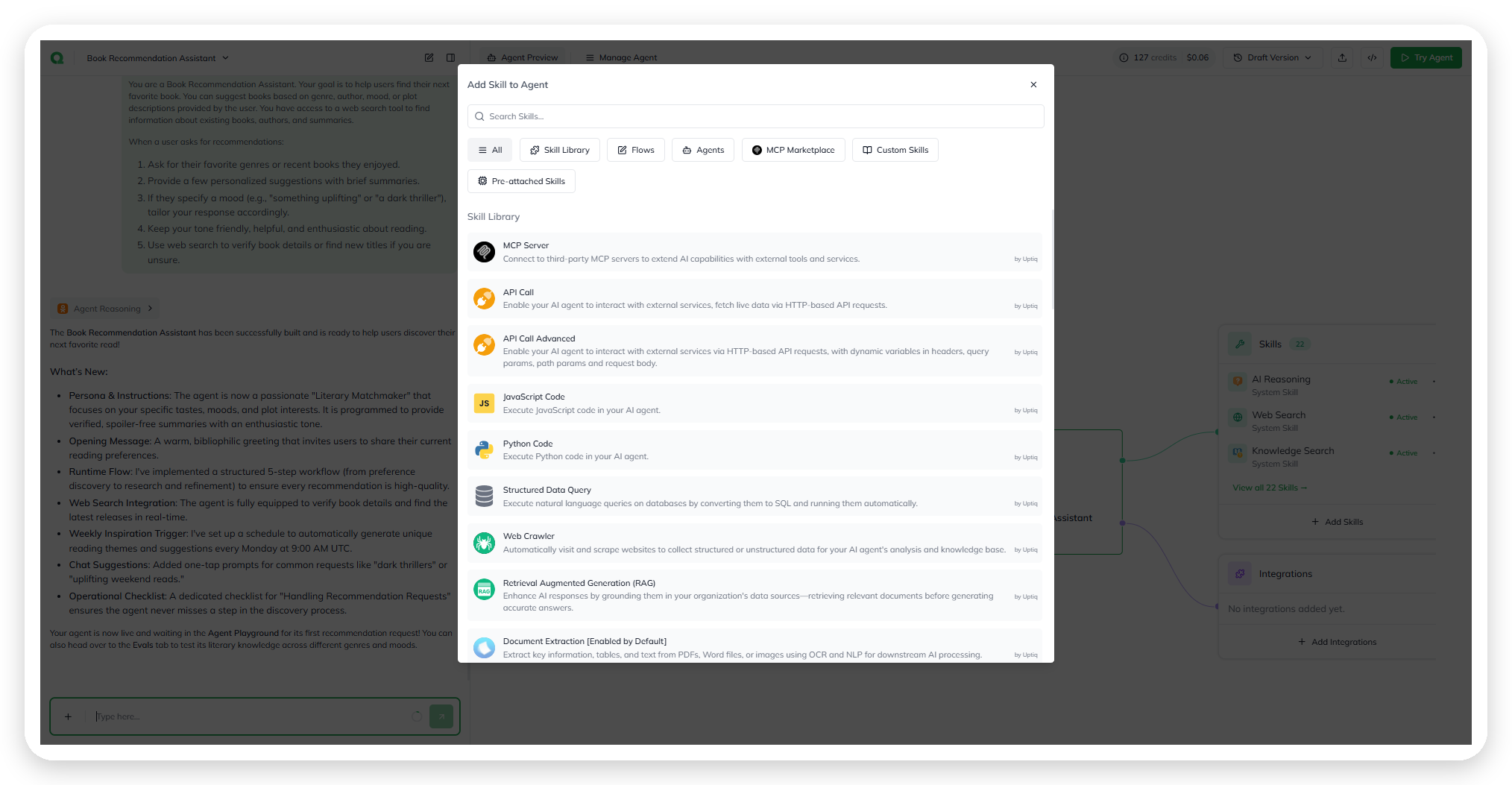
From the Builder Canvas, select **+ Add Skill** in the Skills section below the agent node.
Opening the Add Skill flow from the canvas.
This opens the **Add Skill to Agent** dialog.
{% endstep %}
{% step %}
#### Step 2—Choose a skill source
The dialog is organized into multiple tabs to help you discover skills from different sources.
| Tab | Description |
| ----------------------- | -------------------------------------------------------------------------------------------------------------------------------------------------------------------------------------------------------------------------------------------------------------------------------------------------------------------------------- |
| **All** | Every skill from every tab |
| **Skill Library** | Skills by Uptiq that you configure for your own systems and logic: MCP Server, API Call, API Call Advanced, JavaScript Code, Python Code, Structured Data Query, Web Crawler, Document Extraction, and Document Summarizer. See [Skill Library](/ai-workbench-qore/platform-resources/skill-library.md) |
| **Flows** | Flows you can add to the agent as a skill. **+ Create Flow** makes a new one; see [Create a flow](/ai-workbench-qore/task-guides/create-a-flow.md#create-a-flow-from-an-agent) |
| **Agents** | Existing agents that you can reuse as sub-agents |
| **MCP Marketplace** | MCP servers, grouped by category. See [MCP Tools](/ai-workbench-qore/console/agent-builder/build/mcp-tools.md) |
| **Custom Skills** | Upload your own skill, a folder with a `SKILL.md` file and up to 10 supporting files. See [Custom skills](/ai-workbench-qore/platform-resources/skill-library/custom-skills.md) |
| **Pre-attached Skills** | The built-in General and Document skills, in two lists: **Active Skills**, and **Skills you can add**, each with an **Enable** button. See [General skills](/ai-workbench-qore/platform-resources/skill-library/general-skills.md) and [Document skills](/ai-workbench-qore/platform-resources/skill-library/document-skills.md) |
Switching tabs automatically filters the available skill list.
#### Add another agent as a skill
The **Agents** tab lists the other agents in the project, each with its name and description. The agent you're editing isn't listed.
{% hint style="warning" %}
**Selecting an agent attaches it straight away.** There is no form or confirmation step. The agent appears in the canvas's **Skills** list as an **Agent** skill, and the skill count goes up by one.
{% endhint %}
The attached agent becomes a sub-agent. Like any skill, it's chosen by its description, so make sure each agent's description says what it's for.
{% endstep %}
{% step %}
#### Step 3—Search for a skill
Use the **Search Skills** field to quickly filter skills by name or capability.
Search results are scoped to the currently selected tab.
{% endstep %}
{% step %}
#### Step 4—Select the skill
Select a skill to open its configuration form.
Each skill card includes:
* Skill name
* Capability summary
* Skill type
* Author or provider attribution
The configuration experience varies depending on the selected skill type.
{% endstep %}
{% step %}
#### Step 5—Configure and save
Configure the selected skill based on its runtime requirements.
Examples:
| Skill | What you configure |
| ---------------------------- | -------------------------------------------------------------------------------------------------------------------------- |
| API Call | URL, method, authorization, headers, query parameters, and input and output schemas. API Call Advanced adds a request body |
| JavaScript Code, Python Code | Name, description, timeout, code, and input and output schemas |
| MCP Server | Connection name and remote server URL, with optional OAuth client credentials and headers |
| Web Crawler | A Firecrawl MCP connection. Add your Firecrawl API key, or a `$secret` reference to it, to the pre-filled URL |
| Agent | Agent selection and invocation configuration |
For every Skill Library skill, see [Skill Library](/ai-workbench-qore/platform-resources/skill-library.md#what-each-skill-asks-for).
Secrets and variables can be referenced dynamically using:
* `$secret.{name}`
* `$agent.{name}`
This enables reusable and secure runtime configuration.
{% endstep %}
{% endstepper %}
### What happens after adding a skill
{% hint style="info" %}
Once saved, the skill becomes available to the agent during runtime execution.
The agent planner can now decide when to invoke the skill based on the incoming user request and the agent instructions.
The Builder Canvas and Agent Config views are also updated to reflect the newly attached capability.
{% endhint %}
### Common issues and troubleshooting
#### The agent does not use the skill
Possible causes:
* The agent instructions do not describe when the skill should be used
* The skill description is too generic or unclear
* Another skill is being prioritized by the planner
Improving the skill description and refining agent instructions usually resolves this.
#### The skill fails during runtime
Check:
* Authentication and credentials
* Endpoint configuration
* MCP server availability
* Runtime syntax or dependency errors
Use Monitoring and execution traces to inspect failures in detail.
#### An MCP server won't connect
* **It fails at Next on an OAuth server:** the server may not support dynamic client registration. Enter the **OAuth Client ID** from its OAuth app under **Advanced Settings**.
* **The sign-in pop-up didn't open:** select **Connect to Authorize**.
* **Every tool call fails as unauthorised:** the server may expect client credentials. Turn on **Authenticate M2M (OAuth client credentials)** and reconnect.
* **It shows Initialize:** it was imported without its credentials. Select **Initialize** and enter them.
See [MCP Tools](/ai-workbench-qore/console/agent-builder/build/mcp-tools.md).
#### The required skill cannot be found
Try switching to the **All** tab to search across every source.
If the capability does not exist yet, create it through **Custom Skills** or connect it via MCP integrations.
### Why skills matter
{% hint style="info" %}
Skills are the operational layer of the agent runtime.
Without skills, agents can only generate responses. With skills, agents can execute workflows, retrieve live data, interact with systems, automate tasks, and orchestrate multi-step business actions.
The most effective agents combine:
* Strong knowledge sources
* Well-defined instructions
* Carefully selected runtime skills
This combination enables agents to move beyond conversational responses into real operational execution.
{% endhint %}
***
{% columns %}
{% column width="83.33333333333334%" %}
Maintained by Abhishek Paul AI-assisted, human-approved
{% endcolumn %}
{% endcolumns %}
---
# Agent Instructions
This documentation is published with GitBook. GitBook is the documentation platform designed so that both humans and AI agents can read, navigate, and reason over technical content effectively. Learn more at gitbook.com.
## Querying This Documentation
If you need additional information that is not directly available in this page, you can query the documentation by asking a question.
Perform an HTTP GET request on the following URL with the `ask` and `goal` query parameters:
```
GET https://docs.uptiq.ai/ai-workbench-qore/console/agent-builder/build/adding-a-skill-to-the-agent.md?ask=&goal=
```
`ask` is the immediate question: it should be specific, self-contained, and written in natural language.
`goal` is what the user is ultimately trying to achieve, the reason they need the answer. Sharing it helps GitBook give you a better, more relevant answer. A goal is most helpful when it describes the outcome the user wants rather than restating the question. For example, with `ask=how do I create an API token`, a goal like `automate deployments from our CI pipeline` lets GitBook tailor the answer to that use case.
The response will contain a direct answer to the question and relevant excerpts and sources from the documentation.
Use this mechanism when the answer is not explicitly present in the current page, you need clarification or additional context, or you want to retrieve related documentation sections.